The best USB MIDI interfaces make it easier to connect keyboards, synthesizers, drum machines, and other MIDI hardware to a computer or mobile setup. The right choice depends on your ports, device count, cable length, and need for routing or filtering.
We’ve selected 10 USB MIDI interfaces and MIDI connection tools for different workflows, from simple plug-and-play cables to multi-port interfaces for more complex studios.
Best 10 USB Midi Interfaces Picks for 2026
Best All-in-One Pick

- 5-pin MIDI I/O plus microphone, instrument, and line connections
- 192 kHz support, loopback, and 48V phantom power
- Includes creative software and a 5-year warranty
Best For: Beginners and home producers needing MIDI and audio recording
Best Simple MIDI Cable

- One MIDI input and one MIDI output with FPT processing
- Integrated cables and USB bus power simplify setup
- LED indicators show MIDI input and output activity
Best For: Connecting one MIDI instrument to a computer
Best Advanced MIDI Router

- Standalone USB host connects modern devices to 5-pin MIDI hardware
- Routing, filtering, mapping, and splitting via HxMIDI Tools
- Supports complex MIDI data and up to eight USB devices with a hub
Best For: Hybrid hardware rigs and advanced MIDI routing
Best Budget Cable
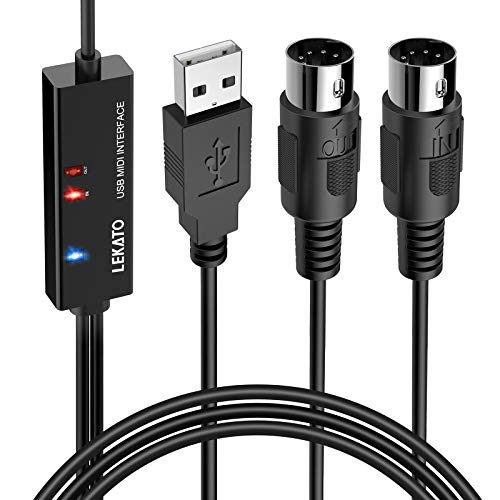
- 6.5-foot plug-and-play cable for Windows and Mac
- One MIDI input and one MIDI output with LED indicators
- Supports up to 16 input and output channels
Best For: Basic keyboard-to-computer recording and editing
Best All-Around MIDI Hub

- 3-in/3-out standalone MIDI routing
- Broad desktop and mobile OS support
- Low-latency transmission with advanced filtering
Best For: Multi-device studios and advanced MIDI setups
Best Budget MIDI Cable

- 1-in/1-out MIDI connectivity
- Plug-and-play USB-C setup
- LEDs show power and signal activity
Best For: Simple keyboard-to-computer or tablet connections
Best Advanced MIDI Cable

- 1-in/1-out cable with 16 MIDI channels
- Routing, filtering, and mapping tools
- Plug-and-play support for major operating systems
Best For: Portable setups needing configurable MIDI control
Best Plug-and-Play Pick

- 1 MIDI in and 1 MIDI out with 16 channels
- Plug-and-play with LED power and signal indicators
- Supports Windows, Mac, iOS, and Android
Best For: Simple computer-based MIDI recording and editing
Best for Longer Runs

- 6.5-foot cable for flexible placement
- 16 MIDI channels in and out
- LED indicators for power and MIDI activity
Best For: Home studios connecting keyboards or synthesizers to computers
Best All-in-One Pick – Arturia MiniFuse 1
The Arturia MiniFuse 1 is a compact choice for shoppers comparing USB MIDI interfaces that also need audio recording. It combines 5-pin MIDI input and output with microphone, instrument, and line connectivity, plus 48V phantom power and USB bus functionality.
Best For: Beginners, vocalists, guitarists, and home producers who want MIDI and audio recording in one compact interface.
Pros:
- Includes 5-pin MIDI input and output alongside audio connections.
- Supports sample rates up to 192 kHz and includes a loopback feature.
- Comes with Ableton Live Lite, Analog Lab Intro, Arturia FX, and other creative software.
- Backed by a 5-year warranty.
Cons:
- Its single-channel design may be limiting for larger recording setups.
- It is more than a basic MIDI-only cable if you only need simple MIDI connectivity.
The MiniFuse 1 is a strong fit when you want a beginner-friendly USB MIDI interface with useful audio I/O and bundled software, rather than a MIDI connection alone.
Best Simple MIDI Cable – Roland UM-ONE-MK2
The Roland UM-ONE-MK2 is a straightforward option among USB MIDI interfaces, using an integrated USB-to-MIDI cable design rather than a separate hardware box. It provides one MIDI input and one MIDI output, with visual indicators to help monitor data flow.
Best For: Keyboard players and computer-based musicians who need a compact connection between one MIDI device and a Mac, Windows computer, or compatible iPad setup.
Pros:
- High-performance FPT processing is designed for low latency and tight clock timing.
- Integrated USB and MIDI cables avoid extra adapters.
- USB bus-powered operation requires no external power supply.
- Input and output indicators make signal activity easy to check.
Cons:
- Provides one MIDI input and one MIDI output, limiting expansion.
- iPad use requires an Apple iPad Camera Connection Kit.
- It does not provide the audio inputs and outputs found on an audio interface.
Choose the UM-ONE-MK2 when simplicity and portability matter most. Its fixed one-in/one-out layout is less suitable for multi-device MIDI rigs, but it keeps a basic setup easy to connect.
Best Advanced MIDI Router – CME H2MIDI Pro
The CME H2MIDI Pro stands out among USB MIDI interfaces for hybrid rigs that combine USB and traditional 5-pin MIDI hardware. It can operate as a standalone USB host, connect to a computer over USB-C, and manage routing, filtering, mapping, and splitting through HxMIDI Tools.
Best For: Producers and performers integrating keyboards, controllers, synths, drum machines, pedals, and other modern or legacy MIDI gear.
Pros:
- Connects USB class-compliant MIDI devices directly to 5-pin DIN MIDI hardware without a computer.
- Supports up to eight USB MIDI device ports through a standard USB hub.
- Handles complex MIDI data including clock, SysEx, MTC, and MPE.
- Offers presets, advanced routing tools, broad operating-system compatibility, and lifetime software updates.
Cons:
- Its advanced routing features may be unnecessary for users seeking a basic MIDI cable.
- USB host expansion requires a standard USB hub.
- It has one 5-pin MIDI input and one 5-pin MIDI output.
The H2MIDI Pro is the most flexible choice here for complex setups. Its standalone operation and configurable signal handling make it particularly useful for live or hybrid hardware workflows.
Best Budget Cable – LEKATO USB MIDI Cable
The LEKATO USB MIDI Cable is a practical low-complexity option for connecting a keyboard, piano, synthesizer, or similar instrument to a Windows or Mac computer. Its 6.5-foot cable has one MIDI input and one MIDI output, with LED indicators for power and signal activity.
Best For: Home musicians who want a plug-and-play MIDI connection for editing or recording with a computer.
Pros:
- Plug-and-play design requires no special drivers for supported Windows and Mac systems.
- Separate input and output indicators help troubleshoot MIDI activity.
- Supports up to 16 input and output channels.
- Soft copper construction and interference-resistant design are intended to support stable transmission.
Cons:
- It is a cable-based solution without hardware routing or standalone operation.
- The supplied notes do not specify compatibility beyond Windows and macOS.
- It does not include audio recording inputs or outputs.
The LEKATO makes sense for a basic computer-to-instrument connection. It keeps setup simple and adds useful status lights, but advanced users will need a more capable USB MIDI interface for routing or multi-device control.
Best All-Around MIDI Hub – CME U6MIDI Pro
The CME U6MIDI Pro is a versatile choice among USB MIDI interfaces for musicians who need more than a basic computer connection. It provides standalone 3-in/3-out MIDI routing, filtering, merging, and splitting, while its USB-C connection supports major desktop and mobile operating systems.
Best For: Multi-device studios, advanced MIDI routing, and musicians using several keyboards, synthesizers, or controllers.
Pros:
- Standalone 3-in/3-out operation with router, filter, merge, split, and mapping functions.
- Supports macOS, iOS, Windows, Android, Linux, and Chrome OS.
- Designed for low-latency, jitter-free transmission across MIDI channels and message types, including MPE and SysEx.
- Includes UxMIDI Tools software, lifetime updates, and manufacturer support.
Cons:
- Its advanced routing features may be more than needed for a simple one-device setup.
- Uses 5-pin DIN MIDI connections rather than a direct USB-MIDI instrument connection.
Choose the U6MIDI Pro if you want a flexible MIDI control center that can work independently of a computer as well as integrate with music software. Its three inputs and outputs make it particularly useful as a studio expansion hub.
Best Budget MIDI Cable – LEKATO USB-C MIDI Interface
The LEKATO cable is a straightforward option for shoppers comparing USB MIDI interfaces for connecting one MIDI instrument to a computer or tablet. Its 1-in/1-out design, USB-C connection, plug-and-play setup, and status LEDs keep basic recording and editing workflows simple.
Best For: Home studios and musicians who need an affordable, uncomplicated connection for a keyboard, digital piano, synthesizer, or drum pad.
Pros:
- 1-in/1-out MIDI connection supports up to 16 input and output channels.
- USB-C design with built-in driver and plug-and-play operation.
- LED indicators show power and signal activity for easier troubleshooting.
- Compatible with Windows, macOS, and iPad setups according to the product notes.
Cons:
- Only provides one MIDI input and one MIDI output.
- Specific older or vintage instruments may require compatibility checks or driver settings.
The LEKATO is best viewed as a practical single-instrument cable rather than a studio routing box. It offers the essential MIDI connection and useful signal indicators without adding extra hardware controls.
Best Advanced MIDI Cable – CME U2MIDI Pro
The CME U2MIDI Pro combines the convenience of a cable with features that make it more capable than basic USB MIDI interfaces. Its 1-in/1-out 5-pin DIN connection supports 16 channels, while UxMIDI Tools adds routing, filtering, and mapping options for compatible computers and mobile devices.
Best For: Performers and producers who want a compact cable with advanced MIDI control and broad device compatibility.
Pros:
- Plug-and-play operation across macOS, iOS, Windows, Android, Linux, and ChromeOS.
- Supports all 16 MIDI channels and messages including SysEx, MTC, and MPE.
- UxMIDI Tools provides MIDI filtering, routing, and mapping features.
- Colored MIDI plugs and smart LED indicators simplify setup and monitoring.
Cons:
- Its 1-in/1-out design is less suitable for multi-device studios.
- Uses a USB-A connector, which may require an adapter with some newer devices.
The U2MIDI Pro is a strong fit when you want a portable, integrated cable but still need more control than a basic MIDI lead provides. It is especially appealing for mobile or computer-based setups that benefit from software-configurable routing and filtering.
Best Plug-and-Play Pick – FORE USB MIDI Interface
For shoppers comparing usb midi interfaces, the FORE model offers a straightforward way to connect a 5-pin MIDI keyboard, synthesizer, electronic drum, or other MIDI device to a computer. It provides one MIDI input, one MIDI output, 16 input and output channels, USB bus power, and compatibility with Windows, macOS, iOS, and Android devices.
Best For: Musicians who want a simple, driver-free connection for recording and editing MIDI tracks.
Pros:
- Plug-and-play setup with a built-in driver and LED status indicators.
- Supports 16 MIDI input and output channels with no-delay data transmission.
- Works with common software including GarageBand, FL Studio, Cubase, Sonar, and CoreMIDI.
- Integrated 6.5-foot cable and USB bus power simplify installation.
Cons:
- The included connection is USB Type-A; a USB A-to-C adapter is needed for some newer devices and is not included.
- Designed for MIDI connections rather than carrying analog audio.
The FORE interface is a practical choice when ease of setup and broad software compatibility matter most. Its integrated cable keeps the setup tidy, while the indicator lights make power and signal activity easy to monitor.
Best Flexible Cable Design – NUOSIYA MIDI to USB Cable
This NUOSIYA cable is one of the more flexible usb midi interfaces for connecting a 5-pin MIDI keyboard or piano to a PC or Mac. Its MIDI in/out design supports 16 channels in and out, while the included USB-to-Type-C adapter helps with compatible phones and iPads.
Best For: Keyboard players who want a flexible MIDI cable with computer and select mobile-device connectivity.
Pros:
- Supports MIDI input and output with 16 channels for fast data transfer.
- Compatible with Windows systems and Mac OS.
- Includes a USB-to-Type-C adapter for connecting to compatible mobile devices.
- Depressed connector design is intended to make plugging and unplugging easier.
Cons:
- Some older audio equipment, including devices with only RCA inputs, may require an additional adapter.
- Mobile-device compatibility depends on the device and adapter setup.
With its 4.5- to 6-foot total length, flexible materials, and included Type-C adapter, the NUOSIYA is suited to compact keyboard-to-computer setups. Buyers should confirm their device connectors and remember that MIDI signal transfer is separate from analog audio output.
Best for Longer Runs – TENINYU USB MIDI Cable
The TENINYU is a 6.5-foot usb midi interface cable designed to connect an electronic instrument to a Windows or Mac computer. It includes separate MIDI in and out leads, supports up to 16 channels in each direction, and uses LED indicators to show power and MIDI activity.
Best For: Home studios that need extra cable length for connecting a keyboard or synthesizer to a computer.
Pros:
- Sixteen MIDI channels in and sixteen channels out support multichannel setups.
- Compatible with Windows XP through Windows 10 and Mac OS.
- LED power, input, and output indicators provide useful connection feedback.
- Supports recording, overdubbing, editing, mixing, and printing sheet music with suitable software.
Cons:
- Some setups require both MIDI plugs to be connected.
- It does not support hot-swapping; the keyboard and audio software should be turned off before connecting.
- Using it with iOS devices requires an authentic Camera Connection Kit.
The TENINYU stands out for its longer 2-meter cable and clear activity indicators, making it useful when the computer cannot sit directly beside the instrument. Its setup requires a little more care, especially when connecting both MIDI leads or using older iOS hardware.
How We Picked These USB Midi Interfaces
We focused on practical compatibility, connection type, port layout, portability, and intended use. The lineup includes straightforward USB-to-MIDI cables for one device, compact interfaces for mobile rigs, and multi-port options for connecting several MIDI instruments. We also considered whether each product is suited to editing, recording, live performance, or basic computer-to-keyboard communication.
Before buying, check the connector details carefully. “USB MIDI interface” can describe a cable with MIDI In and Out plugs, a dedicated multi-port box, or a device that also includes audio inputs. These products are not interchangeable in every setup.
Quick Comparison
- For basic keyboard connection: A USB-to-MIDI cable is usually the simplest and most affordable option.
- For reliable two-way MIDI: Choose a model with clearly labeled MIDI In and MIDI Out connections and status indicators.
- For multiple instruments: A multi-port interface such as a 3-in/3-out model provides more room to expand.
- For audio and MIDI together: A compact audio interface with MIDI support may be more versatile than a MIDI-only cable.
- For USB-C computers: Confirm whether the interface includes USB-C connectivity or requires an adapter.
Key Buying Factors for USB Midi Interfaces
Ports and Signal Direction
Count the MIDI devices you need to connect now, not just the ones you may add later. MIDI In receives data from a keyboard or controller, while MIDI Out sends data to an external instrument. If you need both directions, avoid one-way adapters.
USB and Device Compatibility
Check whether the interface uses USB-A, USB-C, or a detachable cable. Most basic models work with common music software, but operating-system support, adapters, and USB host requirements can vary. A USB host interface may be necessary when connecting MIDI hardware directly without a computer.
Latency, Filtering, and Routing
For playing software instruments, low-latency transmission matters. Advanced interfaces may add filtering, mapping, merging, or routing controls. These features are useful in larger setups but unnecessary if you only need to record notes from one keyboard.
Cable Design and Build Quality
Look for clearly marked plugs, adequate cable length, strain relief, and indicator lights that show MIDI activity. A compact, durable cable is often preferable for travel, while a dedicated interface can be easier to replace or expand around in a permanent studio.
Who Should Buy Which USB Midi Interfaces?
- Beginners and occasional users: Choose a simple USB-to-MIDI cable for connecting one keyboard or synthesizer to a computer.
- Keyboard players who need dependable two-way communication: Look for a dedicated MIDI interface with separate In and Out connections.
- Mobile producers: Prioritize a compact model with the correct USB connector and minimal setup requirements.
- Hardware-focused producers: Choose a multi-port interface if you sequence several synthesizers, drum machines, or effects units.
- Producers recording audio as well as MIDI: Consider a combined audio and MIDI interface to reduce desktop clutter and simplify monitoring.