Live MIDI rigs need more than basic computer connectivity. The right interface can keep keyboards, drum machines, controllers, mixers, and software instruments synchronized while minimizing setup time and unwanted latency.
These 10 picks cover dedicated MIDI routing, USB-C audio interfaces with MIDI I/O, portable recording units, and expansion hardware for larger live systems. Use the guide below to match connectivity, routing, and portability to your performance setup.
Best 10 Midi Interfaces for Live Performances Picks for 2026
Versatile Creator Pick

- 5-pin MIDI I/O plus two combo audio inputs
- Balanced outputs, headphone control, and USB hub
- Five-year warranty with included creative software
Best For: Compact audio-and-MIDI live setups
Routing Specialist

- Standalone 3-in/3-out MIDI routing
- Supports filtering, merging, splitting, and mapping
- Compatible with major desktop and mobile operating systems
Best For: Complex multi-device MIDI performance rigs
Audio-and-MIDI Workhorse

- 4-in/4-out USB-C connectivity with MIDI I/O
- Two microphone preamps and low-latency monitoring
- LCD metering, loopback, and iOS compatibility
Best For: Live rigs needing audio recording and MIDI
Multi-Device MIDI Splitter

- One MIDI input feeds six MIDI outputs
- Standard 5-pin MIDI with 16-channel support
- USB-powered and designed for simple plug-and-play use
Best For: Sending one controller signal to multiple devices
Versatile Live Rig Hub
Focusrite Scarlett 4i4 4th Gen

- MIDI I/O with four line inputs and outputs
- 120dB dynamic range and 24-bit/192kHz support
- Auto Gain, Clip Safe, and Air modes
Best For: Performers running multi-device MIDI and audio setups
Portable Budget Pick

- Bus-powered USB-C design for mobile setups
- Two combo inputs with 48V phantom power
- Zero-latency monitoring and 24-bit/192kHz audio
Best For: Solo performers needing compact two-channel audio I/O
Compact Artist Interface
Focusrite Scarlett 2i2 4th Gen

- Two mic preamps and two Hi-Z instrument inputs
- 120dB dynamic range with 24-bit/192kHz support
- Auto Gain, Clip Safe, and Air modes
Best For: Solo performers with simple microphone-and-instrument rigs
Live Rack Expansion
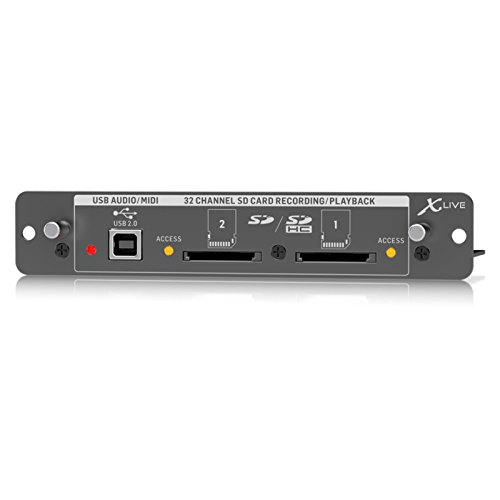
- 32-channel SD/SDHC recording and playback
- USB audio/MIDI connectivity
- Remote control via apps or compatible surfaces
Best For: X32-based live rigs needing multichannel recording
Compact Studio Interface

- One mic preamp and one Hi-Z input
- 24-bit/192 kHz and 120 dB dynamic range
- Air modes plus bundled recording software
Best For: Solo performers with simple USB audio setups
Mobile Creator Dock

- 24-bit/96 kHz audio with adaptive gain
- Loopback, monitoring, and wireless backing tracks
- USB-C phone connection with charging support
Best For: Mobile live streaming and portable instrument recording
Versatile Creator Pick – Arturia MiniFuse 2
The Arturia MiniFuse 2 is a practical choice for performers who need audio recording and MIDI connectivity in one compact USB interface. Its two combo inputs, balanced outputs, headphone control, USB hub, and 5-pin MIDI I/O make it suitable for connecting microphones, instruments, synths, controllers, and drum machines during live performances or production.
Best For: Performers and creators who want a compact audio/MIDI interface with flexible connections and beginner-friendly software.
Pros:
- Includes 5-pin MIDI input and output for synths, controllers, and drum machines.
- Two combo mic/instrument/line inputs with 48V phantom power support varied setups.
- Offers balanced outputs, headphone volume control, USB hub functionality, and loopback.
- Backed by a five-year warranty and extensive reliability testing.
Cons:
- Its two-input design may be limiting for larger live rigs.
- It requires USB connectivity for computer-based workflows.
The MiniFuse 2 is a well-rounded option when your live setup combines MIDI gear with microphones or instruments. It is especially appealing if long-term support and included creative software matter as much as connectivity.
Routing Specialist – CME U6MIDI Pro
The CME U6MIDI Pro is built for performers who need dependable MIDI routing rather than audio recording. This 3-in/3-out interface works with computers or as a standalone MIDI router, supporting split, merge, thru, filtering, and mapping for complex live performance systems.
Best For: Keyboardists and electronic performers managing multiple MIDI devices, channels, and routing paths.
Pros:
- Provides standalone 3-in/3-out MIDI operation with router and filter functions.
- Supports all MIDI channels and messages, including clock, sysex, MIDI timecode, and MPE.
- Offers plug-and-play USB-C compatibility across major desktop and mobile operating systems.
- Designed for low-latency, jitter-free transmission with error-resistant synchronization.
Cons:
- It provides MIDI only and has no audio inputs or outputs.
- Advanced routing configuration requires the UxMIDI Tools software.
For MIDI-focused live performances, the U6MIDI Pro stands out through its routing flexibility and broad compatibility. It is a better fit than an audio interface when precise MIDI distribution and filtering are the main priorities.
Audio-and-MIDI Workhorse – MOTU M4 USB-C Interface
The MOTU M4 combines 4×4 USB-C connectivity with audio recording, MIDI I/O, and low-latency monitoring. Its two microphone preamps, LCD screen, loopback, and support for computers or iOS devices make it a capable center for live performers who also need a broader audio interface.
Best For: Performers who need multiple audio connections, MIDI I/O, and monitoring features in one interface.
Pros:
- Provides 4-in/4-out USB-C connectivity for flexible routing and recording.
- Includes two microphone preamps, MIDI I/O, and low-latency monitoring.
- LCD metering helps monitor levels during recording or performance.
- Supports Mac, PC, and iOS devices and includes free production content.
Cons:
- It is larger and heavier than compact MIDI-only interfaces.
- Its listed operating-system support is limited to specified Windows, macOS, and iOS versions.
The M4 is a strong choice when live performance requires both audio and MIDI flexibility. Choose it over a MIDI-only box if microphone inputs, loopback, metering, and four-channel USB connectivity are central to your setup.
Multi-Device MIDI Splitter – MIDI Thru-6 Box
The MIDI Thru-6 Box is a straightforward solution for live performers who need to send one MIDI source to several devices. Its 1-in/6-out design distributes incoming MIDI messages to six outputs, allowing a controller or synth to feed multiple keyboards, modules, or other compatible equipment.
Best For: Performers who need simple, simultaneous MIDI distribution to up to six devices.
Pros:
- Distributes one MIDI input to six MIDI Thru outputs.
- Uses standard 5-pin MIDI and supports the standard 16 MIDI channels.
- Passes incoming MIDI messages without advertised delay or interference.
- Uses a 5V DC USB power supply and requires no batteries.
Cons:
- It is a splitter, not a configurable MIDI router, merger, or filter.
- It provides only one MIDI input, limiting two-way or multi-source setups.
- It requires external 5V USB power.
The Thru-6 Box is a practical pick for expanding a simple MIDI performance chain. Its fixed one-to-six distribution is easy to understand, but performers needing filtering, merging, or programmable routing should consider a more advanced MIDI interface.
Versatile Live Rig Hub – Focusrite Scarlett 4i4 4th Gen
For performers who need MIDI interfaces for live performances alongside multiple audio sources, the Focusrite Scarlett 4i4 4th Gen offers MIDI I/O, four line inputs, and four line outputs in a compact USB-C interface. Its flexible connections suit setups involving synths, drum machines, microphones, guitars, and studio monitors.
Best For: Live performers and electronic musicians who need MIDI plus several line-level connections.
Pros:
- MIDI input and output support integration with keyboards, synths, and other MIDI gear.
- Four line inputs and four line outputs provide useful routing flexibility.
- 120dB dynamic range, 24-bit/192kHz operation, and Air modes support detailed sound.
- Auto Gain and Clip Safe help simplify level management.
Cons:
- Its larger I/O set may be more than needed for a simple two-channel performance rig.
- USB-C operation requires connection to a compatible computer or device.
The Scarlett 4i4 is the strongest fit here when your live setup extends beyond a single instrument or microphone. MIDI I/O and four outputs make it especially practical for routing multiple sources, while the included software adds value for rehearsing and production.
Portable Budget Pick – PIYONE Q2 2X2 USB Interface
For straightforward MIDI interfaces for live performances, the PIYONE Q2 is a compact 2X2 USB audio interface focused on portable audio capture and monitoring. Its two combo inputs, bus-powered USB-C connection, and zero-latency direct monitoring make it suited to small performance or mobile recording setups.
Best For: Solo performers who prioritize portable two-channel audio recording and direct monitoring.
Pros:
- USB-C bus power avoids the need for a separate power supply.
- Two combo inputs accept microphones and instruments, with 48V phantom power available.
- 24-bit/192kHz conversion supports high-resolution recording.
- Direct Monitor provides zero-latency tracking, and the 3.5mm headphone jack adds convenience.
Cons:
- The supplied notes describe audio inputs and monitoring but do not specify dedicated MIDI input or output.
- Two channels provide less routing capacity than a larger multi-input interface.
- Windows compatibility is the only operating system support listed in the supplied details.
The Q2 is best viewed as a simple audio interface for compact live rigs rather than a dedicated MIDI hub. It can work well when your setup centers on one or two audio sources and you need bus-powered monitoring on the move.
Compact Artist Interface – Focusrite Scarlett 2i2 4th Gen
The Focusrite Scarlett 2i2 4th Gen is a compact option for performers seeking MIDI interfaces for live performances while keeping their audio setup simple. It provides two mic preamps, two Hi-Z instrument inputs, and USB connectivity for a microphone-and-instrument or dual-source rig.
Best For: Solo artists, singers, and instrumentalists who need a portable two-input interface.
Pros:
- Two mic preamps and two Hi-Z inputs support vocals, guitars, and other instruments.
- 120dB dynamic range and 24-bit/192kHz operation support studio-quality audio.
- Auto Gain and Clip Safe help prevent inconsistent or clipped levels.
- Works with Mac, Windows, iOS, tablets, and smartphones according to the supplied details.
Cons:
- The supplied notes do not list dedicated MIDI input or output.
- Two audio inputs limit expansion for larger live ensembles or multi-device rigs.
- Its included USB-A-to-C cable may require an adapter for some newer setups.
The 2i2 is a practical choice when portability and uncomplicated audio connections matter more than extensive routing. It is well suited to solo live performers, though users who specifically need hardware MIDI connectivity should verify their requirements before buying.
Live Rack Expansion – XLIVE X32 SD/USB Card
For larger live setups, the Behringer XLIVE X32 Expansion Card is a specialized option among MIDI interfaces for live performances. It adds 32-channel SD/SDHC recording and playback, USB audio/MIDI connectivity, and remote-control support for compatible computers, tablets, apps, and control surfaces.
Best For: X32 users who need multichannel live recording, playback, and MIDI-enabled USB integration.
Pros:
- Supports 32 channels for live recording and playback.
- Works independently with SD cards and USB recording/playback.
- Offers USB audio/MIDI connectivity and remote-control compatibility.
Cons:
- Designed as an expansion card for compatible Behringer X32 systems rather than a standalone interface.
- Operation is specified at 48 kHz.
This is the most capable choice here for multichannel live capture, provided you already use compatible X32 hardware. Its SD-card independence and remote-control options make it practical for venue and performance workflows.
Compact Studio Interface – Scarlett Solo 4th Gen
The Focusrite Scarlett Solo 4th Gen is a compact two-channel USB-C interface for performers who need a simple computer or iPad connection. For MIDI interfaces for live performances, it is best suited to streamlined setups centered on one microphone, one instrument, and software-based production.
Best For: Solo vocalists, guitarists, and electronic performers using a computer, iPad, or headphones and monitors.
Pros:
- Combines one XLR mic preamp with one Hi-Z instrument input.
- Provides 24-bit/192 kHz recording and a 120 dB dynamic range.
- Includes Air modes and a substantial recording-software bundle.
Cons:
- Provides only two channels and one audio input, limiting larger live rigs.
- It is primarily an audio interface; the supplied notes do not specify dedicated MIDI ports.
The Solo is a practical, portable choice when your live performance setup needs high-quality vocal or instrument capture rather than extensive routing. Its software compatibility and Air modes add flexibility for recording and monitoring.
Mobile Creator Dock – Synido A20 USB-C Interface
The Synido A20 is a pocket-sized USB-C interface aimed at guitarists, creators, and mobile broadcasters. Among MIDI interfaces for live performances, it stands out for direct smartphone or computer connection, loopback and monitoring, wireless backing tracks, and phone charging during mobile live streams.
Best For: Mobile performers, guitarists, DJs, and creators streaming or recording with phones, tablets, or computers.
Pros:
- Supports 24-bit/96 kHz audio with adaptive instrument gain control.
- Offers loopback, monitoring, and wireless backing-track functionality.
- Can connect to a phone or computer while charging a phone during broadcasts.
- Works with a broad range of instruments, including guitars, MIDI keyboards, basses, and electronic drums.
Cons:
- Camera or phone compatibility with USB-C audio input is required for direct embedded recording.
- Its two-channel design is less suitable for complex multichannel stages.
- The supplied notes do not specify dedicated MIDI ports.
The A20 is a strong fit for portable, phone-centered performance workflows. Its compact design and live-stream features are useful for creators who prioritize quick setup, while larger stage systems may need more inputs and routing.
How We Picked the Best Midi Interfaces for Live Performances
We focused on the details that matter on stage: dependable MIDI timing, practical input and output counts, connection compatibility, portability, monitoring, and setup simplicity. The selection includes dedicated MIDI interfaces and audio interfaces that add MIDI connectivity, since many performers need both instrument recording and hardware control in one unit.
We also considered whether each option suits a compact solo rig, a multi-device hardware setup, or a larger mixer-based system. USB-C support, class-compliant operation, optocoupled or high-speed MIDI transmission, and dedicated routing features can all reduce friction during rehearsals and shows.
Quick Comparison
| Best For | What to Prioritize |
|---|---|
| Solo performers | Small footprint, simple monitoring, and reliable USB power |
| Keyboard and hardware rigs | Multiple MIDI inputs and outputs with clear routing |
| Live recording | Low-latency audio inputs, direct monitoring, and stable drivers |
| Large stage systems | High output counts, MIDI splitting, or mixer expansion support |
| Mobile setups | USB-C connectivity, bus power, and compact construction |
Key Buying Factors for Midi Interfaces for Live Performances
MIDI I/O and Routing
Count every device you plan to connect, including keyboards, grooveboxes, effects processors, and lighting or control hardware. A basic 1-in/1-out interface may suit one controller, while a multi-output unit or MIDI thru box is better for distributing one signal to several devices without repeatedly daisy-chaining cables.
Latency and Timing
Look for stable drivers, high-speed transmission, and dependable clock handling. Direct monitoring is especially valuable when the interface also carries microphones or instruments, because it lets you hear the input with minimal delay while software handles the rest of the performance.
Audio Connectivity
If you sing, play guitar, or capture a stereo keyboard, choose the appropriate number of inputs and outputs. Combo XLR/TRS inputs provide flexibility, while balanced monitor outputs help reduce noise on longer stage runs.
Power, Compatibility, and Portability
Confirm compatibility with your laptop, tablet, operating system, and hub setup. Bus-powered models simplify mobile rigs, but larger systems may benefit from dedicated power and more robust physical controls. Check whether the unit is class-compliant if you plan to use iOS or another tablet-based setup.
Who Should Buy Which Midi Interfaces for Live Performances?
Choose a compact two-channel audio interface if you perform solo and need one keyboard, microphone, guitar, or stereo source alongside MIDI control. A four-channel interface is a better fit for performers who use several hardware instruments or need more flexible monitor and recording connections.
Dedicated MIDI interfaces and thru boxes make the most sense when your priority is hardware routing rather than audio recording. They are useful for drum machines, synthesizers, effects, and systems where one controller must feed multiple destinations. For stage mixers or larger production rigs, an expansion card or higher-I/O interface can centralize recording, playback, and MIDI duties.
Before buying, map your complete signal flow and leave at least one spare connection for future gear. The best choice is the unit that supports your current rig without forcing unnecessary adapters, daisy chains, or software workarounds.