Running short on MacBook storage can slow down creative work, complicate backups, and force you to manage files more aggressively than necessary. An external SSD adds fast, portable capacity without the noise or moving parts of a traditional hard drive.
We’ve selected 10 options spanning everyday transfers, photo and video libraries, travel, backups, and high-speed workflows. The right choice depends on your MacBook’s ports, the files you handle, and whether durability or peak performance matters most.
Best 10 External SSD for Macbook Picks for 2026
Best Overall

- Up to 1,050MB/s read speeds
- Durable aluminum design with 6-foot drop protection
- 256-bit AES hardware encryption
Best For: Everyday MacBook storage, backups, and creative files
Best Rugged Value
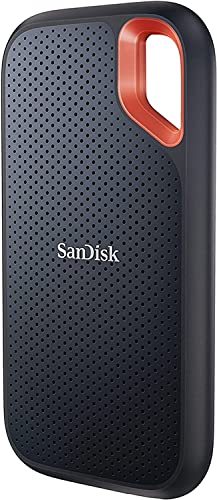
SanDisk Extreme Portable SSD 2TB
- Generous 2TB storage capacity
- IP65 water and dust resistance
- Up to 3-meter drop protection
Best For: Traveling MacBook users and large media libraries
Best Compact Budget Pick

- Pocket-sized, lightweight design
- Up to 1,000MB/s read and write speeds
- USB-C compatibility for Macs and mobile devices
Best For: Portable everyday storage and quick file transfers
Best for Speed
SanDisk Extreme Portable SSD 1TB

- Up to 2,000MB/s transfer speeds
- IP65-rated water and dust resistance
- 256-bit AES password protection
Best For: Fast creative workflows and large file transfers
Fastest Pick

- Up to 2,000 MB/s read and write speeds
- Thermal management for sustained workloads
- Drop resistance and AES 256-bit hardware encryption
Best For: Large creative projects and demanding MacBook workflows
Best Value
- Read speeds up to 1,000 MB/s
- Pocket-sized USB-C design
- Drop protection up to 2 meters
Best For: Portable everyday storage and MacBook backups
Best Rugged Choice
- Up to 1,050 MB/s read speeds
- IP65 water and dust resistance
- Drop protection up to 9.8 feet
Best For: Travel and demanding portable use
Best with Extra Features
- Up to 1,050MB/s read speeds
- 256-bit AES hardware encryption
- 6.5-foot drop resistance
Best For: Durable MacBook backups and secure portable storage
Best Slim Design

- Up to 1,050MB/s read speeds
- Slim 10.5mm, pocket-friendly design
- Includes 256-bit AES encryption software
Best For: Lightweight, cross-device file transfers
Best Cable Bundle

- Includes USB-C and USB-A cables
- Up to 1,050MB/s read speeds
- Lightweight aluminum enclosure
Best For: MacBook users connecting across multiple device types
Best Overall – Samsung T7 Portable SSD 1TB
The Samsung T7 is a well-rounded external SSD for MacBook users who want fast transfers, a compact build, and broad device compatibility. Its USB 3.2 Gen 2 connection supports read speeds up to 1,050MB/s and write speeds up to 1,000MB/s.
Best For: MacBook owners who need dependable everyday storage for photos, videos, backups, and working files.
Pros:
- Fast PCIe NVMe performance for transfers and large projects
- Compact aluminum unibody with shock and drop protection up to 6 feet
- 256-bit AES hardware encryption and thermal control
- Compatible with Mac, PC, smartphones, tablets, and gaming consoles
Cons:
- 1TB capacity may be limiting for extensive video libraries
- Its USB 3.2 Gen 2 speeds are lower than newer 2,000MB/s-class drives
The T7 balances speed, portability, security, and compatibility, making it a strong general-purpose choice for most MacBook setups.
Best Rugged Value – SanDisk Extreme Portable SSD 2TB
The SanDisk Extreme offers generous capacity and rugged protection in a portable external SSD for MacBook users. It delivers read speeds up to 1,050MB/s, includes password protection with 256-bit AES hardware encryption, and is rated for IP65 water and dust resistance.
Best For: Travelers, photographers, and MacBook users who want 2TB of storage in a drive built for demanding conditions.
Pros:
- 2TB capacity for large photo, video, and backup collections
- Up to 1,050MB/s read and 1,000MB/s write speeds
- IP65 water and dust resistance with up to 3-meter drop protection
- Carabiner loop makes it easy to secure to a bag or belt
Cons:
- Listed as an old model
- Included speeds depend on the host device and other factors
With its large capacity, five-year warranty, and rugged enclosure, this Extreme model is a practical choice when portability and physical protection matter as much as MacBook compatibility.
Best Compact Budget Pick – Verbatim Pocket SSD 512GB
The Verbatim Pocket SSD is a small, lightweight external SSD for MacBook users who need quick access to everyday files without carrying a larger drive. It supports USB 3.2 Gen 2 and offers read and write speeds up to 1,000MB/s.
Best For: Students, travelers, and everyday MacBook users who prioritize a pocket-friendly design and moderate capacity.
Pros:
- Ultracompact design with keyring and cable holder
- Up to 1,000MB/s read and write speeds
- USB-C compatibility with Macs, tablets, smartphones, and consoles
- Solid-state design has no moving parts
Cons:
- 512GB capacity is smaller than the other listed options
- Included Nero Backup Software is not compatible with Mac OS
- Two-year limited warranty is shorter than some alternatives
The Pocket SSD is best suited to portable file transfers and everyday backups rather than maintaining a very large media archive.
Best for Speed – SanDisk Extreme Portable SSD 1TB
The newer SanDisk Extreme is a high-speed external SSD for MacBook users who regularly move large photo, video, or AI-content files. Its USB Type-C connection supports transfer speeds up to 2,000MB/s, nearly twice the stated speed of the previous generation.
Best For: Creative professionals and power users who want very fast transfers in a pocket-sized drive.
Pros:
- Up to 2,000MB/s transfer speeds
- IP65 rating and up to 3-meter drop protection
- 256-bit AES encryption with password protection
- Pocket-sized design and five-year limited warranty
Cons:
- 1TB capacity may not suit very large media collections
- Real-world performance can depend on the host device and setup
This is the strongest speed-focused option in the group, particularly for MacBook workflows involving frequent transfers of high-resolution photos and video.
Fastest Pick – Samsung T9 1TB Portable SSD
If you want a high-speed external SSD for MacBook, the Samsung T9 is built for demanding transfers, editing, and longer workloads. It offers read and write speeds of up to 2,000 MB/s and is compatible with Mac computers, while its thermal management helps control heat during heavy use.
Best For: MacBook users handling large creative projects, frequent transfers, or sustained workloads.
Pros:
- Up to 2,000 MB/s read and write speeds for fast file handling
- Dynamic Thermal Guard helps manage heat during extended use
- Drop resistance up to 9.8 feet and AES 256-bit hardware encryption
- Includes compatibility with Mac, PC, tablets, and iPhone 15/16
Cons:
- Its top advertised speeds require compatible USB hardware
- May be more performance than needed for basic file storage
The T9 is the strongest performance choice in this roundup, especially for users who regularly move large media files or work on projects directly from an external drive.
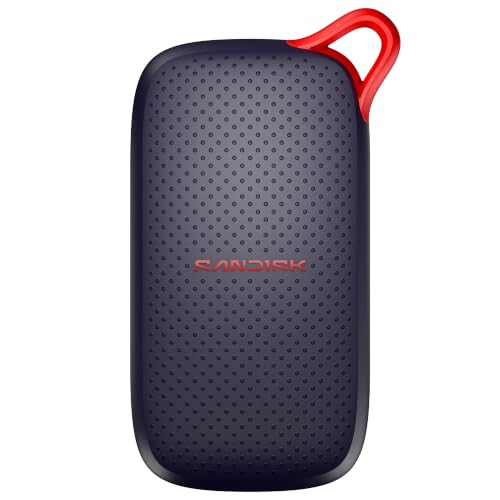
Best Value – SanDisk 1TB Portable SSD
The SanDisk 1TB is a practical external SSD for MacBook users who want quick everyday transfers without adding much weight to their bag. With read speeds up to 1,000 MB/s, a pocket-sized design, and USB-C connectivity, it is suited to portable photo, video, and document storage.
Best For: Everyday MacBook backups, media storage, and lightweight travel use.
Pros:
- Read speeds up to 1,000 MB/s for faster transfers than traditional portable hard drives
- Slim, lightweight design that fits easily in a pocket or bag
- Drop protection up to 2 meters and resistance to dust, shock, and water
- USB-C ready with no drivers or setup required
Cons:
- Slower than the Samsung T9 for intensive workloads
- Supplied details specify read speed, not a matching write-speed figure
This SanDisk model keeps things simple: it is compact, fast enough for common MacBook tasks, and easy to carry when you need extra storage on the go.
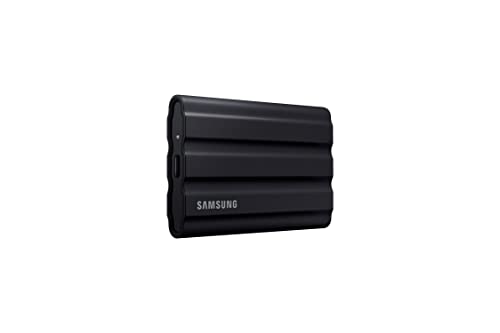
Best Rugged Choice – Samsung T7 Shield 1TB SSD
The Samsung T7 Shield is a dependable external SSD for MacBook users who work or travel in less predictable conditions. It combines read speeds up to 1,050 MB/s with IP65 water and dust resistance and drop protection up to 9.8 feet, making it a strong option for portable creative work.
Best For: Travelers, photographers, and MacBook users who prioritize added protection in a portable drive.
Pros:
- Up to 1,050 MB/s read and 1,000 MB/s write speeds
- IP65-rated resistance to water and dust
- Drop resistant from falls up to 9.8 feet
- Compatible with Mac, PC, Android devices, consoles, and iPhone 15/16
Cons:
- Not as fast as the Samsung T9 for maximum-throughput transfers
- Its rugged enclosure is thicker than the most minimalist portable SSDs
The T7 Shield is the better fit when durability matters as much as speed. It gives MacBook users fast transfers while adding meaningful protection for travel and outdoor use.
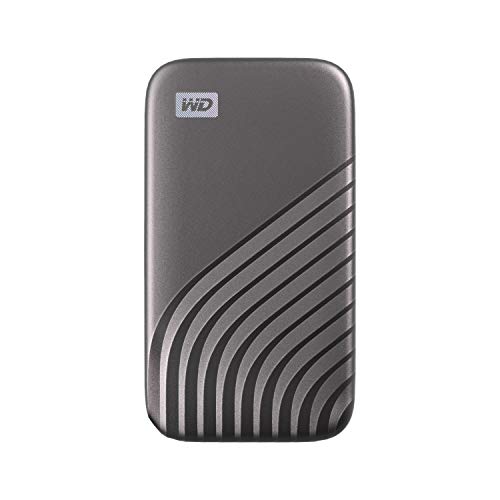
Best with Extra Features – WD My Passport SSD 1TB
If you want a dependable external SSD for MacBook backups and everyday file transfers, the 1TB WD My Passport SSD combines USB 3.2 Gen 2 performance with a compact, shock-resistant design. It supports macOS Big Sur, Catalina, Mojave, and High Sierra, though other operating systems may require reformatting.
Best For: MacBook users who prioritize durability, hardware-based security, and a longer warranty.
Pros:
- Up to 1,050MB/s read and 1,000MB/s write speeds.
- 256-bit AES hardware encryption with password protection.
- Drop resistant up to 6.5 feet and resistant to shock and vibration.
- Includes USB-C compatibility plus USB-A support for older systems.
Cons:
- Other operating systems may require reformatting.
- Its listed dimensions are larger than some ultra-slim portable SSDs.
The WD My Passport SSD is a strong all-around choice when protecting stored files matters as much as transfer speed. Its five-year limited warranty and rugged construction add reassurance for frequent travel or regular backups.
Best Slim Design – Lexar ES3 Portable SSD 1TB
The Lexar ES3 is a slim external SSD for MacBook users who want fast transfers in a lightweight package. Its USB 3.2 Gen 2 interface is rated for up to 1,050MB/s reads and 1,000MB/s writes, although performance can be lower on systems that do not support that standard.
Best For: MacBook owners who want a pocket-friendly SSD for files, multimedia, and cross-device use.
Pros:
- USB 3.2 Gen 2 speeds up to 1,050MB/s read and 1,000MB/s write.
- Thin 10.5mm design and approximately 42–45g weight.
- Type-C cable supports plug-and-play convenience.
- Lexar DataShield software provides 256-bit AES encryption.
Cons:
- Maximum performance depends on USB 3.2 Gen 2 support.
- The listed version does not include MagSafe.
- Its three-year warranty is shorter than some competing options.
The ES3 emphasizes portability without giving up headline USB 3.2 Gen 2 speeds. It is a practical fit for MacBook users who carry an SSD between a laptop, phone, camera, or gaming system.
Best Cable Bundle – SSK Portable SSD 1TB
The SSK SD500 is a versatile external SSD for MacBook users who also connect to phones, tablets, or older computers. It offers USB 3.2 Gen 2 performance, includes both USB-C and USB-A cables, and uses a compact aluminum enclosure for portable backups and media transfers.
Best For: MacBook owners who need broad device compatibility, included cables, and a lightweight design.
Pros:
- Up to 1,050MB/s read and 1,000MB/s write speeds.
- Includes both USB-C and USB-A USB 3.2 Gen 2 cables.
- Compact 36.6g aluminum design with heat-dissipating enclosure.
- Supports TRIM, S.M.A.R.T. diagnostics, and SLC caching.
Cons:
- Sustained transfer behavior can depend on the available SLC cache.
- The product notes describe a three-year warranty, shorter than some alternatives.
- Its broad mobile-device features may be unnecessary for MacBook-only use.
The SSK SD500 stands out for flexible connectivity and a very light chassis. With both common cable types included, it can simplify moving files between a MacBook and other devices without buying an extra adapter cable.
How We Picked the Best External SSD for Macbook
We compared these drives by capacity, advertised sequential speed, USB interface, portability, physical protection, security features, and overall suitability for macOS workflows. We also considered how clearly each model fits a specific use case, since a compact backup drive does not need the same specifications as a drive for large video projects.
Advertised speeds are maximum figures measured under ideal conditions. Your real-world performance depends on the MacBook model, cable, port, file sizes, drive temperature, and whether the source or destination storage can keep up.
Quick Comparison
| Best For | Recommended Type | What to Look For |
|---|---|---|
| Everyday expansion | Samsung T7, SanDisk Portable, Lexar ES3, or SSK | 1TB capacity, USB 3.2 Gen 2, and roughly 1,000–1,050MB/s |
| Rugged travel | Samsung T7 Shield or SanDisk Extreme | Improved resistance to drops, dust, and moisture |
| Maximum compatible speed | Samsung T9 or newer SanDisk Extreme | USB 3.2 Gen 2×2 support and a suitable host connection |
| Lightweight backup | Verbatim Pocket or WD My Passport SSD | Small size, dependable software, and sufficient capacity |
Key Buying Factors for an External SSD for Macbook
Connection and Real-World Speed
Most listed drives use USB-C connections or include compatible cables, but USB standards differ. A USB 3.2 Gen 2 drive can reach about 1,000–1,050MB/s in ideal conditions. USB 3.2 Gen 2×2 models advertise up to 2,000MB/s, but many MacBook ports do not support that full mode, so verify your specific model before paying for the upgrade.
Capacity and Sustained Workloads
Choose 512GB for documents and a modest backup, 1TB for general use, or 2TB when storing photo libraries, games, or video projects. Large transfers can reduce speed as the cache fills, particularly on compact drives, so leave free space and avoid treating a portable SSD as permanently full.
Durability, Security, and Compatibility
Rugged housings are valuable for commuting and production locations. Password protection or hardware encryption can help protect sensitive files, but check macOS software support. Before using a drive for Time Machine, format it appropriately in Disk Utility and confirm that any bundled utility works with your version of macOS.
Who Should Buy Which External SSD for Macbook?
Choose a standard 1TB model such as the Samsung T7, SanDisk Portable, Lexar ES3, or SSK if you want fast, uncomplicated everyday storage. Pick the Samsung T7 Shield or SanDisk Extreme for travel, fieldwork, or environments where drops and exposure are concerns. The Samsung T9 or newer high-speed SanDisk Extreme is better suited to demanding transfers, provided your MacBook and cable can use the advertised interface. For a smaller, simpler backup drive, the Verbatim Pocket model is a practical capacity-conscious choice, while the WD My Passport SSD adds a security-focused option.
Whichever External SSD for Macbook you select, use a reliable USB-C cable, eject the drive before unplugging it, and maintain a second backup for irreplaceable data.