If you’re on the lookout for budget USB audio mixers that still deliver high-quality sound, you’ve come to the right place. These mixers combine affordability with essential features, ensuring you get great sound without breaking the bank. From versatile channels to built-in effects, each option has something unique to offer. Let’s explore which mixers stand out in this competitive market and find the perfect fit for your audio needs.
FIFINE Gaming Audio Mixer with XLR Microphone Interface

The FIFINE Gaming Audio Mixer is the perfect choice for streamers looking to elevate their audio game on a budget. With its XLR microphone interface, you can connect high-quality condenser mics, thanks to the built-in 48V phantom power. You’ll appreciate the four independent channels for seamless volume control, plus the mute button to eliminate background noise. The vibrant RGB lighting adds flair to your setup, while customizable sound effects and voice modulation options keep your streams engaging. Plug-and-play compatibility guarantees smooth operation on both Mac and Windows, making it a versatile addition to your streaming toolkit.
Best For: Streamers on a budget who want to enhance their audio quality with professional-grade equipment.
Pros:
- Versatile Connectivity: Supports high-quality condenser microphones with built-in 48V phantom power.
- User-Friendly Controls: Features independent channel control and a mute button for efficient audio management.
- Engaging Effects: Offers customizable sound effects and voice modulation options to keep streams entertaining.
Cons:
- XLR Cable Not Included: Requires purchase of an XLR cable separately, which can affect overall setup cost.
- Limited Compatibility: Not compatible with USB microphones, limiting options for some users.
- RGB Lighting May Not Appeal to Everyone: The vibrant RGB lighting may not fit all aesthetic preferences or setups.
Pyle Professional 6 Channel Audio Mixer with Bluetooth (PMXU63BT)

For musicians and DJs seeking an affordable yet feature-packed audio mixer, the Pyle Professional 6 Channel Audio Mixer with Bluetooth (PMXU63BT) stands out as an excellent choice. This versatile mixer offers USB input, Bluetooth streaming, and built-in MP3 capabilities, allowing you to connect your devices effortlessly. With XLR and unbalanced inputs, plus +48V phantom power, you can achieve high-quality sound. The ultra-musical 3-band EQ and low-noise design enhance your audio experience. Built with a rugged steel chassis, it’s perfect for live gigs and karaoke. Plus, its multi-voltage power supply makes it ideal for worldwide use.
Best For: Musicians, DJs, and performers looking for an affordable, feature-rich audio mixer for live events and studio recordings.
Pros:
- Versatile Connectivity: Supports USB, Bluetooth, and MP3 playback for easy integration with various devices.
- High-Quality Sound: Equipped with +48V phantom power and ultra-musical 3-band EQ for enhanced audio performance.
- Durable Build: Rugged steel chassis and sealed controls ensure longevity and reliability in demanding environments.
Cons:
- Limited Channels: Only 6 channels may not be sufficient for larger setups or complex mixing needs.
- No Built-in Effects: Lacks built-in effects beyond basic DSP, which may limit creative options for some users.
- Learning Curve: May require some time for beginners to fully master all features and functionalities.
FIFINE PC Audio Mixer for Recording Music

Looking to elevate your recording game without breaking the bank? The FIFINE PC Audio Mixer is perfect for you. Designed for recording music, streaming, and podcasting, it features a USB interface with an XLR microphone input, dedicated instrument input, and 48V phantom power for condenser mics. You’ll enjoy improved sound quality that captures every detail of your vocals and instruments. Its direct monitor functionality allows for real-time sound control, while the dedicated knobs help you adjust volume levels easily. Plus, it’s compatible with both Mac and PC, making setup a breeze. Get ready to create amazing audio!
Best For: The FIFINE PC Audio Mixer is best for musicians, podcasters, and streamers looking for an affordable yet high-quality audio solution.
Pros:
- Improved sound quality with studio-grade XLR microphone and instrument interfaces.
- User-friendly plug-and-play functionality for seamless setup on both Mac and PC.
- Real-time sound control with direct monitor functionality and dedicated volume knobs.
Cons:
- Limited to one XLR input, which may not be sufficient for larger setups.
- Phantom power may not be suitable for all microphone types, limiting compatibility.
- Basic features compared to more advanced mixers, which may not meet the needs of professional users.
Yamaha MG06 6-Input Compact Stereo Mixer

Ideal for musicians and podcasters seeking a compact solution, the Yamaha MG06 6-Input Compact Stereo Mixer offers exceptional sound quality without breaking the bank. With studio-grade discrete class A D PRE preamps, you’ll enjoy rich bass and bright highs. Its 3-band EQ and high-pass filters give you maximum control, helping eliminate unwanted noise for a cleaner mix. Plus, the intuitive 1-knob compressors enhance your instruments and vocals effortlessly. Built with a rugged, powder-coated metal chassis, this mixer promises durability and reliability in any setting. It’s the perfect tool for achieving professional sound in a portable package.
Best For: Musicians and podcasters seeking a compact and high-quality mixer for live performances and recordings.
Pros:
- Studio-grade preamps deliver exceptional sound quality with rich bass and clear highs.
- 3-band EQ and high-pass filters provide maximum control over the audio mix.
- Durable metal chassis ensures longevity and reliability in various environments.
Cons:
- Lacks USB connectivity for direct digital audio recording.
- Limited to 6 input channels, which may not be sufficient for larger setups.
- No built-in effects, requiring external processing for advanced sound shaping.
M-AUDIO M-Track Solo USB Audio Interface for Recording and Streaming

The M-AUDIO M-Track Solo USB Audio Interface stands out as an excellent choice for budding musicians and content creators who need quality without breaking the bank. With 48kHz audio resolution, it’s perfect for recording, streaming, and podcasting. You’ll appreciate the combo XLR/Line input with phantom power for versatile connections, whether it’s vocals or instruments. The transparent Crystal Preamp guarantees peak sound quality for any microphone. Plus, the USB/Direct switch allows for zero latency monitoring, so you can hear yourself in real-time. Included MPC Beats Software boosts your production capabilities, making it an all-in-one solution for your audio needs.
Best For: Budding musicians and content creators looking for an affordable, high-quality audio interface for recording, streaming, and podcasting.
Pros:
- Versatile input options with one combo XLR/Line input and one Line/Instrument input.
- Zero latency monitoring for real-time audio feedback with the USB/Direct switch.
- Comes with MPC Beats Software for enhanced music creation and editing.
Cons:
- Limited to one XLR input, which may not be sufficient for multi-mic setups.
- Lacks advanced features found in higher-end audio interfaces.
- May require additional software or plugins for more complex audio production needs.
SONICAKE Portable USB Mini Sound Board Console for Music Recording and Streaming

For musicians and content creators on a budget, the SONICAKE Portable USB Mini Sound Board Console stands out as a versatile tool for music recording and streaming. With its two channels and 48V phantom power, it’s perfect for everything from podcasting to karaoke. The compact design makes it easy to transport, weighing just 10.9 ounces. You’ll appreciate the stable performance and compatibility with mainstream audio software, ensuring high-quality sound at 16 BIT, 48KHZ. Plus, its USB power supply simplifies connectivity with your computer. With a customer rating of 3.9 stars, this mixer is a reliable choice for your audio needs.
Best For: Musicians and content creators seeking an affordable and portable solution for music recording and streaming.
Pros:
- Compact and lightweight design makes it easy to carry for on-the-go recording and streaming.
- High audio resolution of 16 BIT, 48KHZ ensures quality sound output.
- Compatible with mainstream audio software, providing flexibility for various applications.
Cons:
- Limited customer rating of 3.9 stars may indicate some performance issues for certain users.
- Only two channels might restrict more complex audio setups.
- Phantom power feature may not be suitable for all microphones, limiting compatibility.
Mackie ProFX10v3 10-Channel Analog Mixer with USB

With its built-in 2×4 USB-C audio interface and pristine 24-bit / 192 kHz quality, the Mackie ProFX10v3 is perfect for home studio enthusiasts and live performers alike. You’ll love the flexibility of its three recording modes, whether you’re mixing, streaming, or recording directly. The bidirectional Bluetooth feature lets you easily connect smartphones or tablets, perfect for incorporating calls or backing tracks. Plus, with the upgraded GigFX+ effects engine, you can access 12 editable presets on the fly. Its one-knob compression and low-cut filters enhance sound quality, making it an essential tool for your audio needs.
Best For: The Mackie ProFX10v3 is best for home studio enthusiasts and live performers looking for a versatile and high-quality audio mixing solution.
Pros:
- High-resolution 24-bit / 192 kHz audio quality for professional recordings.
- Bidirectional Bluetooth with Mix Minus functionality for seamless integration of phone calls and backing tracks.
- User-friendly features like one-knob compression and an upgraded effects engine with 12 editable presets.
Cons:
- Limited to 10 channels, which may not be sufficient for larger setups.
- Some users may find the learning curve steep for utilizing all features effectively.
- Lacks advanced digital connectivity options compared to some competitors.
4 Channel Audio Mixer Board for PC and DJ Mixing
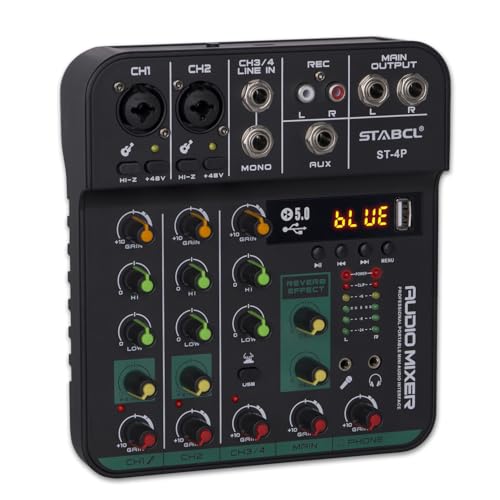
Whether you’re a budding podcaster or a DJ looking to elevate your sound, the 4 Channel Audio Mixer Board stands out as an excellent choice. With two XLR inputs and built-in Bluetooth, you can easily connect microphones and stream music. The 48V phantom power guarantees your condenser mic performs at its best. You’ll love the onboard effects, including echo and delay, which enhance your audio quality. Its compact design makes it portable, perfect for various settings. Plus, you get 24-hour customer support and a 24-month warranty for peace of mind. This mixer truly balances functionality and affordability for your audio needs.
Best For: Podcasters and DJs seeking a compact and versatile mixer for high-quality audio production.
Pros:
- Versatile connectivity with XLR inputs and built-in Bluetooth for easy music streaming.
- Onboard effects like echo and delay enhance audio quality for professional sound.
- Compact and portable design makes it easy to transport for various events and settings.
Cons:
- Limited to 4 channels, which may not suffice for larger productions.
- Some users may find the learning curve steep for using all features effectively.
- Power supply is limited to 5V, which may not be sufficient for high-demand equipment.
Pyle 4-Channel Bluetooth Mini Line Mixer with USB Audio Interface (PMAX4)

The Pyle 4-Channel Bluetooth Mini Line Mixer (PMAX4) stands out as an excellent choice for musicians and content creators seeking a budget-friendly audio solution. This compact mixer offers ultra-low noise design, ensuring pristine audio quality while you create. With eight mono/stereo inputs, you can achieve precise control over your sound. Bluetooth 5.x technology allows you to stream music wirelessly from your devices within a 50-foot range. The built-in USB sound card simplifies computer integration for effortless recording. Its durable metal chassis and minimal power consumption make it highly portable—perfect for those on the go. Enjoy a seamless audio experience with the PMAX4!
Best For: Musicians, podcasters, and content creators looking for a compact, budget-friendly audio mixer with Bluetooth capabilities.
Pros:
- Ultra-low noise design ensures high-quality audio output.
- Bluetooth 5.x technology allows for convenient wireless streaming from various devices.
- Durable metal chassis and compact size enhance portability for on-the-go use.
Cons:
- Limited to 4 channels, which may not be sufficient for larger setups.
- Requires a power source, which may limit mobility in certain situations.
- Some users may prefer more advanced features found in higher-end mixers.
Aveek Professional Audio Mixer for Recording and Live Streaming

For podcasters and live streamers seeking an affordable yet versatile audio solution, the Aveek Professional Audio Mixer stands out. With three XLR inputs and various stereo connections, you can easily connect microphones, instruments, and playback devices. The built-in recording chip allows for hassle-free PC recording via USB-B. You’ll appreciate the headphone monitor for real-time sound checks and the 48V phantom power for condenser mics. Plus, the onboard EQ and effects like delay and echo enhance your audio quality. With a 45-day satisfaction guarantee, you can confidently explore its features for your next project or event.
Best For: Podcasters, live streamers, and small bands looking for an affordable and versatile audio mixing solution.
Pros:
- Affordable and versatile audio solution with multiple input options for various devices.
- Built-in recording chip for easy plug-and-play PC recording via USB-B, enhancing convenience.
- Onboard EQ and audio effects like delay and echo improve overall sound quality for professional results.
Cons:
- Bluetooth, USB, and 4/5 channel functions cannot be used simultaneously, limiting flexibility.
- Requires reconnection for Bluetooth streaming if connectivity issues arise, which may disrupt sessions.
- Limited to 15ft range for Bluetooth connectivity, which may not suit larger setups or spaces.
Factors to Consider When Choosing Budget USB Audio Mixers
When choosing a budget USB audio mixer, you should consider several key factors to guarantee you get the best value. Think about audio quality and clarity, as well as the number of input channels you might need for your projects. Don’t forget to look at connectivity options, built-in effects, and phantom power support to enhance your setup.
Audio Quality and Clarity
Choosing a budget USB audio mixer isn’t just about the price; it’s vital to take into account audio quality and clarity to confirm your recordings sound professional. The preamps play a key role here—studio-grade preamps provide clearer sound and lower noise levels. Look for mixers boasting high-resolution audio specifications, like 24-bit/192 kHz, which capture more detail and enhance overall clarity. A 3-band equalizer lets you fine-tune frequency responses, eliminating unwanted noise and improving the clarity of vocals and instruments. Features like direct monitoring and zero-latency monitoring give you real-time feedback, helping you assess audio quality during recordings. Finally, using high-quality cables and connectors guarantees that poor connections won’t introduce noise or degrade your sound quality.
Connectivity Options and Versatility
While evaluating budget USB audio mixers, connectivity options and versatility are essential for guaranteeing you can accommodate a variety of audio sources and applications. Look for mixers with multiple input options like XLR, line, and instrument inputs to enhance flexibility. USB connectivity is a must for seamless integration with your computer, making recording and streaming effortless. A built-in Bluetooth feature can further boost versatility, allowing wireless audio streaming from your devices for diverse uses. Additionally, check for extra outputs, such as RCA and headphone outputs, to facilitate monitoring and connecting to external speakers or recording devices. Finally, confirm the mixer’s compatibility with Mac and PC to guarantee smooth functionality across your preferred devices.
Number of Input Channels
Having the right connectivity options lays the groundwork for a successful audio mixing experience, but understanding the number of input channels is equally important. The number of channels directly impacts your ability to connect multiple audio sources simultaneously, which is vital for live performances, podcasts, or recording sessions. Mixers typically range from 2 to 10 input channels, giving you greater flexibility in managing microphones, instruments, and line sources. Each channel usually includes its own gain control and EQ settings, allowing you to tailor sound quality for each source. When choosing a mixer, think about your future needs; opting for a model with extra channels can accommodate potential expansions, all while balancing sound quality and essential features for the best investment.
Built-in Effects and Processing
When it comes to budget USB audio mixers, built-in effects and processing can considerably elevate your sound quality. Many mixers feature 16-bit DSP effects, giving you versatile audio mixing options. You can customize sound effects like echo and delay, perfect for creating dynamic experiences during live performances or recordings. Integrated equalization controls, often with at least a 2-band EQ, let you adjust high and low frequencies for clearer sound tailoring. Plus, real-time monitoring options allow you to hear your adjustments immediately, ensuring you can make changes on the fly. Voice modulation features, such as auto-tune and voice-changing modes, add an extra layer of creativity and fun to your audio streams or recordings.
Phantom Power Support
How essential is phantom power support for your audio projects? If you’re using condenser microphones, it’s vital. These mics need an external power source to deliver their best performance, and most budget USB audio mixers provide the standard 48V phantom power. This feature greatly enhances your audio quality, allowing for clearer and more professional recordings.
When choosing a mixer, verify it has a dedicated phantom power switch; this flexibility lets you activate or deactivate it based on your mic needs. Also, check if the mixer supports phantom power on multiple channels, which is ideal if you plan to use several condenser microphones at once. Investing in this feature can elevate your audio game without breaking the bank.
Portability and Size
For any audio project, especially if you’re on the move, portability and size play a significant role in your choice of budget USB audio mixers. A compact mixer is easier to transport, fitting snugly into bags or tight spaces without sacrificing crucial features. Look for lightweight designs, as these often enhance portability while still delivering quality performance. Many budget mixers come with rugged chassis, ensuring they can withstand the rigors of travel. However, keep in mind that smaller mixers may offer fewer channels, which can limit simultaneous audio inputs. Finally, a well-designed portable mixer makes setup and use in various environments, like home studios or on-the-go locations, a breeze, allowing you to focus on creating great audio.
Price and Value Comparison
Choosing the right budget USB audio mixer hinges on understanding both price and value. Prices typically range from $50 to $300, affecting the features and sound quality you can expect. Evaluate the value by examining features like the number of channels, built-in effects, and connectivity options that enhance usability without breaking the bank. Don’t forget to factor in additional costs for items like XLR cables and power supplies, which can inflate your budget. User reviews and ratings are invaluable; they provide insights into the mixer’s performance and reliability, helping you gauge its true value. Finally, consider warranty and customer support options—longer warranties often indicate better product quality and offer you peace of mind.
User-Friendly Interface Design
While diving into the world of budget USB audio mixers, it is vital to prioritize a user-friendly interface design that simplifies your experience. Look for intuitive controls with clearly labeled knobs, buttons, and sliders, making adjustments during live sessions or recordings effortless. Visual indicators like LED meters or screens offer real-time feedback on audio levels, allowing you to make quick tweaks as needed. A streamlined layout minimizes clutter, so you can easily locate essential functions without distractions. Features such as dedicated mute buttons and monitoring controls enhance usability, providing immediate access to significant functions. Finally, confirm compatibility with common operating systems and plug-and-play functionality, so you can set up and start mixing without technical hassles.