When it comes to enhancing your recording setup, investing in a quality desk microphone boom arm can make a significant difference in sound quality and flexibility. These boom arms offer adjustable heights and stable support for various microphones, ensuring you get the best audio possible. But with so many options available, how do you choose the right one for your needs? Let’s explore the top contenders that can elevate your audio experience.
FIFINE Microphone Boom Arm Stand for Podcast Streaming

If you’re a podcaster or gamer looking for a reliable and adjustable solution for your microphone setup, the FIFINE Microphone Boom Arm Stand is an excellent choice. Its all-metal construction guarantees stability, preventing slips and scratches with its C-clamp design. You can easily extend the arm up to 29 inches, allowing for 220-degree vertical and 360-degree horizontal adjustments. The low-profile design keeps your view unobstructed during intense gaming sessions. Plus, it features hidden cable management to keep your workspace tidy. The included adapters make it compatible with most microphones, ensuring a seamless assembly process.
Best For: Podcasters and gamers seeking a reliable, adjustable microphone setup for optimal performance.
Pros:
- All-metal construction ensures stability and durability during use.
- Low-profile design allows for unobstructed visibility during gaming or streaming.
- Compatible with most microphones, thanks to included adapters for easy assembly.
Cons:
- Microphone not included, requiring separate purchase.
- Desk clamp may not fit all desktop thicknesses, limiting compatibility.
- Full extension of the arm may require careful adjustment to avoid obstruction.
RØDE PSA1+ Professional Studio Arm
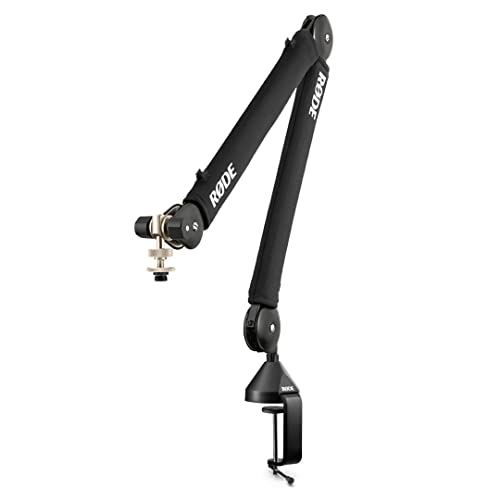
The RØDE PSA1+ Professional Studio Arm stands out as an essential tool for podcasters and streamers who demand precision and flexibility in their audio setup. With its innovative parallelogram spring design, you can achieve effortless microphone placement and enjoy ultra-smooth movement with 360-degree rotation. The fully damped springs guarantee silent operation, minimizing distractions. Plus, it offers superior noise isolation from keyboard and desk sounds, enhancing your audio quality. This arm supports a variety of microphones, accommodating weights from 94g to 1.2kg, making it perfect for content creators who seek high-quality audio solutions in studio settings.
Best For: Podcasters, streamers, and broadcasters seeking a professional-grade microphone arm for precise and flexible audio setups.
Pros:
- Innovative parallelogram spring design allows for effortless microphone placement and smooth 360-degree rotation.
- Superior noise isolation minimizes distractions from keyboard, mouse, and desk sounds, enhancing audio quality.
- Compatible with a wide range of microphones and supports weights between 94g and 1.2kg.
Cons:
- May require a sturdy desk or mounting surface to support its weight and movement.
- Installation can be complex for users unfamiliar with mounting equipment.
- The premium construction might come at a higher price point compared to basic microphone arms.
InnoGear Upgraded Microphone Boom Arm (Black)

For those who value a clean and organized workspace, the InnoGear Upgraded Microphone Boom Arm (Black) stands out with its ultra-sleek design that sits just 3.35 inches above your desk. It’s perfect for minimalist setups and helps free up valuable desk space. You’ll appreciate the integrated magnetic cable management, keeping your cables hidden and tangle-free. With 360° base rotation and 170° tilt, it guarantees your microphone is always in the ideal position. Plus, its solid alloy steel construction supports up to 1.5 kg and comes with two screw adapters for compatibility with various devices. Quick assembly makes it a breeze to set up!
Best For: Those looking for a sleek and efficient microphone solution to maximize desk space and maintain an organized workspace.
Pros:
- Ultra-sleek design that enhances minimalist setups and saves valuable desk space.
- Integrated magnetic cable management keeps cables hidden and tangle-free for a professional look.
- High adjustability and flexibility with various rotation and tilt options to position the microphone perfectly.
Cons:
- Limited payload capacity of 1.5 kg may not support heavier microphones.
- C-style clamp may not fit all desk thicknesses and could require additional adapters for thicker desks.
- Initial assembly time may be required for those who prefer a plug-and-play setup.
InnoGear Mic Boom Arm Microphone Stand for Blue Yeti and Other Microphones

Designed specifically for popular microphones like the Blue Yeti and Shure SM7B, the InnoGear Mic Boom Arm is an ideal choice for podcasters, streamers, and musicians alike. Its built-in cable management channels keep your setup tidy, reducing tangles during recording sessions. You’ll appreciate the arm’s 135° and 180° adjustability, allowing you to find the perfect angle without noise. With a maximum reach of 32.3 inches horizontally and 37.4 inches vertically, it adapts to your workspace. Plus, the sturdy design supports up to 3.5 pounds, ensuring your gear stays secure while you focus on delivering superior sound quality.
Best For: Podcasters, streamers, and musicians looking for a versatile and reliable microphone stand.
Pros:
- Built-in cable management helps keep your workspace organized and tangle-free.
- High adjustability with 135° and 180° movement allows for optimal recording angles.
- Sturdy construction supports a maximum load of 3.5 pounds, ensuring stability during use.
Cons:
- Limited weight capacity may not support heavier microphones or accessories.
- Desk clamp compatibility is restricted to desks up to 2 inches thick.
- Installation may require some effort and time for optimal setup.
IXTECH Boom Arm – Adjustable Microphone Stand

Seeking an adjustable microphone stand that enhances your recording experience? The IXTECH Boom Arm is your solution. Its 360° rotatable design allows for ideal mic placement, improving voice quality during podcasts or gaming sessions. You’ll appreciate the angle adjustments that promote better posture while recording. The space-saving design features a clip-on cable holder to keep your desk tidy and professional. Stability is key, and the dual suspension springs guarantee your microphone stays steady, eliminating shakes. Plus, it’s compatible with most standard microphones, features a strong C-clamp for secure attachment, and folds for easy storage. Enjoy flexibility and convenience with IXTECH!
Best For: Podcasters, gamers, and anyone in need of a versatile and stable microphone stand for recording sessions.
Pros:
- 360° rotatable design allows for optimal microphone placement and improved voice quality.
- Dual suspension springs provide stability, preventing shakes and enhancing recording quality.
- Space-saving design with a clip-on cable holder helps maintain a tidy workspace.
Cons:
- The C-clamp may not fit all desk types, potentially limiting compatibility.
- Foldable design may sacrifice some sturdiness compared to non-foldable stands.
- Limited color options may not appeal to all aesthetic preferences.
M05 Boom Arm 360° Rotatable Microphone Stand

The M05 Boom Arm 360° Rotatable Microphone Stand is perfect for content creators who demand flexibility and stability in their setups. Its foldable design and sturdy C-type clamp guarantee a secure grip on desks up to 2 inches thick. With a durable aluminum alloy construction, it supports microphones weighing up to 5.5 lbs, making it suitable for heavy models like the Yeti and SM7B. The 360° adjustable arm and 9.8-inch extension rod let you position your mic without blocking your view. Plus, it’s compatible with a range of microphones, assuring you have the versatility you need for any project.
Best For: Content creators, podcasters, and streamers looking for a versatile and stable microphone stand.
Pros:
- 360° rotatable arm allows for optimal microphone positioning without obstructing the user’s view.
- Sturdy construction supports heavy microphones like the Yeti and SM7B, ensuring durability and stability.
- Universal compatibility with various microphones and shock mounts makes it suitable for diverse audio projects.
Cons:
- Limited load capacity of 5.5 lbs may not accommodate all microphone models.
- C-type clamp may not fit all desk thicknesses if exceeding 2 inches.
- Foldable design might require more space when extended fully compared to non-foldable alternatives.
Mic Boom Arm, Adjustable Height Overhead Microphone Stand

For creators who need flexibility in their recording setups, the mic boom arm offers an adjustable height that makes it perfect for both sitting and standing positions. With a high extension riser of 31.5 inches, you can easily position your microphone overhead without blocking your monitors. Tool-less adjustments let you quickly change the height and angle, adapting to any situation. Made from heavy-duty steel, this boom arm grips desktops securely, ensuring stability during use. Its full range of motion and universal compatibility with various microphone models make it an ideal choice for broadcasting, recording, and live streaming.
Best For: Creators, podcasters, and gamers who require an adjustable and stable microphone setup for various recording scenarios.
Pros:
- Tool-less adjustments allow for quick height and angle changes.
- Made from heavy-duty steel, ensuring durability and stability.
- Universal compatibility with multiple microphone models enhances versatility.
Cons:
- May be too bulky for small or cramped spaces.
- Requires a sturdy desk to accommodate the upgraded clamps effectively.
- Extension riser height might not suit all users’ preferences.
IXTECH Microphone Boom Arm with Desk Mount – Elegance Model
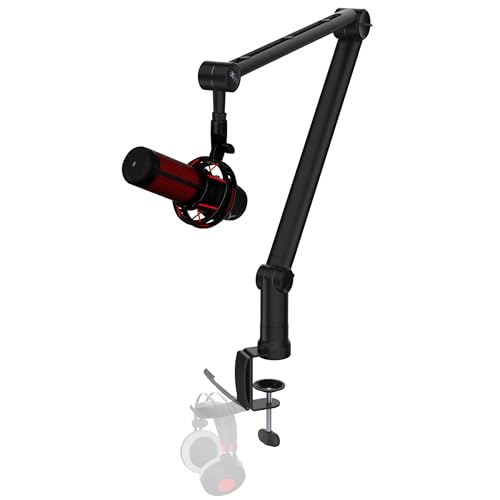
Designed with podcasters and gamers in mind, the IXTECH Microphone Boom Arm with Desk Mount – Elegance Model elevates your audio experience. Its 360° adjustable arm lets you position your mic perfectly, while strong dual suspension springs guarantee stability without shaking. You’ll love the included clip-on cable holder, which keeps your workspace tidy and professional. The robust C-clamp securely attaches to your desk, preventing any unwanted movement during intense recording sessions. Plus, it’s compatible with various microphone setups, making it ideal for home studios or gaming rigs. With this boom arm, you’ll enjoy both flexibility and peak sound quality.
Best For: Podcasters, gamers, and anyone needing a stable and adjustable microphone setup for high-quality audio recordings.
Pros:
- 360° adjustable arm allows for optimal mic positioning and flexibility during use.
- Strong dual suspension springs prevent shaking and ensure stability even with heavier microphones.
- Clip-on cable holder keeps cables organized, reducing clutter and enhancing workspace aesthetics.
Cons:
- May not support microphones heavier than 1kg, limiting options for certain users.
- The C-clamp may not fit all desk thicknesses, potentially restricting mounting options.
- Some users may find the setup process requires additional adjustments for the perfect fit.
Low Profile Boom Arm for Heavy Microphones

If you’re using heavy microphones like the Shure SM7B or Blue Yeti, a low profile boom arm offers the perfect solution for maintaining a clean and efficient setup. With a 6.6lbs load capacity, it securely supports these mics, featuring sturdy adapters for versatile connections. The low profile design fits neatly under monitors, while the 780mm reach accommodates large desks. Enjoy smooth, tool-free adjustments with ergonomic knobs and a 360° swivel for peak positioning. Crafted from durable, corrosion-resistant materials, it guarantees stability without sagging. Plus, professional customer support is available for any issues, assuring your setup stays reliable and clutter-free.
Best For: The Low Profile Boom Arm is best for podcasters, streamers, and content creators using heavy microphones who need a stable and unobtrusive setup.
Pros:
- Versatile Compatibility: Supports a wide range of heavy microphones, ensuring secure connections with multiple adapters.
- Space-Saving Design: The low profile structure keeps the workspace neat by sliding under monitors and reducing clutter.
- Durable Construction: Built with robust materials and a gear-lock mechanism, providing stability and longevity for extended use.
Cons:
- Weight Limitations: The 6.6lbs load capacity may not accommodate all heavy microphone models or additional accessories.
- Adjustment Difficulty: While tool-free, some users may find the ergonomic knobs less intuitive for quick adjustments.
- Installation Complexity: Initial setup may involve a learning curve for users unfamiliar with boom arm installations.
SUNMON QuadCast Boom Arm for Microphones

The SUNMON QuadCast Boom Arm is ideal for content creators who demand versatility and stability in their audio setup. It accommodates popular microphones like the Blue Yeti and HyperX QuadCast, thanks to its pre-installed silver adapter. You’ll appreciate the adjustable suspension boom arm, allowing you to easily tweak the angle and height for peak voice capture. Dual suspension springs enhance stability, eliminating unwanted noise during your recordings. Installation is straightforward with a desk clamp that fits desktops up to 1.89″ thick, and sponge padding protects your desk from scratches. This boom arm’s functionality makes it a must-have for serious creators.
Best For: Content creators looking for a versatile and stable microphone setup.
Pros:
- Adjustable suspension boom arm allows for customizable microphone positioning for optimal audio capture.
- Dual suspension springs provide exceptional stability, minimizing shaking and unwanted noise during recordings.
- Easy installation with a desk clamp and protective sponge padding to prevent desk damage.
Cons:
- Streaming microphone not included, requiring separate purchase for complete setup.
- Desk clamp may not fit thicker desktops, limiting installation options for some users.
- Limited compatibility with microphones outside of the specified brands and models.
Factors to Consider When Choosing Desk Microphone Boom Arms
When choosing a desk microphone boom arm, you should consider several key factors to guarantee it meets your needs. Think about the build quality and material, as well as how adjustable and flexible the arm is for your setup. Don’t forget to check compatibility with your microphone and look for features like cable management for a clean workspace.
Build Quality and Material
Choosing a microphone boom arm with high build quality and durable materials is essential for achieving the best audio experience. Look for all-metal construction, as it enhances stability and protects your microphone from damage during use. Sturdy materials like solid alloy steel or stainless steel guarantee the boom arm can support heavier microphones without sagging. A well-designed C-clamp prevents slipping and scratches on your desktop, keeping your workspace clean and secure. Additionally, dual suspension springs can greatly reduce shaking and noise, improving audio quality during recordings and live streams. Consider integrated cable management features to keep your microphone cables organized and hidden, contributing to a professional appearance and minimizing clutter on your desk.
Adjustability and Flexibility
An adjustable and flexible microphone boom arm can greatly enhance your recording experience. Look for boom arms that offer full 360° rotation and multiple angles of adjustment, like 180° swivel and 170° tilt. This flexibility helps you achieve ideal microphone positioning, whether you’re sitting or standing. A model with a reach of up to 32 inches or more allows for versatility in different desktop arrangements and user heights. Easy-to-use adjustment mechanisms, such as tool-free knobs or quick-release levers, enable swift changes during sessions. Additionally, choose a design with integrated cable management to keep your workspace organized. Finally, verify the boom arm can support your microphone’s weight, typically between 1 kg to 1.5 kg, to prevent sagging.
Compatibility With Microphones
Compatibility is key to a successful recording setup, so ensuring your desk microphone boom arm matches your microphone’s specifications is essential. First, check the threading of your microphone, as it could be 1/4″, 3/8″, or 5/8″ according to industry standards. Many boom arms come with multiple screw adapters, enhancing your options for various brands and models. Additionally, consider the maximum weight capacity; it should match or exceed your microphone’s weight to prevent sagging. If you use heavier microphones, look for boom arms designed for broadcast models, providing extra support. Finally, verify that the boom arm’s reach and adjustability fit your desired microphone positioning, ensuring it won’t obstruct your workspace or view.
Cable Management Features
How can effective cable management elevate your recording setup? By choosing a microphone boom arm with integrated cable management, you can greatly reduce clutter and enhance the aesthetics of your workspace. Look for models featuring magnetic or snap-on channels that allow for easy routing, creating a professional appearance during recordings or live streams. Built-in cable management minimizes tangling and prevents accidental disconnections, ensuring uninterrupted audio quality. Plus, it enhances your experience by letting you adjust microphone positioning without wrestling with tangled wires. Many boom arms cater to different cable types, such as USB and XLR, making them versatile for various microphone setups. Investing in effective cable management is essential for a clean, functional, and efficient recording environment.
Weight Capacity and Stability
Effective cable management not only keeps your workspace tidy but also sets the stage for considering other vital aspects of your microphone boom arm, like weight capacity and stability. When choosing a boom arm, check its weight capacity—most models support between 1 kg (2.2 lbs) and 2.5 kg (5.5 lbs). Stability is key; opt for arms made from robust materials like alloy steel to minimize shaking during recordings. Features like dual suspension springs and C-clamp mounting can enhance stability, guaranteeing a firm grip on your desk. Additionally, a gear-lock mechanism helps maintain the arm’s position under heavier microphones, preventing sagging. Always verify the maximum load specifications to confirm it meets your microphone’s needs without compromising performance.
Space-Saving Design Elements
When selecting a desk microphone boom arm, consider the importance of space-saving design elements that can greatly enhance your workspace. Look for a low profile design that extends beneath your computer screen, keeping your view clear and maximizing desk space. Compact, foldable boom arms are perfect for small workstations or when you’re on the go. Integrated cable management systems help conceal and organize microphone cables, reducing clutter and giving your setup a professional look. C-clamp mounts securely attach to your desktop without occupying additional surface area, freeing up valuable space. Finally, adjustable height and angle features allow you to position your microphone most effectively without sacrificing your workspace, ensuring a comfortable and efficient setup.