Choosing the right DJ controller with screens can make browsing, cueing, and performance work faster and more intuitive. Whether you want a standalone setup or a laptop-based rig, the right display features can streamline your workflow.
Below, we focus on controllers that balance screen visibility, hands-on control, and practical feature sets for beginners through working DJs.
Best 10 Dj Controller with Screens Picks for 2026
Flagship Open-Format Choice

- Track Separation for vocals, drums, and instruments
- On-jog displays show waveforms, artwork, and track parts
- Works with rekordbox and Serato DJ Pro
Best For: Serious hobbyists, mobile DJs, and pros who want a future-proofed controller
Standalone Streaming Pick

- 7-inch touchscreen for laptop-free mixing
- Built-in speakers and Wi-Fi for easy setup
- Supports major streaming services and Engine DJ OS
Best For: Mobile DJs and laptop-free performers who want streaming access
Scratch Battle Favorite

- On-jog displays show playback position
- Battle-style 2-channel layout for scratch play
- Includes rekordbox and Serato DJ Pro
Best For: Scratch DJs and open-format performers who want visual playback feedback
Standalone Club-Style Pick

- 7-inch touchscreen for standalone browsing and control
- Built-in speakers for practice and mobile play
- 4-channel layout with Serato DJ Pro and VirtualDJ support
Best For: Mobile, streaming, and club DJs who want a standalone 4-deck controller
Portable Standalone Pick

- Battery-powered standalone controller
- 7-inch touchscreen with onboard speakers
- Wi-Fi streaming, SD, and USB support
Best For: Mobile DJs who want a laptop-free controller with a screen
Motorized Performance Choice
RANE Performer 4-Channel DJ Controller

- 7-inch motorized platters with displays
- OLED pad mode screens and Stem controls
- Serato DJ Pro integration with pro hardware
Best For: DJs who want premium tactile control and built-in displays
Ultra-Portable Streaming Pick
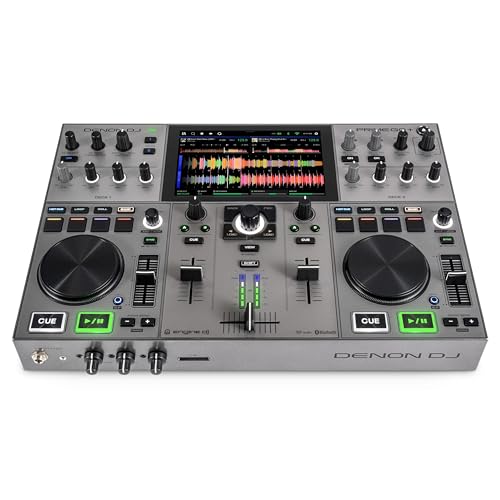
- Battery-powered standalone controller
- Built-in Wi-Fi and streaming access
- Touchscreen with Engine DJ OS features
Best For: Traveling DJs who want compact standalone streaming performance
Beginner-Friendly All-Rounder

- Simple 2-channel layout for learning fast
- Smart Fader helps blend songs smoothly
- Works with phones, tablets, and computers
Best For: New DJs who want an easy, streaming-ready starter controller
Ultra-Portable Starter Pick
AlphaTheta Pioneer DJ DDJ-FLX2

- Lightest compact option with USB-C bus power
- Smart Fader simplifies beatmatching
- Works with streaming apps and headphones
Best For: First-time DJs who need a lightweight controller for quick practice
Portable Streaming-Ready Choice

- Lightweight design for easy portability
- Smart Fader helps automate smoother transitions
- Supports PC, Mac, iOS, Android, and Bluetooth
Best For: Beginners who want a flexible, easy-to-carry controller for streaming mixes
Flagship Open-Format Choice – Pioneer DJ DDJ-FLX10
If you want a dj controller with screens that feels built for serious performance, the Pioneer DJ DDJ-FLX10 is a strong pick. Its large jog wheels include multicolor on-jog displays that show waveforms, artwork, and the parts you are playing, while the 4-channel layout and pro FX make it a solid fit for open-format sets and club-style mixing.
Best For: Serious hobbyists, mobile DJs, and pros who want a future-proofed controller with track separation and club-standard workflow.
Pros:
- Track Separation lets you split vocals, drums, and instruments for live mashups.
- Large jog wheels with multicolor on-jog displays show waveforms, artwork, and active track parts.
- Works with rekordbox and Serato DJ Pro for flexible software choice.
- Built-in DMX output adds direct lighting control from the controller.
Cons:
- At 14.8 pounds, it is not the most portable option.
- Geared more toward advanced users than casual bedroom setups.
The DDJ-FLX10 stands out if you want performance features that go beyond basic control. It is especially appealing for DJs who value screen feedback, track separation, and a layout that translates well to professional booth workflows.
Standalone Streaming Pick – Numark Mixstream Pro+
The Numark Mixstream Pro+ is a practical dj controller with screens for DJs who want to mix without a laptop. Its 7-inch touchscreen, built-in speakers, Wi-Fi, and streaming support make it easy to start playing quickly, while the standalone Engine DJ OS workflow keeps the focus on fast browsing and hands-on performance.
Best For: Mobile DJs and laptop-free performers who want streaming access, onboard speakers, and a touchscreen workflow.
Pros:
- 7-inch touchscreen for browsing and mixing without a computer.
- Built-in speakers make it easy to rehearse or play casually without extra gear.
- Supports streaming from services like Amazon Music Unlimited, Apple Music, TIDAL, Beatport, Beatsource, and SoundCloud Go+.
- Works with Serato DJ and VirtualDJ for added flexibility.
Cons:
- The built-in speakers are convenient, but they are not a substitute for a full PA.
- Best suited to laptop-free and mobile use rather than a traditional club-style setup.
For DJs who value convenience and immediate access to music, the Mixstream Pro+ is one of the easiest ways to get started. It blends a touchscreen, standalone operation, and streaming support into a compact all-in-one unit.
Scratch Battle Favorite – Pioneer DJ DDJ-REV5
If you want a dj controller with screens that is tuned for scratch and open-format work, the Pioneer DJ DDJ-REV5 is worth a close look. Its on-jog displays show playback position, helping you stay locked in while the battle-style 2-channel layout and DJM-style controls keep the workflow focused and performance-ready.
Best For: Scratch DJs and open-format performers who want a battle-style layout with visual playback feedback.
Pros:
- On-jog displays show playback position for tighter track control.
- Battle-style 2-channel layout is built for scratch and open-format play.
- Ships with rekordbox and Serato DJ Pro, so you can choose your preferred platform.
- Performance pads support samples, Hot Cues, and streaming-service mixing.
Cons:
- Two-channel design may feel limiting if you want a 4-channel workflow.
- More specialized toward scratch performance than all-around studio use.
The DDJ-REV5 is a good fit if your priority is hands-on scratching with clear visual feedback. It delivers a club-inspired feel in a format that is especially comfortable for battle-style DJs.
Standalone Club-Style Pick – Denon DJ SC LIVE 4
The Denon DJ SC LIVE 4 is a feature-rich dj controller with screens for DJs who want standalone operation and a larger, club-style feature set. Its 7-inch touchscreen, 4-channel layout, built-in speakers, and streaming support make it a flexible choice for mobile, streaming, and club-style performances.
Best For: Mobile, streaming, and club DJs who want a standalone 4-deck controller with touchscreen control and onboard speakers.
Pros:
- 7-inch touchscreen supports browsing and control without a laptop.
- Built-in speakers let you practice or play without extra monitors.
- 4-channel layout and standalone Engine DJ OS support flexible performance setups.
- Compatible with Serato DJ Pro and VirtualDJ, plus Wi-Fi streaming and Bluetooth audio in.
Cons:
- At 13.6 pounds, it is still a substantial unit to move around.
- Standalone feature set may be more than casual DJs need.
The SC LIVE 4 is a strong pick if you want the convenience of standalone operation without giving up a full-featured layout. It combines touchscreen navigation, speaker monitoring, and modern streaming support in one controller.
Portable Standalone Pick – Numark Mixstream Pro Go
If you want a dj controller with screens that can travel, the Numark Mixstream Pro Go is built for truly mobile sets. It runs on battery power, includes a 7-inch touchscreen, onboard speakers, Wi-Fi streaming, and Engine DJ OS so you can perform without a laptop.
Best For: Mobile DJs, practice sessions, and laptop-free performances that need a self-contained setup.
Pros:
- Battery-powered standalone design with built-in speakers
- 7-inch touchscreen, plus Wi-Fi and streaming support
- SD card and dual USB options for flexible media access
- Works with Serato DJ and Virtual DJ integrations
Cons:
- Only 6-inch jog wheels, so it is not the largest-control option
- Portable focus may not suit DJs wanting a heavy-duty club layout
The Mixstream Pro Go stands out if portability and self-contained operation matter more than a traditional booth-style controller. Its screen, battery power, and onboard playback features make it a practical choice for DJs who want to set up fast and keep moving.
Motorized Performance Choice – RANE Performer 4-Channel DJ Controller
The RANE Performer is a premium dj controller with screens for DJs who want a more hands-on performance layout. It combines 7-inch motorized platters with built-in displays, OLED pad mode displays, and advanced Stem controls for a more expressive Serato DJ Pro workflow.
Best For: Experienced DJs who want motorized jogs, integrated displays, and deep performance control.
Pros:
- 7-inch motorized high-torque platters with built-in displays
- OLED pad mode displays and advanced Stem modes
- Serato DJ Pro integration with streaming access and Pitch ‘n Time included
- Solid metal construction with pro-grade connections
Cons:
- Large and heavy compared with portable all-in-one units
- Designed around Serato, so it is less flexible for laptop-free use
If your priority is tactile control and performance detail, the Performer is the most turntable-like option in this group. Its screens, motorized platters, and Stem features make it especially strong for expressive, club-ready mixing.
Ultra-Portable Streaming Pick – Denon DJ PRIME GO+
The Denon DJ PRIME GO+ is a compact dj controller with screens designed for battery-powered, laptop-free performance. It adds a touchscreen, built-in Wi-Fi, streaming access, and Engine DJ OS features so you can load and mix music from a wide range of sources on the move.
Best For: Traveling DJs who want strong streaming support in a compact standalone unit.
Pros:
- Ultra-portable battery-powered standalone design
- Built-in Wi-Fi with access to major streaming services
- Engine DJ OS with Touch FX, sampler, and wireless updates
- SD and USB media support for saved playlists and collections
Cons:
- Smaller format may feel less expansive than full-size controllers
- Best suited to mobile use rather than a traditional large booth setup
The PRIME GO+ is a strong fit if you want portability without giving up modern streaming and performance tools. Its screen, battery operation, and flexible media options make it an efficient choice for DJs who need to stay ready anywhere.
Beginner-Friendly All-Rounder – Pioneer DJ DDJ-FLX4 White
If you want a dj controller with screens-style learning curve without the actual screen premium, the Pioneer DJ DDJ-FLX4 is built to make first mixes feel straightforward. Its pro-inspired layout, Smart Fader, and 2-channel design keep the focus on clean transitions, while streaming support and broad device compatibility make it easy to start with the gear you already own.
Best For: New DJs and improvers who want a simple, portable controller for learning, streaming, and casual mixing.
Pros:
- Simple, user-friendly layout inherited from Pioneer DJ pro gear
- Smart Fader helps auto-adjust volume, bass, and BPM for smoother blends
- 16 performance pads add Hot Cues, Pad FX, Beat Jump, and Sampler control
- Works with PC, Mac, iPhone, iPad, and Android, plus built-in sound card for speakers
Cons:
- Only 2-channel / 2-deck control, so it is not aimed at advanced multi-deck setups
- Does not include built-in screens
Overall, the DDJ-FLX4 is a practical starter controller that prioritizes ease of use and growth. It is especially appealing if you want a lightweight way to learn, mix from streaming services, and connect quickly to common devices.
Ultra-Portable Starter Pick – AlphaTheta Pioneer DJ DDJ-FLX2
The AlphaTheta Pioneer DJ DDJ-FLX2 is a compact dj controller with screens-style simplicity in mind, even though it keeps the design lightweight and screenless. It is aimed at first-time DJs who want quick setup, Smart Fader mixing help, and broad app support for starting with the music they already use.
Best For: Beginners who want the lightest, most travel-friendly controller in this group.
Pros:
- Lightest and most compact controller here, with USB-C bus power
- Smart Fader automatically matches volume, BPM, and bass
- Supports streaming through compatible apps like rekordbox and djay
- Can play through device speakers, external speakers, or headphones
Cons:
- 2-channel design limits it to straightforward mixing setups
- No built-in screens or advanced display features
In practice, the DDJ-FLX2 is best viewed as a grab-and-go learning controller rather than a feature-heavy performance unit. If portability and fast setup matter most, it is the easiest one to carry and start using right away.
Portable Streaming-Ready Choice – Pioneer DJ DDJ-FLX4 Graphite
If you are shopping for a dj controller with screens benefits but do not need actual onboard displays, the Pioneer DJ DDJ-FLX4 in graphite focuses on the essentials that matter most. It keeps the same beginner-friendly 2-deck layout, adds Smart Fader support, and works across a wide range of devices and apps for simple, flexible mixing.
Best For: Learners who want a portable controller that can mix from streaming sources and move between devices easily.
Pros:
- Portable, lightweight design for easy setup and transport
- Smart Fader helps with automatic volume, bass, and BPM adjustment
- 16 performance pads support Hot Cues, Pad FX, Beat Jump, and Sampler use
- Compatible with PC, Mac, iOS, and Android, with USB and Bluetooth connectivity
Cons:
- Still a 2-channel controller, so it is best for simple mixing workflows
- Does not include built-in screens
For most beginners, the graphite DDJ-FLX4 offers the same core strengths as the white version with a more understated finish. It is a strong pick if you want a flexible, streaming-friendly controller that is easy to carry and simple to learn.
How We Picked the Best Dj Controller with Screens
We focused on controllers that offer meaningful screen-based feedback, strong performance controls, and real-world usability. Priority went to models with clear displays, useful onboard information, solid software or standalone compatibility, and layouts that support confident mixing under pressure.
Quick Comparison
Some DJ controllers with screens are built for portability and all-in-one convenience, while others are better suited to club-style mixing, scratching, or creative performance. Standalone units reduce reliance on a laptop, while controller-style models often deliver deeper software integration and more affordable entry points.
Key Buying Factors for a Dj Controller with Screens
Screen Type and Visibility
Check whether the display shows waveforms, track position, BPM, and browsing information. Bright, angle-friendly screens are especially helpful in dim booths and mobile setups.
Standalone Vs. Laptop-Based
If you want a simpler setup, standalone units with screens can be a big advantage. If you already rely on performance software, a controller with display feedback may be enough without going fully standalone.
Deck Layout and Performance Features
Look for jog displays, performance pads, track separation tools, stem control, and solid mixer sections. These features can matter more than screen size alone.
Portability and Power
For mobile DJs and travelers, weight, size, and battery or USB power options are major considerations. A compact Dj Controller with Screens may be easier to transport, but larger models often provide more room to work.
Software and Ecosystem Support
Make sure the controller works with your preferred platform and streaming services, if needed. Compatibility can affect how much value you actually get from the hardware.
Who Should Buy Which Dj Controller with Screens?
Beginners usually benefit from simpler two-channel models with smart mixing aids and clear visual feedback. Intermediate and advanced DJs may want larger controllers with deeper performance tools, better displays, and stronger hands-on control. Mobile performers should prioritize portability and reliable setup speed, while club-focused users may prefer larger, more tactile designs with professional layout and expansion room.
If you are comparing a Dj Controller with Screens for home practice, events, or live performance, choose the model that best matches your workflow rather than chasing the biggest display alone.