When you’re setting up your podcast, the audio interface you choose can make or break your sound quality. You want something that offers clarity and reliability, helping your voice come through crisp and clear. With so many options available, it can be overwhelming to decide which one fits your needs best. Let’s explore the top contenders that promise to elevate your podcasting experience and help you make an informed choice.
Focusrite Scarlett 2i2 USB Audio Interface for Recording and Streaming

If you’re a podcaster or musician looking for a reliable audio interface that delivers professional sound quality, the Focusrite Scarlett 2i2 USB Audio Interface is an excellent choice. This 4th Gen device offers studio-quality sound with a 120dB dynamic range, utilizing top-tier converters found in major studios. With features like Auto Gain for ideal levels, Clip Safe technology to prevent recording mishaps, and Air mode to enhance vocals and guitars, it’s designed for seamless recording. Plus, it comes with a software bundle that includes Pro Tools Intro+ and Ableton Live Lite, providing everything you need for a polished audio project.
Best For: Podcasters and musicians seeking a reliable audio interface that ensures professional sound quality and ease of use.
Pros:
- High-quality sound with a 120dB dynamic range, suitable for studio recordings.
- User-friendly features like Auto Gain and Clip Safe technology enhance the recording experience.
- Comes with a comprehensive software bundle, including Pro Tools Intro+ and Ableton Live Lite, for easy mixing and mastering.
Cons:
- May be considered pricey for beginners or casual users.
- Limited number of input/output options compared to more advanced interfaces.
- Requires USB power, which may not be ideal for mobile setups without a power source.
Focusrite Scarlett Solo 3rd Gen USB Audio Interface

The Focusrite Scarlett Solo 3rd Gen USB Audio Interface is ideal for solo artists and podcasters who demand high-quality sound in a compact design. With high-performing mic pre-amps and switchable Air mode, you’ll capture bright, clear recordings that enhance your vocals or acoustic instruments. The two high-headroom instrument inputs prevent distortion, ensuring your guitars or basses sound pristine. Enjoy studio-quality recordings with up to 24-bit/192kHz support, and low-noise balanced outputs for clean playback. Plus, with included software like Pro Tools Intro+ and a three-year warranty, you’re set for success in your podcasting journey.
Best For: Solo artists, podcasters, and musicians seeking high-quality sound in a compact audio interface.
Pros:
- High-performing mic pre-amps and switchable Air mode enhance recording clarity.
- Supports studio-quality recordings up to 24-bit/192kHz for professional sound quality.
- Includes useful software like Pro Tools Intro+ and a three-year warranty for added value.
Cons:
- Limited to two inputs, which may not be sufficient for larger setups.
- Lacks MIDI input/output, which could restrict compatibility with some instruments.
- Some users may find the setup process slightly complex for beginners.
MAONO Podcast Equipment Bundle: Audio Interface Mixer (MaonoCaster E2 Gen2)

For podcasters looking for an all-in-one solution, the MAONO Podcast Equipment Bundle, featuring the MaonoCaster E2 Gen2 audio interface mixer, stands out with its dual XLR inputs. This bundle boasts high-quality preamps that deliver 60dB gain, ensuring crystal-clear audio for your recordings. You’ll appreciate the eight customizable sound effect buttons to keep your audience engaged, along with pitch-changing and reverb options to set the perfect mood. Plus, the one-touch mute button and loopback function enhance convenience during live streams. With easy compatibility across devices and a built-in battery lasting eight hours, this setup is a game-changer for any podcaster.
Best For: Podcasters and streamers seeking an all-in-one audio solution with high-quality sound and customizable features.
Pros:
- High-quality preamps providing 60dB gain for crystal-clear audio.
- Customizable sound effects and pitch-changing options enhance content engagement.
- Built-in battery lasts up to 8 hours, allowing for portable use.
Cons:
- Designed solely for audio recording and mixing; does not support phone charging.
- Limited to audio functions; may not cater to users looking for video capabilities.
- The battery life may not be sufficient for extended recording sessions without recharging.
M-AUDIO M-Track Duo USB Audio Interface for Recording and Streaming

Looking for an affordable and versatile audio interface for your podcasting needs? The M-AUDIO M-Track Duo USB Audio Interface is a fantastic choice. It boasts dual XLR, line, and DI inputs, perfect for capturing vocals and instruments alike. With 48kHz audio resolution and transparent Crystal Preamps, your recordings will sound professional and clear. Plus, its two combo inputs come with phantom power, catering to various microphones. Enjoy flexible monitoring through its headphone and stereo outputs, and benefit from zero latency monitoring. Included MPC Beats Software also enhances your music creation and editing experience, making it a solid investment for any podcaster.
Best For: Podcasters and musicians looking for an affordable, high-quality audio interface for recording and streaming.
Pros:
- Versatile dual XLR, line, and DI inputs for various audio sources.
- High-quality 48kHz audio resolution with transparent Crystal Preamps.
- Zero latency monitoring for real-time audio feedback during recordings.
Cons:
- Limited to two inputs, which may not suffice for larger setups.
- The included software may not cater to advanced production needs.
- USB-powered, which may limit mobility if a power source is not available.
M-AUDIO M-Track Solo USB Audio Interface for Recording and Streaming

Designed with budding podcasters and streamers in mind, the M-AUDIO M-Track Solo USB Audio Interface offers exceptional audio quality and versatility. It’s compatible with both Mac and PC, delivering a pristine 48kHz audio resolution. You’ll appreciate the combo XLR/Line input with phantom power and a dedicated Line/Instrument input, perfect for capturing vocals and instruments. The zero-latency monitoring feature guarantees you hear yourself in real-time, thanks to the USB/Direct switch. Plus, the transparent Crystal Preamp enhances sound quality for all mic types. With MPC Beats Software included, you’ll have the tools you need to elevate your audio production game.
Best For: Budding podcasters, streamers, and musicians looking for an affordable and versatile audio interface for high-quality recording and monitoring.
Pros:
- High-quality 48kHz audio resolution for clear sound reproduction.
- Zero-latency monitoring allows for real-time audio feedback during recordings.
- Includes MPC Beats Software for enhanced music production and editing capabilities.
Cons:
- Limited to one XLR/Line input, which may not be sufficient for multi-mic setups.
- Lacks advanced features found in higher-end audio interfaces, such as MIDI input/output.
- May require additional software or drivers for optimal performance on certain systems.
Maono Audio Interface and Podcast Mixer (AME2)

The Maono Audio Interface and Podcast Mixer (AME2) is ideal for content creators seeking professional audio quality without the complexity of high-end equipment. It features a 10-channel mixer with customizable sound pads, allowing you to enhance your recordings effortlessly. The built-in preamps support phantom power for XLR microphones, while the ultra-low noise gain guarantees clarity. You’ll appreciate the six reverb modes and 12-step auto-tune for added versatility. Plus, it’s plug-and-play ready, making setup a breeze. Whether you’re podcasting, streaming, or recording instruments, the AME2 provides everything you need for outstanding sound quality in your home studio.
Best For: Content creators, podcasters, and musicians looking for a user-friendly audio interface that delivers professional sound quality.
Pros:
- High-quality preamps with phantom power support for XLR microphones enhance audio clarity.
- Customizable sound pads and multiple sound effects provide versatility for creative recording.
- Plug-and-play design ensures easy setup for immediate use in home studios.
Cons:
- Not compatible with USB microphones, limiting options for some users.
- The 10-channel mixer may be overwhelming for beginners unfamiliar with audio equipment.
- Limited recording time on sound pads may restrict more complex audio projects.
PUPGSIS Gaming Audio Mixer for PC/Podcast/Streaming

For gamers and content creators seeking to elevate their audio experience, the PUPGSIS Gaming Audio Mixer stands out with its professional preamplifier and 48V phantom power. You’ll enjoy clear audio output that enhances your streaming, making your content more engaging. With six voice-changing modes and four customizable soundpads, you can experiment and add humor to your streams. Its intuitive interface features four volume faders, allowing you to control Mic, Aux, and Line Out channels effortlessly. Plus, with zero latency monitoring and one-touch mute, you can focus on your game while maintaining clear communication with teammates.
Best For: Gamers and content creators looking to enhance their audio quality and interactivity during streaming and recording.
Pros:
- High-quality audio with professional preamplifier and phantom power for clear output.
- Six voice-changing modes and customizable soundpads foster creativity and humor.
- Intuitive interface with independent volume control simplifies streaming and communication.
Cons:
- May require some setup time for optimal use with various devices.
- Limited to three microphone inputs, which may not accommodate larger groups.
- Additional features may be overwhelming for beginners unfamiliar with audio mixing.
Podcast Equipment Bundle for 4 with Audio Interface and Microphones
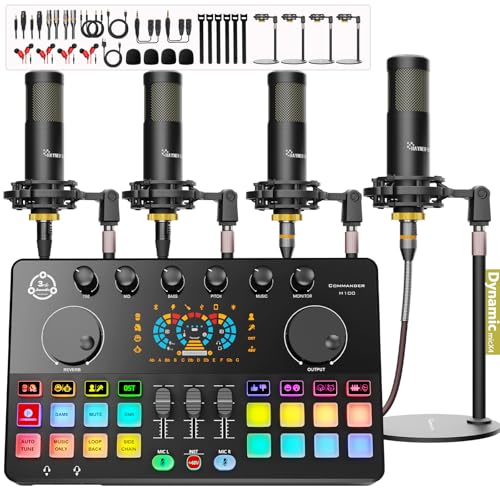
If you’re looking to start a podcast with friends or colleagues, the Podcast Equipment Bundle for 4 is an excellent choice. This all-encompassing package includes the COMMANDER M100 audio interface, four dynamic microphones, and all the necessary accessories for a smooth setup. You’ll enjoy crystal-clear audio quality thanks to noise isolation technology and advanced features like real-time monitoring. The plug-and-play design makes it user-friendly, compatible with various devices like Windows and iOS. Plus, you can add fun sound effects to your recordings. With a solid customer rating of 4.2 stars, it’s a reliable investment for any podcasting endeavor.
Best For: Anyone looking to start a podcast with friends or colleagues who need a comprehensive and user-friendly equipment bundle.
Pros:
- Easy plug-and-play setup with no specialized software required, making it accessible for beginners.
- High audio quality with noise isolation technology and customizable sound effects to enhance recordings.
- Comes with all necessary accessories, including microphones, stands, and cables, providing a complete solution for podcasting.
Cons:
- The weight of the bundle (11.33 pounds) may make it less portable for on-the-go recording.
- Limited to four users, which may not be suitable for larger podcasting teams.
- Customer rating of 4.2 out of 5 suggests some users may have experienced minor issues or dissatisfaction.
NearStream Audio Interface with Pro Preamp and Dual Inputs

Ideal for content creators aiming for exceptional sound quality, the NearStream Audio Interface (AMIX40U) stands out with its professional-grade preamps and dual XLR/6.35mm combo inputs. You’ll appreciate the versatility it brings, supporting Bluetooth, AUX, and USB for playback. With ultra-low-noise preamps, you can adjust gain and enjoy three tone profiles along with noise reduction. The 2-inch HD LCD screen keeps you informed, while intuitive controls let you easily tweak your sound. Its compact design guarantees portability, making it perfect for any recording space. Just remember, it requires an external power source to operate.
Best For: Content creators seeking high-quality audio solutions for streaming, podcasting, and music production.
Pros:
- High-quality sound: Ultra-low-noise preamps and adjustable gain ensure professional audio quality.
- Versatile connectivity: Supports multiple input options including Bluetooth, AUX, and USB for playback with dual combo inputs.
- User-friendly interface: Intuitive controls and a 2-inch HD LCD screen make adjustments easy and efficient.
Cons:
- Requires external power source: The device does not have a built-in power supply, which may limit portability.
- Compact design may limit some features: While portable, the size might restrict certain advanced functions compared to larger interfaces.
- Accessories not included: Users need to purchase additional equipment for optimal use, such as external power sources or specific cables.
Shure MVX2U XLR-to-USB Interface with Headphone Jack

The Shure MVX2U XLR-to-USB Interface stands out with its built-in headphone jack and zero-latency monitoring, making it perfect for podcasters who need real-time audio feedback. With up to 60dB of clean gain and 48V phantom power, it supports various microphones, from dynamic models like the SM7B to sensitive condensers. Its compact design saves space, while dual mounting options let you customize your setup. Plus, the included USB-C cable guarantees compatibility with both Mac and Windows systems. The ShurePlus app enhances your experience, making the MVX2U an excellent choice for achieving crystal-clear sound quality in your podcasting journey.
Best For: The Shure MVX2U XLR-to-USB Interface is best for podcasters and content creators seeking high-quality audio with real-time monitoring capabilities.
Pros:
- Built-in headphone jack allows for real-time audio monitoring without latency.
- Supports a wide range of microphones with up to 60dB gain and 48V phantom power.
- Compact and flexible design offers dual mounting options for customized setups.
Cons:
- Limited to USB connectivity, which may not be suitable for all users.
- Requires a compatible app for enhanced features, which could complicate setup for some.
- Price point may be higher compared to basic audio interfaces on the market.
Factors to Consider When Choosing Podcast Audio Interfaces
When choosing a podcast audio interface, you need to evaluate several key factors. Sound quality, connectivity options, and input-output flexibility can make or break your setup. Plus, a user-friendly design and included software can enhance your overall podcasting experience.
Sound Quality Importance
Sound quality plays an essential role in podcasting because it influences how engaged your listeners will be. To achieve professional-sounding audio, you’ll want an audio interface with a dynamic range up to 120dB, ensuring clear capture of every nuance. High-performance converters that support up to 24-bit/192kHz resolution help retain sonic qualities, making your recordings more appealing. Look for features like low-noise preamps and noise reduction technology to minimize unwanted sounds, keeping your audio clean. Adjustable gain controls allow you to optimize levels for different microphones, enhancing clarity and reducing distortion. Finally, zero-latency monitoring is vital; it lets you hear your audio in real-time, ensuring a seamless recording experience that keeps your content engaging and polished.
Connectivity Options Available
Choosing the right connectivity options for your podcast audio interface can considerably impact your recording experience. Look for interfaces with dual XLR inputs, which are essential for accommodating multiple microphones, especially when you have co-hosts or guests. USB-C connectivity is also vital, as it offers faster data transfer and compatibility with modern devices. Consider options that include additional input types like 3.5mm and Bluetooth, allowing you to connect various audio sources and playback devices. Zero-latency monitoring is a great feature, providing real-time audio feedback without delay during recordings. Finally, opt for plug-and-play functionality to simplify the setup process, ensuring seamless compatibility with both Mac and Windows systems without extensive installation hassles.
Input and Output Flexibility
While selecting a podcast audio interface, input and output flexibility plays an essential role in guaranteeing a smooth recording experience. First, consider the number and types of inputs available, like XLR, line, and instrument inputs, to accommodate various microphones and instruments. Look for interfaces that support phantom power, vital for condenser microphones needing extra voltage. Additionally, verify the interface offers multiple output options, such as headphone and balanced outputs, for real-time monitoring and connecting to external devices. Evaluate connectivity options like USB-C, AUX, and Bluetooth for compatibility with your gear. Finally, features like zero-latency monitoring allow you to hear your audio input in real-time, enhancing your overall recording experience.
User Interface Design
When selecting a podcast audio interface, the design of the user interface can greatly impact your recording experience. A user-friendly interface allows for intuitive navigation, making it easier to adjust settings on-the-fly during recordings or live streams. Look for clear labeling of input and output options, which enhances usability and helps you quickly identify and manipulate necessary features without confusion. An HD display or visual feedback on audio levels aids in real-time monitoring, allowing you to manage sound quality effectively. Well-placed knobs and buttons for volume control and gain adjustment promote efficient access, especially during fast-paced sessions. Additionally, compact designs contribute to portability, making it easier to set up in various environments without creating clutter.
Included Software Packages
Selecting the right audio interface for your podcast involves considering the included software packages, as they can greatly enhance your production capabilities. Many audio interfaces come bundled with popular digital audio workstations (DAWs) like Pro Tools Intro+ and Ableton Live Lite, which are essential for recording and editing. You’ll also find additional software that offers tools for audio enhancement, such as effects, virtual instruments, and mastering tools, helping you achieve a professional sound. Some interfaces even include specialized software designed to streamline podcast production with features like sound effects and voice modulation. Be certain to check compatibility with your operating system and hardware to guarantee a smooth integration into your workflow, saving you from extra expenses down the line.