Choosing studio monitors with room correction can make a bigger difference than upgrading to a larger speaker. In untreated rooms, even great monitors can sound misleading, which slows down mixing and mastering decisions.
This roundup focuses on options that help you hear a more accurate picture of your work, whether you want built-in calibration, a room-correction system, or a monitor pair that benefits from external correction.
Best 10 Studio Monitors with Room Correction Picks for 2026
Compact ARC-Corrected Pair
IK Multimedia iLoud MTM MKII Pair

- Built-in ARC room correction
- 36 Hz to 32 kHz frequency range
- ARC X monitor emulation
Best For: Compact studios needing correction and emulation
Wide-Dispersion Reference
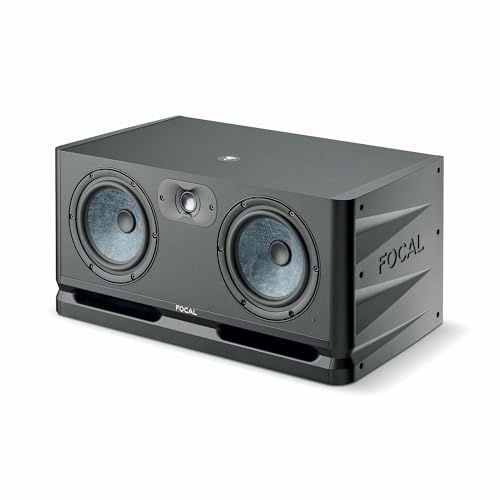
- Wide dispersion for consistent sound
- Neutral Slatefiber cone design
- Up to 3 audio sources
Best For: Mixers wanting a neutral reference monitor
Stand-Alone Room Correction

- Dedicated correction processor
- Includes measurement mic and software
- Adds monitor emulation
Best For: Studios upgrading room correction without new monitors
Classic Nearfield Pair

- Pure, uncolored monitoring
- 5-inch nearfield design
- XLR and TRS inputs
Best For: Producers wanting a trusted neutral monitor
Reference-Grade MTM
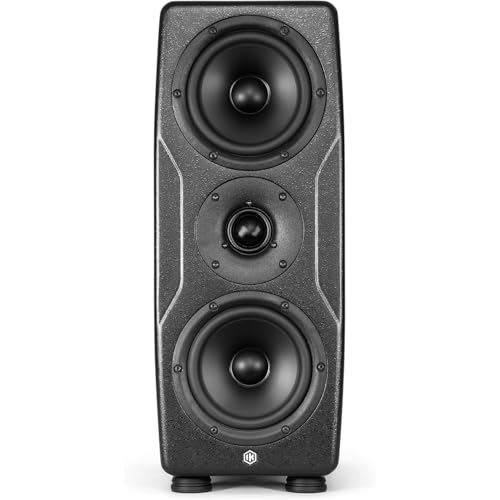
- ARC X auto-calibration with included mic
- Linear-phase MTM design for accurate imaging
- DSP voicing and LF/HF tuning options
Best For: Mixing and mastering with room correction
Compact Tuning Control

- Room tuning via knobs and ConneX app
- 3-way active crossover for detailed playback
- XLR, TRS, RCA, AUX, and Bluetooth 6.0
Best For: Desktop and home studio setups
Classic Big-Driver Pair

- 8-inch bi-amped studio monitor pair
- 38Hz–30kHz frequency response
- XLR input for traditional studio setups
Best For: Studio recording without built-in room correction
Room-Tuning Reference
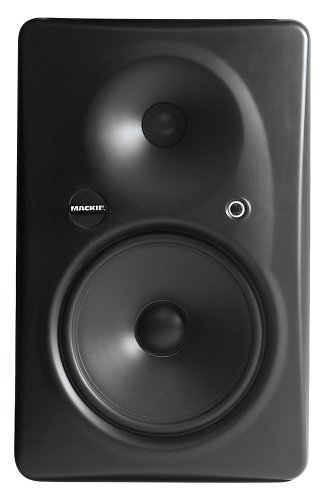
- Acoustic Space Control helps adapt to the room
- 8.75-inch LF driver for full-range monitoring
- Designed for stereo and surround applications
Best For: Mixers who want a full-range monitor with built-in room adjustment
Bass-Ready Bundle

- HF and LF shelving EQ for room adjustment
- 35Hz-22kHz response with 8.5-inch woofer
- Includes isolation pads and balanced XLR cables
Best For: Bass-heavy producers who want room-tuning flexibility and bundled accessories
THX Reference Pick

- Rear-panel Acoustic Space, LF roll-off, and HF adjust
- THX pm3 certified for critical listening
- XLR, TRS, and RCA inputs for flexible setup
Best For: Engineers who want a compact reference monitor with room-tuning controls
Compact ARC-Corrected Pair – IK Multimedia iLoud MTM MKII Pair
If you want studio monitors with room correction in a compact format, the IK Multimedia iLoud MTM MKII pair is built for critical listening, mixing, and production. The built-in ARC room correction workflow is designed to help optimize sound in different rooms, while the linear-phase time alignment and wide frequency response support detailed, accurate monitoring.
Best For: Home and project studios that need compact monitors with built-in room correction and translation-focused monitoring.
Pros:
- Built-in ARC room correction helps compensate for room and placement issues.
- Ultra-flat 36 Hz to 32 kHz response supports detailed bass, mids, and highs.
- Time alignment aims to reduce phase distortion and listening fatigue.
- ARC X software adds monitor emulation for checking mixes on different references.
Cons:
- ARC mic is noted as sold separately in the product details.
- 3.5-inch speaker size may feel small for users wanting more physical low-end output.
Overall, this is a strong choice if room correction is a priority and you want a flexible monitoring setup with emulation tools for mix checking. The compact size and mounting options make it especially practical for smaller workspaces.
Wide-Dispersion Reference – Focal Alpha Twin EVO
The Focal Alpha Twin EVO is a solid pick if you are comparing studio monitors with room correction needs, but prefer a monitor built around accuracy rather than onboard calibration. Its wide dispersion, neutral Slatefiber cone design, and consistent tonal balance at low and high volumes make it a practical nearfield monitor for studio work.
Best For: Mixers and producers who want a neutral, wide-dispersion monitor without relying on built-in room correction.
Pros:
- Wide dispersion helps keep sound consistent across the room.
- Slatefiber cone is designed for neutrality and low distortion.
- Identical tonal balance at both low and high volume supports reliable decisions.
- Multiple input options let you connect up to 3 audio sources.
Cons:
- Does not include built-in room correction or calibration features.
- Large 6.5-inch design may be more than some small desks can comfortably handle.
This model makes sense if you want a straightforward reference monitor and plan to handle room issues through placement or external treatment. It is especially appealing for users who value even coverage and a neutral sound signature.
Stand-Alone Room Correction – IK Multimedia ARC Studio
For buyers focused on studio monitors with room correction, the IK Multimedia ARC Studio is the most specialized option here because it is a dedicated correction system rather than a speaker. It includes a high-precision measurement microphone, calibration software, and a stand-alone processor to improve frequency balance, stereo imaging, and monitor emulation in a studio or listening space.
Best For: Studio owners who want a dedicated room correction processor for accurate monitoring and monitor emulation.
Pros:
- Includes measurement mic, software, and a correction processor.
- Designed to improve frequency balance and stereo imaging.
- Monitor emulation helps check mixes against different reference systems.
- Set-it-and-forget-it approach reduces the need for constant adjustment.
Cons:
- Not a monitor pair, so it must be used with existing studio monitors.
- Requires setup and calibration rather than offering instant sound on its own.
If your main goal is room optimization rather than buying new speakers, ARC Studio is a focused solution. It is best suited to users who already have monitors and want a more controlled, repeatable listening environment.
Classic Nearfield Pair – Yamaha HS5 Pair
The Yamaha HS5 pair is a classic nearfield option for studio monitoring, but it does not include built-in room correction. Its selling point is sonic purity and an uncolored presentation, which makes it useful if you want a straightforward baseline for mixing and production in a properly managed room.
Best For: Producers who want an honest nearfield monitor and are handling room correction separately.
Pros:
- Designed to emphasize sonic purity without coloration.
- 5-inch woofer and 1-inch dome tweeter suit nearfield use.
- Bi-amped design with 70 watts total power.
- XLR and TRS inputs support balanced or unbalanced signals.
Cons:
- No built-in room correction or calibration system.
- 5-inch size may offer limited low-end compared with larger monitors.
This pair is best if you want a trusted studio standard and plan to address acoustics with placement, treatment, or external correction. It remains a practical choice for users who prefer a direct, uncompromising monitoring sound.
Reference-Grade MTM – iLoud Precision MTM MKII
If you want studio monitors with room correction for serious mixing or mastering, the iLoud Precision MTM MKII is built around accuracy first. Its ARC X system can auto-calibrate to the room in seconds, while the MTM layout and linear-phase design aim to keep imaging tight and translation reliable across playback systems.
Best For: Mixing, mastering, and immersive audio setups where room calibration and precise imaging matter.
Pros:
- ARC X auto room calibration with included microphone for fast setup
- Linear-phase response and symmetrical MTM design for strong imaging and phase coherence
- Reference-grade response with detailed DSP controls, including LF/HF tuning and low-end options
- High output capacity suited to demanding professional monitoring
Cons:
- Single monitor listing, so stereo use requires buying a second unit
- More feature-rich than a basic nearfield speaker, so setup may take more time
The MKII is clearly aimed at users who need calibration, precision, and flexible voicing tools rather than a simple plug-and-play speaker. If your priority is dependable translation in a treated or untreated room, it stands out as a capable reference monitor.
Compact Tuning Control – Edifier MR5
The Edifier MR5 is a practical choice if you want studio monitors with room correction in a compact, flexible package. It uses rear tone controls plus the EDIFIER ConneX app for room compensation, making it easier to adapt the sound to your desk, room size, or listening position without complicated setup.
Best For: Home studios, desktop setups, and users who want app-based room compensation with multiple inputs.
Pros:
- Room acoustic tuning via physical knobs and the EDIFIER ConneX app
- 3-way active crossover with woofer, mid driver, and silk dome tweeter for detailed sound
- Wide connectivity including XLR, TRS, RCA, AUX, and Bluetooth 6.0
- Compact powered design with front-panel volume and headphone output
Cons:
- Room compensation is manual/app-based rather than full automatic calibration
- Designed as a bookshelf-style monitor, so it may not suit larger studio spaces
For buyers who want more control over room tuning without moving up to a larger pro monitor, the MR5 hits a useful middle ground. It combines studio-oriented connectivity and adjustment tools with a straightforward desktop-friendly form factor.
Classic Big-Driver Pair – Yamaha HS8
The Yamaha HS8 is a well-known studio monitor pair for buyers who want a straightforward reference sound rather than built-in room correction. With an 8-inch woofer, bi-amp power, and a broad frequency range, it offers the kind of nearfield detail many engineers use for studio recording and critical listening.
Best For: Studio recording and larger nearfield setups where a powerful, familiar reference monitor is preferred.
Pros:
- 8-inch woofer and bi-amp design for strong output and low-end reach
- Wide 38Hz–30kHz frequency response for monitoring detail
- Sold as a pair, making it a ready-to-use stereo setup
- XLR connectivity keeps the signal path focused on studio use
Cons:
- No room correction or automatic calibration features
- Large size may be too much for smaller desks or untreated rooms
If your priority is a dependable studio staple and you do not need built-in correction, the HS8 remains an easy monitor to understand and deploy. It is best treated as a traditional reference speaker pair that may benefit from external room treatment or calibration tools.
Room-Tuning Reference – Mackie HR824mk2 8" 2-Way
If you want studio monitors with room correction features built into the speaker itself, the Mackie HR824mk2 is a strong option. Its Acoustic Space Control is designed to adapt the monitor to different rooms, while the large 8.75-inch low-frequency driver and optimized waveguide aim for accurate, natural playback.
Best For: Mixing engineers and home-studio owners who need a full-range monitor with built-in room adjustment and strong clarity for stereo or surround work.
Pros:
- Acoustic Space Control helps adapt the monitor to the room.
- Zero Edge baffle and optimized waveguide are designed for more accurate imaging.
- Large 8.75-inch LF driver supports full-range monitoring.
- Useful for both stereo and surround 5.1/7.1 applications.
Cons:
- Sold as a single monitor, so you need two for a stereo pair.
- Large and heavy cabinet may not suit small desks.
- No wireless connectivity.
This is a practical pick if your priority is a monitor with built-in room adaptation rather than external correction gear. It focuses on accuracy, clarity, and room adjustability in a traditional powered studio-monitor design.
Bass-Ready Bundle – Adam Audio T8V Pair Kit
The Adam Audio T8V bundle is a useful pick if you want studio monitors with room correction-style flexibility in the speaker itself. The rear-panel HF and LF shelving EQ lets you trim the response for your room, and the included isolation pads help reduce desk-borne bass buildup that can cloud the low end.
Best For: Producers working on bass-heavy music in larger rooms who want an affordable monitor bundle with room-tuning controls and setup accessories included.
Pros:
- HF and LF shelving EQ provides room-adjustment flexibility.
- 8.5-inch woofer and 35Hz-22kHz response suit bass-focused production.
- ART ribbon tweeter with HPS waveguide supports accurate imaging.
- Bundle includes isolation pads and XLR cables for easier setup.
Cons:
- Designed for larger mix rooms rather than tiny desktop setups.
- No built-in wireless features.
- Lowest-rated power output in the supplied notes is relatively modest.
For producers who need low-end extension and practical room-tuning controls, this bundle makes a lot of sense. The included accessories also help you get closer to a clean monitoring setup without buying extras separately.
THX Reference Pick – Mackie HR624mk2 6.7" Monitor
If you’re comparing studio monitors with room correction options, the Mackie HR624mk2 stands out for its rear-panel Acoustic Space, LF roll-off, and HF adjust switches. Those controls make it easier to tailor the monitor to your room, while the THX pm3 certification and ultra-linear response aim for reliable mix translation.
Best For: Critical listening, mixing, and mastering in small to mid-sized rooms where adjustable monitor voicing matters.
Pros:
- Rear-panel Acoustic Space, LF roll-off, and HF adjust help match the room.
- THX pm3 certification adds confidence for critical monitoring.
- Bi-amped design with 100W LF and 40W HF amplification.
- XLR, 1/4-inch TRS, and RCA inputs offer flexible connectivity.
Cons:
- Sold individually, so a stereo pair requires two units.
- 6.7-inch woofer is smaller than the other options here.
- Not a wireless monitor.
This monitor is a sensible choice if you care more about trustworthy translation and room tailoring than sheer low-end size. Its control options and THX certification make it especially appealing for disciplined reference listening.
How We Picked the Best Studio Monitors with Room Correction
We looked for monitors and correction tools that help reduce the impact of room modes, reflections, and placement issues. Priority went to systems with proven calibration features, strong reference performance, useful low-end control, and practical setups for project studios, home studios, and nearfield mixing.
Quick Comparison
Some options are all-in-one monitors with built-in correction, while others are traditional nearfield speakers that pair well with external calibration. If you want the simplest path, choose a monitor with onboard correction. If you already own monitors, a dedicated correction system may be the smarter upgrade.
Key Buying Factors for Studio Monitors with Room Correction
Correction Method
Check whether correction is built into the speaker, handled by software, or performed by an external hardware/software system. Built-in systems are convenient; external solutions may offer more flexibility across multiple monitors.
Room Size and Listening Distance
Smaller rooms usually benefit from compact nearfield models, while larger spaces can take advantage of bigger drivers and higher output. Match the monitor size to your desk, distance, and room volume so the correction system has less work to do.
Frequency Balance and Low-End Control
Room correction should improve translation, not just make bass louder or flatter on paper. Look for monitors that stay controlled through the low end and maintain clear mids, since that is where most mix decisions happen.
Setup and Workflow
Simple calibration can save time if you move speakers often or work in a multipurpose room. If you prefer a fixed studio setup, more advanced software-based correction can offer finer control and better tuning.
Who Should Buy Which Studio Monitors with Room Correction?
If you want the easiest plug-and-play path, go with an all-in-one monitor that includes room correction. If you already have solid speakers and need better accuracy, a dedicated correction system can be the best value. If you mix in a treated room and want traditional reference sound, a standard monitor pair may still be the right choice, especially when paired with external calibration later.
For most buyers, the best choice comes down to your room first, then your monitor size, and finally your correction workflow. That order will help you choose Studio Monitors with Room Correction that actually improve decisions instead of just adding features.