If you’re looking to enhance your podcasting experience, choosing the right USB audio mixer can make all the difference. These mixers offer features that improve sound quality and provide flexibility for your recordings. From zero-latency monitoring to built-in phantom power, the options are plentiful. But how do you find the best fit for your needs? Let’s explore some top picks that could elevate your sound quality considerably.
M-AUDIO M-Track Duo USB Audio Interface for Recording and Streaming

If you’re looking for a reliable USB audio interface that excels in podcasting, the M-AUDIO M-Track Duo is an excellent choice. With dual XLR, line, and DI inputs, it offers versatility for various audio sources, whether you’re recording vocals or instruments. You’ll enjoy high-quality recordings with 48kHz audio resolution and transparent Crystal Preamps that enhance sound from any mic, including condensers. Plus, the zero-latency monitoring feature lets you hear audio in real-time, ensuring a smooth recording experience. The included MPC Beats Software also provides essential tools for editing and music creation, making it a complete package for your podcasting needs.
Best For: The M-AUDIO M-Track Duo is best for podcasters, musicians, and content creators who require a versatile and high-quality audio interface for recording and streaming.
Pros:
- High-quality 48kHz audio resolution with transparent Crystal Preamps for optimal sound.
- Dual combo XLR/Line/Instrument inputs with phantom power for versatile recording options.
- Zero-latency monitoring feature allows for real-time audio feedback during recordings.
Cons:
- Limited number of inputs (only two), which may not suffice for larger setups.
- The included software, MPC Beats, may require a learning curve for beginners.
- Lacks advanced features found in more expensive audio interfaces, such as MIDI connectivity.
M-AUDIO M-Track Solo USB Audio Interface for Recording and Streaming

The M-AUDIO M-Track Solo USB Audio Interface stands out as an ideal choice for podcasters and streamers seeking high-quality sound without breaking the bank. With its 48kHz audio resolution, it guarantees your recordings are crisp and clear. You’ll appreciate the versatile input options, including a combo XLR/Line input with phantom power and a dedicated Line/Instrument input for guitars. Plus, the zero-latency monitoring feature lets you hear yourself in real-time. The transparent Crystal Preamp optimizes sound quality for all microphones, and the included MPC Beats Software enhances your production capabilities. Elevate your podcasting experience with this reliable interface.
Best For: The M-AUDIO M-Track Solo USB Audio Interface is best for podcasters and streamers looking for a cost-effective solution to achieve professional-quality sound.
Pros:
- High audio resolution at 48kHz for clear and crisp recordings.
- Versatile input options with a combo XLR/Line input and a dedicated Line/Instrument input for different audio sources.
- Zero-latency monitoring allows for real-time audio feedback, enhancing recording experience.
Cons:
- Limited to one XLR input, which may not be sufficient for multi-microphone setups.
- Lacks advanced features found in higher-end audio interfaces.
- May require additional software knowledge to fully utilize the bundled MPC Beats Software.
FIFINE Gaming Audio Mixer with XLR Microphone Interface

Looking for an audio mixer that elevates your podcasting or streaming game? The FIFINE Gaming Audio Mixer with XLR microphone interface is a fantastic choice. It features built-in 48V phantom power for condenser mics, individual channel control, and a smooth volume fader. Need to mute background noise? The front mute button makes it easy. Plus, you can customize your sound with four pre-recorded buttons, six voice-changing modes, and vibrant RGB lighting to enhance your setup. With plug-and-play compatibility for both Mac and Windows, this mixer is all you need to boost your audio quality effortlessly.
Best For: Streamers and podcasters looking for an all-in-one audio mixer to enhance their sound quality and customization options.
Pros:
- Individual channel control allows for precise audio adjustments tailored to specific needs.
- Built-in sound effects and voice modulation features add fun and creativity to broadcasts.
- Plug-and-play compatibility with both Mac and Windows makes setup simple and user-friendly.
Cons:
- XLR cable not included, requiring an additional purchase for full functionality.
- Limited compatibility with USB microphones may restrict options for some users.
- RGB lighting may not appeal to everyone and could be seen as unnecessary for professional setups.
MAONO Gaming Audio Mixer (MaonoCaster G1 NEO)

For gamers and streamers seeking a powerful audio solution, the MAONO Gaming Audio Mixer (MaonoCaster G1 NEO) stands out with its built-in pro-preamp and 48V phantom power, optimizing XLR microphone performance for high-quality sound. This compact mixer features one-click noise reduction for crystal-clear communication during live streams. You’ll enjoy voice-changing options and custom sound pads to engage your audience creatively. Plus, the intuitive interface keeps distractions at bay, letting you focus on your content. With Bluetooth compatibility and seamless integration with platforms like OBS and Twitch, the MaonoCaster G1 NEO is essential for elevating your streaming experience.
Best For: Gamers and streamers looking for a versatile audio mixer to enhance their live streaming and content creation experience.
Pros:
- Built-in pro-preamp and 48V phantom power for high-quality audio performance.
- One-click noise reduction feature ensures clear communication during live streams.
- User-friendly interface with voice-changing options and customizable sound pads for creative engagement.
Cons:
- Not compatible with USB microphones or Xbox devices.
- Limited to XLR microphone support, which may require additional investment for some users.
- May require a learning curve for users unfamiliar with audio mixing equipment.
FIFINE PC Audio Mixer for Recording Music

Designed with versatility in mind, the FIFINE PC Audio Mixer shines for podcasters and musicians alike. It features a USB interface with an XLR microphone input and a dedicated instrument input, perfect for capturing studio-grade vocals and rich guitar tones. With 48V phantom power, you can easily connect condenser microphones. The direct monitor functionality allows for real-time sound control, while dedicated knobs guarantee precise volume adjustments. Plus, it’s compatible with both Mac and PC, making setup a breeze. Whether you’re recording music or podcasting, this mixer elevates your sound quality effortlessly.
Best For: Podcasters and musicians looking for a versatile audio mixer to enhance their recording quality.
Pros:
- Improved sound quality with studio-grade XLR microphone and dedicated instrument inputs.
- 48V phantom power supports a wide range of condenser microphones.
- Plug-and-play functionality ensures easy setup on both Mac and PC.
Cons:
- Limited to one XLR microphone input, which may be restrictive for larger setups.
- Some users may find the monitoring features basic compared to more advanced mixers.
- Non-portable design may not suit users needing a compact solution for on-the-go recording.
Aveek Professional Audio Mixer for Recording and Live Streaming

The Aveek Professional Audio Mixer stands out as an ideal choice for podcasters and live streamers who need versatile connectivity options. With three XLR inputs for microphones or guitars and various stereo inputs, you can easily connect your favorite devices. Its built-in recording chip allows for seamless plug-and-play recording via USB-B, plus you can play and record MP3s directly from a USB drive. Enjoy enhanced audio with 48V phantom power, onboard EQ controls, and effects like delay and echo. The package includes everything you need, and with a satisfaction guarantee, you can start mixing confidently.
Best For: Podcasters and live streamers seeking a versatile audio mixing solution with multiple connectivity options.
Pros:
- Versatile connectivity with multiple XLR and stereo inputs for various devices.
- Built-in recording chip for easy plug-and-play recording via USB-B and USB drive playback.
- Enhanced audio features including 48V phantom power, onboard EQ, and effects like delay and echo.
Cons:
- Bluetooth, USB, and 4/5 channel functions cannot be used simultaneously, limiting some features.
- Potential reconnection issues with Bluetooth streaming after disruptions.
- Limited range for Bluetooth connectivity, requiring devices to be within 15ft.
MAONO Podcast Equipment Bundle: Audio Interface Mixer (MaonoCaster E2 Gen2)

If you’re a podcaster looking for an all-in-one solution, the MAONO Podcast Equipment Bundle (MaonoCaster E2 Gen2) stands out with its dual XLR inputs, perfect for hosting interviews or co-hosting sessions. You’ll enjoy crystal-clear audio thanks to low-noise preamps delivering up to 60dB gain. The eight customizable sound effect buttons let you engage your audience creatively, while the one-touch mute button helps you manage any recording hiccups effortlessly. Plus, its loopback function simplifies live streaming. With easy connections to computers and smartphones, this bundle is designed for hassle-free setup and powerful podcasting capabilities.
Best For: Podcasters and streamers seeking a comprehensive audio solution for high-quality recordings and live streaming.
Pros:
- High-quality preamps with 60dB gain ensure crystal-clear audio for dynamic microphones.
- Customizable sound effect buttons enhance audience engagement and creativity during podcasts.
- Compact design with built-in battery allows for up to 8 hours of use, facilitating portability.
Cons:
- Limited to audio recording and mixing; does not support phone charging or power delivery.
- Some users may find the learning curve steeper for utilizing all features effectively.
- The loopback function may require additional software setup for optimal performance.
4 Channel Audio Mixer Board for PC and DJ Mixing
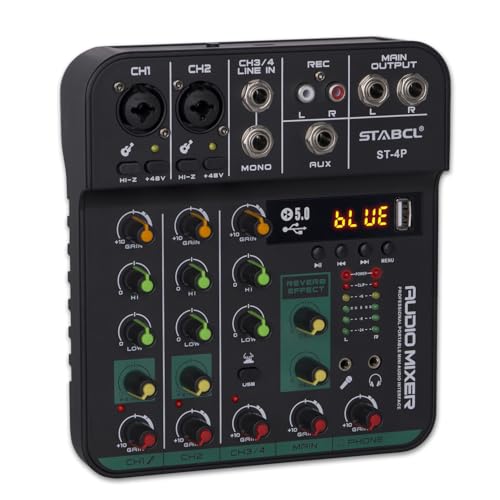
For podcasters and DJs seeking a reliable solution, the 4 Channel Audio Mixer Board stands out with its versatile connectivity options and built-in Bluetooth capabilities. With two XLR jack inputs and a 48V power supply, you’ll have everything you need for professional sound. The stereo 6.35mm jack and auxiliary output let you connect to various devices effortlessly. Plus, the onboard echo and delay effects enhance your audio quality. Its compact design makes it easy to transport, and the 24-hour customer support guarantees you’re covered. Elevate your podcasting or DJ mixing experience with this powerful audio mixer today!
Best For: Podcasters and DJs looking for a compact and versatile audio mixing solution with professional features.
Pros:
- Versatile Connectivity: Multiple input options including XLR, stereo jack, and Bluetooth for seamless device integration.
- Sound Control Features: Equipped with echo, delay effects, and equalization adjustments for enhanced audio quality.
- Compact and Portable Design: Easy to transport, making it suitable for use in various settings like live broadcasts and small performances.
Cons:
- Limited Channels: Only four channels may not be sufficient for larger setups or bands.
- Power Dependency: Requires a 5V power supply, which may limit mobility in outdoor settings.
- Learning Curve: New users may need time to familiarize themselves with the controls and effects for optimal use.
FIFINE Gaming Equipment Bundle with Dynamic XLR/USB Microphone Set

Looking for an all-in-one solution for your podcasting and streaming needs? The FIFINE Gaming Equipment Bundle with the AmpliGame KS5 microphone set delivers exceptional performance with its dynamic XLR/USB mic and versatile audio mixer. Weighing just 3.25 pounds, it’s easy to set up and use. Enjoy features like individual mute control, headphone monitoring, and RGB lighting to enhance your streaming experience. It’s compatible with various devices, making it perfect for gaming, podcasting, or video vocals. With a solid 4.5-star rating, it’s a reliable choice to elevate your sound quality today!
Best For: Gamers, podcasters, and streamers seeking a high-quality microphone and audio mixer bundle to enhance their audio experience.
Pros:
- Versatile Functionality: Supports both XLR and USB connections, making it suitable for various devices and uses.
- User-Friendly Features: Includes individual mute control, headphone monitoring, and a gain knob for easy audio adjustments.
- Aesthetic Appeal: RGB lighting with multiple effects enhances the visual experience and adds flair to your setup.
Cons:
- Weight: At 3.25 pounds, it may be heavier than some other portable microphone options.
- Limited Warranty Information: Warranty details are not clearly stated, potentially leaving users with unanswered questions.
- Learning Curve: Beginners may need time to adjust to the mixer’s features for optimal use.
Professional 4-Channel DJ Audio Mixer with Bluetooth for Karaoke and Live Streaming

The Professional 4-Channel DJ Audio Mixer stands out as an exceptional choice for podcasters, karaoke enthusiasts, and live streamers alike, thanks to its integrated Bluetooth technology. You’ll love the USB MP3 input and 48V phantom power, which enhance your sound quality. With universal compatibility, it connects effortlessly to various devices, including iPads and laptops. The ultra-low noise design and 3-channel equalizer guarantee professional audio clarity. Its compact size makes it perfect for mobile setups, whether for live shows, church activities, or ZOOM meetings. Plus, a dedicated support team is ready to help you achieve the best audio experience.
Best For: The Professional 4-Channel DJ Audio Mixer is best for podcasters, karaoke enthusiasts, and live streamers seeking high-quality audio performance and versatility.
Pros:
- Versatile Connectivity: Supports USB, Bluetooth, and various audio inputs for flexible use with multiple devices.
- Compact Design: Easily portable, making it ideal for mobile setups and on-the-go applications.
- Professional Sound Quality: Features ultra-low noise design and 3-channel equalizer for clear and balanced audio output.
Cons:
- Limited Channels: Only 4 channels may not be sufficient for larger setups or more extensive audio needs.
- Learning Curve: Some users may find the controls and features complex initially.
- Price Point: As a professional-grade mixer, it may be more expensive than basic mixers available on the market.
Factors to Consider When Choosing USB Audio Mixers for Podcasting
When choosing a USB audio mixer for your podcast, you’ll want to take into account several key factors. Think about the input channel options, audio quality, and available monitoring features to guarantee a smooth recording experience. Additionally, check compatibility with your devices and any effects or customization options that can enhance your sound.
Input Channel Options
Choosing the right input channel options is essential for creating a successful podcast, as they directly impact how many audio sources you can connect at once. Look for USB audio mixers that offer a mix of XLR and line inputs, giving you the flexibility to connect various microphones and instruments. If you plan to use condenser mics, choose a mixer that provides phantom power for those XLR inputs. Individual control and monitoring for each channel can greatly enhance your ability to manage audio levels during recordings. Also, consider mixers with dedicated inputs for instruments and extra line inputs to broaden your creative possibilities, allowing for diverse setups that can elevate your podcast’s sound quality.
Audio Quality Specifications
To achieve the best audio quality for your podcast, you need to pay attention to the specifications of your USB audio mixer. Look for mixers that deliver audio resolutions of at least 48kHz. This guarantees high-quality recordings that capture every detail. Transparent preamps are also essential, as they optimize sound quality for various microphone types, including condenser mics. Zero latency monitoring capabilities let you hear real-time audio feedback, enhancing your recording sessions. Built-in noise reduction technology can minimize unwanted sounds, boosting clarity. Finally, consider mixers with customizable sound effects and controls; these features can greatly elevate your listener’s experience, making your podcast more engaging and professional. Choose wisely to enhance your sound quality!
Monitoring Features Availability
Achieving high-quality audio sets the stage for an effective podcast, but monitoring features can make a significant difference in your recording experience. Look for USB audio mixers that provide real-time audio feedback, vital for maintaining sound quality. Headphone outputs and direct monitoring capabilities are essential, helping to minimize latency during recording sessions. Zero-latency monitoring options allow you to hear your voice without delay, enhancing both your performance and communication clarity. Additionally, mixers with multiple output options, like RCA or 1/4-inch outputs, give you the flexibility to connect to various monitoring systems. Built-in monitoring controls are also beneficial, enabling you to adjust headphone volume levels independently from the main mix, ensuring you always hear exactly what you need while recording.
Compatibility With Devices
When you’re diving into podcasting, ensuring your USB audio mixer works seamlessly with your devices is essential for a smooth recording experience. First, check that the mixer is compatible with both Mac and PC systems, so you can easily integrate it into your setup. It’s also vital to confirm compatibility with popular recording software like OBS, Streamlabs, and Zoom for hassle-free streaming and editing. Bluetooth connectivity can enhance your flexibility by allowing wireless streaming from mobile devices. Additionally, consider the number of input options available, such as XLR and line inputs, to accommodate multiple microphones and instruments. Finally, look for mixers with USB-C connections for faster data transfer and improved audio quality with modern devices.
Effects and Customization
While selecting a USB audio mixer for your podcast, consider how effects and customization options can elevate your show’s production value. Many mixers offer customizable sound effects, letting you enhance your content with audio elements tailored to your style. Look for mixers with programmable sound effect buttons that can record up to 20 seconds, allowing for unique audio tags or shifts. Voice modulation features like pitch changing and reverb can inject creativity and personality into your podcast, making it more engaging for listeners. Some mixers come with pre-recorded sound effects and customizable options, enabling you to effortlessly add dynamic elements during recordings. Built-in echo and delay effects can also enhance your audio mixing experience, resulting in a polished final product.
Phantom Power Support
Phantom power is an important feature to contemplate when choosing a USB audio mixer for podcasting, especially if you plan to use condenser microphones. These microphones require 48V to operate effectively, delivering high-quality sound that enhances your podcast. Many USB audio mixers offer phantom power options, ensuring compatibility with a range of professional mics and greatly improving audio clarity. When selecting your mixer, check for independent phantom power switches for each channel, allowing you to use condenser mics selectively. Some mixers even come with built-in phantom power, simplifying your setup by eliminating the need for external power sources. With phantom power support, you’ll elevate your recording quality, making it an essential feature for aspiring podcasters aiming for professional-grade sound.
User-Friendly Interface
Choosing a USB audio mixer with a user-friendly interface can make all the difference in your podcasting experience. Look for intuitive controls like volume faders, mute buttons, and monitoring knobs that let you adjust settings easily during live recordings. Clear labeling of inputs and outputs helps you quickly identify channels for microphones and instruments, reducing setup time. Visual indicators, such as LED peak level meters, give you immediate feedback on audio levels, ensuring ideal sound quality without needing extensive technical knowledge. Many mixers also offer plug-and-play functionality for seamless connections to computers, which is great if you’re not an audio engineering expert. An organized layout minimizes steps to access features, letting you focus on creating compelling content.
Price and Value
When you’re selecting a USB audio mixer for podcasting, balancing price and value is essential to guarantee you get the best sound quality without breaking the bank. Focus on features that enhance audio quality, like phantom power and low-noise preamps, to assure professional results. Consider the long-term value by evaluating durability and warranty options; a higher initial investment may save you money on replacements down the line. Look for mixers that come with bundled software or extra features, adding significant value without extra costs. Analyze the price-to-functionality ratio by comparing similar mixers to maximize performance for your budget. While entry-level mixers are great for beginners, investing in mid-range options can elevate your podcasting experience as your needs evolve.