A good subwoofer can make desktop audio feel fuller without requiring a large home-theater setup. The right model adds deeper bass for games, music, and movies while fitting your available space and connections.
This roundup compares 10 options, including complete 2.1 speaker systems and standalone powered subwoofers, so you can match bass performance, controls, connectivity, and budget to your desk.
Best 10 Subwoofers for Desktop Setups Picks for 2026
THX Desktop Powerhouse

- THX-certified 2.1 system
- 6.5-inch ported subwoofer
- 200W peak power and wired 3.5mm input
Best For: Gaming, movies, and music with room-filling sound
Compact Bass Specialist

- 5.24-inch long-throw woofer
- Class D amplification with 60W output
- Vibration pads for desktop placement
Best For: Compact desktop gaming and studio audio
Connected RGB Value

- Dedicated subwoofer with DSP tuning
- Bluetooth 5.4, USB, USB-C, and AUX
- RGB lighting and multifunction control knob
Best For: Flexible desktop entertainment and home-office setups
Best Connected Pick
Nylavee SK400Pro 2.1 Computer Speakers

- Up to 60W peak power with dedicated deep-bass subwoofer
- USB, AUX, and Bluetooth 5.4 connectivity
- RGB lighting and compact, flexible desktop design
Best For: Gamers and desktop users who want connectivity, bass, and customizable lighting
Best Wired Power
Cyber Acoustics CA-3610 2.1 Speaker System

- 62W peak and 30W RMS output
- 5.25-inch down-firing ported subwoofer
- Dual 2-inch titanium drivers and auxiliary connectivity
Best For: Users seeking powerful, wired desktop audio for multimedia
Best Compact USB Option
Creative Pebble Plus 2.1 Desktop Speakers
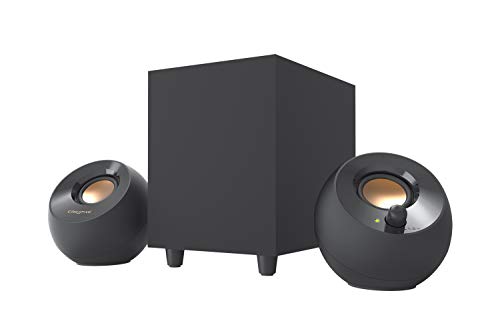
- 4-inch down-firing ported subwoofer
- USB-powered design with 3.5mm AUX input
- Compact speakers with 45-degree elevated drivers
Best For: Small desks and laptops needing a simple bass upgrade
Compact Bass Upgrade
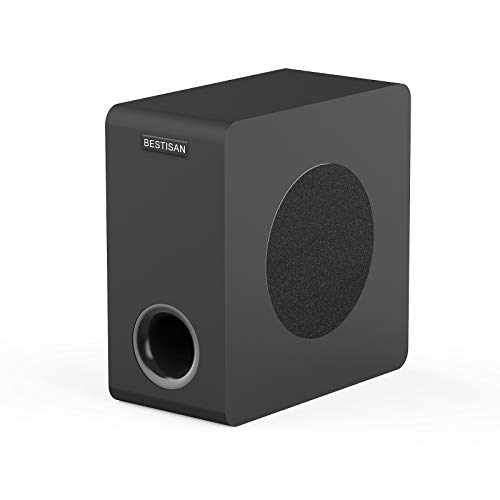
- 6.5-inch powered woofer with 35–200 Hz response
- RCA, AUX, LFE, and high-level connections
- Compact cabinet with remote control
Best For: Flexible desktop and home audio bass expansion
Powerful Desktop Low End
Edifier T5s 8-Inch Powered Subwoofer
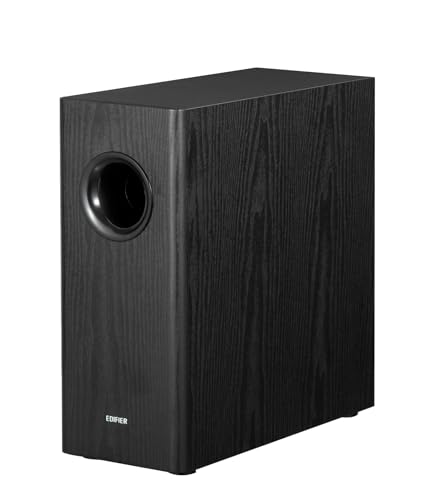
- 8-inch woofer with 70W RMS Class-D power
- 35 Hz bass response with adjustable filter
- Phase control and auto-standby included
Best For: Desktop speaker systems needing deeper, tunable bass
THX Desktop Powerhouse – ProMedia 2.1
The Klipsch ProMedia 2.1 is a strong choice for shoppers comparing subwoofers for desktop setups who want a complete, wired speaker system rather than a standalone bass unit. Its 6.5-inch side-firing, ported subwoofer, THX certification, and 200 watts of peak power are suited to gaming, movies, and music.
Best For: Desktop users seeking room-filling sound and pronounced bass from a complete 2.1 system.
Pros:
- THX-certified system with Klipsch MicroTractrix horn technology.
- 6.5-inch side-firing, ported subwoofer provides bass you can feel.
- Simple wired setup with 3.5mm input and separate subwoofer gain control.
- Compatible with computers, TVs, gaming consoles, and music players.
Cons:
- The subwoofer and satellites require meaningful desk or nearby floor space.
- Connectivity is wired rather than Bluetooth-based.
The ProMedia 2.1 stands out when output and bass impact matter more than minimal size. Its dedicated control pod and broad device compatibility also make it practical for a multi-use desktop setup.
Compact Bass Specialist – Ortizan 60W Active Subwoofer
The Ortizan 60W Active Subwoofer is aimed at shoppers looking for subwoofers for desktop setups without adding a full speaker package. Its compact design combines a 5.24-inch long-throw woofer, Class D amplification, and vibration pads for desktop gaming and studio audio.
Best For: Users who want a compact active subwoofer to extend bass in a desktop gaming or studio setup.
Pros:
- Dedicated active subwoofer design with a 5.24-inch long-throw woofer.
- 60W output and Class D amplification.
- Vibration pads are included for desktop placement.
Cons:
- The supplied notes do not specify connection types or device compatibility.
- It is a standalone subwoofer, so a separate speaker system may be needed.
This model is best considered when desk space is limited and the goal is bass extension rather than an all-in-one speaker upgrade. Confirm your existing system’s connection requirements before buying.
Connected RGB Value – Bluedee 2.1 Speakers
The Bluedee 2.1 system is a flexible pick for shoppers comparing subwoofers for desktop setups alongside connectivity and appearance. It pairs a dedicated wired subwoofer with DSP tuning, Bluetooth 5.4, USB, USB-C, and 3.5mm AUX connections, plus adjustable RGB lighting.
Best For: Desktop, home-office, and gaming users who want bass, modern lighting, and multiple connection options.
Pros:
- Dedicated subwoofer keeps low frequencies separate from the satellite speakers.
- Supports Bluetooth 5.4, USB, USB-C, and 3.5mm AUX.
- DSP tuning is designed to reduce distortion and harsh highs.
- One control knob handles volume, playback, lighting, and input modes.
Cons:
- The system is adapter-powered and uses a wired subwoofer connection.
- RGB lighting may not suit minimalist desks.
The Bluedee offers a broad feature set for everyday desktop entertainment. It is particularly convenient if you switch between a computer, mobile devices, and other sources and want controls within easy reach.
Simple Everyday Pick – Logitech Z313 2.1 Speaker System
The Logitech Z313 is a straightforward option for shoppers seeking subwoofers for desktop setups in a simple 2.1 package. It includes a compact subwoofer, two speakers, a corded control pod, and 25 watts of RMS output for everyday personal listening.
Best For: Users who want an uncomplicated wired speaker system for a desktop, MP3 player, or television.
Pros:
- Complete 2.1 system with a dedicated compact subwoofer.
- 25 watts of RMS output for everyday listening.
- Convenient corded control pod for accessible operation.
- Uses a standard 3.5mm auxiliary connection.
Cons:
- Lower listed output than the Klipsch and Bluedee systems in this roundup.
- Connectivity is limited to wired auxiliary input in the supplied specifications.
The Z313 makes sense when ease of use and a dedicated bass unit are the priorities. It is a practical basic system, though buyers seeking higher output or newer wireless connectivity may prefer another option here.
Best Connected Pick – Nylavee SK400Pro 2.1 Computer Speakers
If you want subwoofers for desktop setups without giving up connectivity or customization, the Nylavee SK400Pro is a flexible 2.1 option. It combines up to 60W peak power, a dedicated wired subwoofer, USB, AUX, and Bluetooth 5.4 with compact desktop-friendly styling.
Best For: Desktop users who want strong bass, wireless or wired connections, and RGB lighting for gaming, movies, and music.
Pros:
- Up to 60W peak power with a dedicated subwoofer for punchy bass.
- USB, AUX, and Bluetooth 5.4 support a wide range of computers and mobile devices.
- Eight RGB lighting modes, four brightness levels, and a single rotary control add convenient customization.
- Compact design and an extended cable allow flexible subwoofer placement.
Cons:
- The subwoofer is wired and the system requires an external power adapter.
- RGB lighting may not suit minimalist desktop setups.
The SK400Pro is a well-rounded choice when convenience matters as much as bass. Its multiple inputs and compact footprint make it especially adaptable for a gaming battlestation or everyday computer desk.
Best Wired Power – Cyber Acoustics CA-3610 2.1 Speaker System
The Cyber Acoustics CA-3610 is a straightforward wired choice among subwoofers for desktop setups. Its 62W peak output, 30W RMS rating, dual-driver satellites, and 5.25-inch down-firing subwoofer are designed to add depth to music, movies, and games.
Best For: Users who prefer a conventional AC-powered desktop speaker system with strong bass and simple wired operation.
Pros:
- 62W peak power and 30W RMS provide substantial output for a desktop system.
- The 5.25-inch down-firing, ported subwoofer is designed for deep bass.
- Satellite speakers use dual 2-inch titanium drivers for crisp highs and warm mid-tones.
- Compatible with desktops, laptops, televisions, projectors, smartphones, and tablets through an auxiliary connection.
Cons:
- Connectivity is wired and limited to auxiliary input.
- The larger 9.7-pound system may require more desk or floor space than compact alternatives.
Choose the CA-3610 if output and traditional wired performance are higher priorities than wireless convenience. The control pod and broad device compatibility keep the setup practical for multimedia use.
Best Compact USB Option – Creative Pebble Plus 2.1 Desktop Speakers
The Creative Pebble Plus keeps subwoofers for desktop setups simple and space-conscious. This 2.1 system uses a standalone 4-inch down-firing subwoofer, angled 2-inch satellite drivers, USB power, and a 3.5mm AUX connection for convenient computer and laptop use.
Best For: Small desks and laptop setups that need an easy USB-powered bass upgrade without a wall socket.
Pros:
- Standalone 4-inch down-firing ported subwoofer adds depth in a compact system.
- 45-degree elevated drivers are angled toward the listener for a more direct soundstage.
- USB power avoids requiring a wall outlet, while the 3.5mm AUX cable supports broad device compatibility.
- High Gain Mode reaches up to 8W RMS when used with a 5V 2A USB adapter.
Cons:
- Its 8W RMS output is substantially lower than the other systems in this roundup.
- A 5V 2A USB adapter is needed for High Gain Mode but is not included.
- It does not offer Bluetooth audio despite wireless technology being listed in the specifications.
The Pebble Plus is best viewed as a compact, convenient upgrade rather than a room-filling system. It suits users who value USB power, front-facing controls, and a small footprint over maximum volume.
Compact Bass Upgrade – BESTISAN SW65D
The BESTISAN SW65D is a practical choice for desktop setups that need fuller low end without a large enclosure. Its powered 6.5-inch side-firing woofer offers a 35–200 Hz response range, while RCA, 3.5mm AUX, LFE, and high-level connections support a variety of audio systems.
Best For: Desktop or home audio users who want flexible wired connectivity and a compact powered subwoofer for music, movies, TV, or gaming.
Pros:
- Compact 6.5-inch cabinet fits more easily near or under a desk.
- Multiple inputs, including RCA, AUX, LFE, and high-level speaker connections.
- Bass-reflex cabinet, internal bracing, and side-firing woofer are designed for tighter bass.
- Includes remote control and delivers up to 100 watts of maximum output.
Cons:
- Wired subwoofer connectivity means it needs a cable to the source.
- Best performance is recommended with signal levels of 850mV or below.
- Its 6.5-inch driver may provide less low-end scale than larger desktop subwoofers.
The SW65D stands out among subwoofers for desktop setups when connection flexibility and a small footprint matter most. It is especially convenient for users whose speakers, TV, or receiver offer different types of analog output.
Powerful Desktop Low End – Edifier T5s 8-Inch Powered Subwoofer
The Edifier T5s brings an 8-inch woofer and 70W RMS of Class-D amplification to desktop setups that need more substantial bass. Its adjustable low-pass filter and phase selector make it easier to integrate with active speakers, stereo systems, or compatible AV equipment.
Best For: Desktop and bookshelf-speaker systems with an RCA subwoofer output or compatible line-level connections that need deeper, more adjustable bass.
Pros:
- 8-inch long-throw woofer reaches a specified 35 Hz low end.
- 70W RMS output provides more headroom for music and home theater.
- Adjustable 30–160 Hz low-pass filter and 0°/180° phase selector help with system matching.
- Auto-standby activates after 15 minutes of inactivity, and cables are included.
Cons:
- Its larger 8-inch cabinet may require more space than compact desktop subwoofers.
- Connections are RCA only, limiting compatibility with systems without line-level outputs.
- The series-connection setup requires main speakers with a wired line input.
For buyers prioritizing deeper, more controllable bass, the T5s is one of the more capable subwoofers for desktop setups in this group. Its tuning controls and included cables are useful, but compatibility should be checked before purchase.
Simple PC Audio Package – OROW S211 USB-Powered 2.1 Speakers
The OROW S211 is a complete 2.1 computer speaker system for shoppers who want subwoofer-equipped desktop audio in one compact package. It delivers 16 watts of system power, uses USB power, and connects through a 3.5mm audio input for PCs, TVs, PS4, and other compatible sources.
Best For: Budget-conscious desktop users who want an easy-to-place 2.1 speaker system with a small subwoofer and USB-powered operation.
Pros:
- Complete 2.1 system includes the subwoofer and two satellite speakers.
- USB-powered design avoids requiring a dedicated AC outlet.
- Compact subwoofer can fit under a desk or bed.
- Wooden enclosures are designed to reduce noise and support clearer sound.
Cons:
- At 16 watts, it offers less output than the larger powered subwoofers in this roundup.
- USB power and 3.5mm-style computer connectivity may be less flexible for advanced audio systems.
- The listed 100 Hz frequency response suggests less deep bass extension than the other two options.
The S211 is best viewed as an affordable all-in-one desktop speaker solution rather than a standalone bass upgrade. It makes sense when space, simple setup, and USB power are more important than maximum low-frequency depth.
How We Picked the Best Subwoofers for Desktop Setups
We focused on systems and powered subwoofers suited to computer desks, small offices, bedrooms, and compact entertainment spaces. Our comparison considered amplifier power, woofer size, claimed low-frequency response, connection options, physical footprint, setup requirements, and whether the product includes satellite speakers.
Because desktop audio needs vary widely, this list includes simple USB-powered systems, affordable 2.1 speaker packages, Bluetooth-equipped options, and larger standalone subwoofers that can integrate with existing speakers or home-audio equipment.
Quick Comparison
| Best For | What to Look For |
|---|---|
| Simple PC upgrade | USB power, 3.5mm input, and included satellite speakers |
| Gaming and movies | Strong low-end output, convenient volume controls, and a larger enclosure |
| Music listening | Clean bass, adjustable level, and compatible stereo connections |
| Small desks | Compact dimensions, down-firing or front-firing design, and low cable clutter |
| Existing speaker systems | A powered subwoofer with suitable line-level inputs and output controls |
Key Buying Factors for Subwoofers for Desktop Setups
System Type and Compatibility
First decide whether you need a complete 2.1 speaker system or a standalone subwoofer. Complete systems are usually easiest for a PC because the satellites, amplifier, and cables are matched. A standalone unit makes more sense when you already own powered speakers or an amplifier with a subwoofer output.
Power and Bass Extension
Wattage can help indicate potential output, but it is not a complete measure of sound quality. Woofer size, enclosure design, amplifier quality, and room placement also matter. A compact 4- to 6-inch woofer is often suitable for desk listening, while larger 6.5- to 8-inch models can deliver more authority but need additional floor or shelf space.
Connections and Controls
Check whether your computer supports the required input. USB-powered models are convenient for laptops and basic desktops, while 3.5mm connections work with most PCs and monitors. Bluetooth adds flexibility for phones and tablets. Separate bass and volume controls are useful because desktop placement can make low frequencies sound boomy or weak.
Placement and Desk Space
Keep the subwoofer on a stable surface with clearance around its vents and driver. Avoid blocking ports or placing it directly against a wall if the bass becomes overpowering. Measure the enclosure before buying, especially for larger standalone models.
Who Should Buy Which Subwoofers for Desktop Setups?
Choose a USB-powered 2.1 system if you want the simplest, lowest-clutter upgrade for a laptop or small desk. Affordable multimedia systems are a practical choice for everyday gaming, streaming, and general PC use. Bluetooth models suit users who want to switch between a computer and mobile devices.
Pick a higher-output compact system when games and movies are your priority, particularly if you want stronger impact without assembling separate components. If you already have quality desktop speakers and need deeper extension, choose a standalone powered subwoofer—but confirm that its inputs and crossover controls match your existing equipment.