The best 3D printers in 2026 make it easier to move from a digital model to a finished object, whether you are learning the basics, prototyping parts, or creating multicolor designs.
This roundup compares ten notable FDM printers across setup, speed, automation, material support, build capacity, and multicolor capability so you can choose a machine that fits your workspace and projects.
Best 10 3d Printers Picks for 2026
Best Multicolor Pick
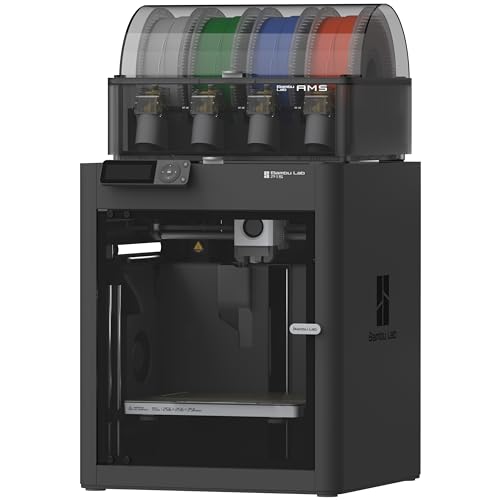
- Up to 16-color printing with AMS
- 500mm/s maximum print speed
- Enclosed design with auto bed leveling
Best For: Creators seeking fast, enclosed multicolor printing
Best Budget-Friendly Starter

- 250mm/s maximum print speed
- CR Touch auto leveling and strain sensor
- Direct extruder with auto filament loading
Best For: Beginners printing common everyday filaments
Best for DIY Light Projects

- Includes an LED lamp kit
- AMS lite enables multicolor printing
- Full-auto calibration and flow compensation
Best For: Makers designing illuminated décor and gifts
Best High-Speed CoreXY Option

- 600mm/s travel speed with CoreXY structure
- Automatic leveling and vibration compensation
- Remote monitoring through Flash Studio
Best For: Rapid prototyping and speed-focused workflows
Beginner-Friendly Speed Pick

- Fast, precise FDM printing
- Automatic calibration and flow compensation
- Optional multi-color printing with AMS lite
Best For: Beginners, families, and quiet home workshops
Advanced Multi-Material Pick
Snapmaker U1 Multi-Toolhead 3D Printer

- Four toolheads with roughly five-second changes
- True multi-color and mixed-material printing
- 500 mm/s CoreXY speed and 270 mm build volume
Best For: Workshops, professionals, and demanding multi-material projects
Enclosed High-Speed Pick

- 500 mm/s printing with automatic bed leveling
- Enclosed design for advanced filaments
- Up to 16 colors with a separate Bambu Lab AMS
Best For: Fast, enclosed printing and future multi-color upgrades
Best Multicolor Starter

- CFS enables multicolor printing with expansion up to 16 colors
- Pre-assembled design with auto-leveling and AI monitoring
- 260 mm cubed build volume and 600 mm/s print speed
Best For: Beginners and makers seeking convenient multicolor printing
Best Easy-Setup Combo

- Ready-to-print setup in about 15 minutes
- AMS 2 Pro adds multicolor printing and filament drying
- 600 mm/s speed with automatic calibration and AI detection
Best For: Users prioritizing automation and a streamlined workflow
Best Large-Format Multicolor

- 350 mm cubed build volume for large models and batches
- Supports up to 16 colors with four connected CFS units
- 60°C chamber and 350°C nozzle support engineering materials
Best For: Large-format models and demanding engineering prints
Best Multicolor Pick – Bambu Lab P1S Combo
The Bambu Lab P1S Combo is a strong choice among 3d printers for users who want fast, enclosed printing and multicolor capability. Its included AMS supports multicolor or multimaterial projects, while automatic bed leveling and a 15-minute setup help simplify the process.
Best For: Creators who want enclosed, high-speed multicolor printing.
Pros:
- Supports printing with up to 16 colors when connected to the Bambu Lab AMS.
- Reaches speeds of up to 500mm/s with 20000 mm/s² acceleration.
- Enclosed design supports advanced filaments and improves print performance.
- Automatic bed leveling and quick setup reduce hands-on preparation.
Cons:
- Multicolor printing requires the Bambu Lab AMS connection.
- Carbon- and glass-fiber-reinforced polymers are not recommended.
- Its 47.5-pound weight makes it less convenient to move.
The P1S Combo stands out when speed, enclosure, and multicolor output matter more than portability. It supports several common filaments and capable materials, though specialized reinforced polymers are outside its recommended use.
Best Budget-Friendly Starter – Creality Ender 3 V3 SE
The Creality Ender 3 V3 SE is a practical entry point among 3d printers, combining a compact open-frame design with automatic leveling, automatic filament handling, and a direct extruder. Its preassembled design is intended to get users from unboxing to a first print in about 20 minutes.
Best For: Beginners and hobbyists who want an accessible, fast everyday printer.
Pros:
- Supports maximum print speeds of 250mm/s with 2500mm/s² acceleration.
- CR Touch leveling and a strain sensor automate key setup adjustments.
- Sprite direct extruder supports PLA, TPU, and PETG.
- Dual Z-axis lead screws and steel Y-axis linear shafts support printing stability.
Cons:
- Its open design does not provide the enclosure of the P1S or similar models.
- The 250mm/s maximum speed is lower than the fastest options in this roundup.
- It is primarily positioned for common filament types rather than advanced materials.
With automatic calibration, filament loading, and a three-step assembly process, the Ender 3 V3 SE keeps the learning curve manageable. It is a sensible option for routine PLA, TPU, and PETG projects without requiring a more elaborate setup.
Best for DIY Light Projects – Bambu Lab A1 Combo
The Bambu Lab A1 Combo adds an included LED lamp kit to a capable set of 3d printers, making it especially appealing for illuminated models and custom décor. Its AMS lite enables multicolor printing, while full-auto calibration and active flow rate compensation are designed to simplify consistent results.
Best For: DIY makers creating multicolor lamps, décor, and gifts.
Pros:
- Includes an LED kit for turning compatible prints into functional decorative lights.
- AMS lite enables accessible multicolor printing.
- Full-auto calibration handles Z-offset, bed leveling, and other adjustments.
- Active flow rate compensation and quiet motor operation support convenient printing.
Cons:
- Multicolor printing requires the AMS lite, which is included with this Combo configuration.
- The LED kit is aimed at compatible lamp designs rather than every model.
- Its focus on creative lighting may be unnecessary for users seeking only basic single-color prints.
The A1 Combo is a specialized but versatile pick for makers who want more than standard models. The combination of multicolor capability, automatic calibration, and the LED kit makes it well suited to functional creative projects.
Best High-Speed CoreXY Option – FLASHFORGE Adventurer 5M
The FLASHFORGE Adventurer 5M targets buyers who prioritize speed and streamlined operation in their 3d printers. Its CoreXY structure, automatic leveling, direct-drive extruder, and vibration compensation are paired with quick nozzle changes and remote app monitoring.
Best For: Rapid prototyping and users who want fast, remotely monitored printing.
Pros:
- CoreXY motion system supports 600mm/s travel speed and 20000mm/s² acceleration.
- Automatic bed leveling helps produce consistent first layers.
- Quick three-second nozzle changes and a 35-second warm-up to 200°C improve workflow.
- Flash Studio enables remote progress monitoring, adjustments, and status alerts.
Cons:
- Multicolor printing is not listed among the supplied features.
- The 220 × 220 × 220mm print size may limit larger projects.
- Optional nozzle sizes must be purchased separately for specialized output.
The Adventurer 5M is compelling for speed-focused workflows, especially rapid prototypes and repeated prints. Its 280°C direct extruder, adaptable nozzle options, and remote controls add flexibility without sacrificing setup convenience.
Beginner-Friendly Speed Pick – Bambu Lab A1
The Bambu Lab A1 is a practical choice for beginners and kids who want one of the more approachable 3d printers. It combines fast printing, automatic calibration, active flow-rate compensation, and a quiet operating experience in a ready-to-use FDM design.
Best For: Beginners, families, and makers who want easy setup, reliable calibration, and optional multi-color printing.
Pros:
- Up to 10,000 mm/s² acceleration with precise printing.
- Fully automatic calibration, including Z-offset and bed leveling.
- Quiet operation, simple touchscreen controls, and a quick-swap nozzle.
- Supports multi-color printing when paired with AMS lite.
Cons:
- AMS lite is required for multi-color printing and may need to be purchased separately.
- The printer weighs 22 pounds and has a relatively large footprint.
The A1 stands out among beginner-oriented 3d printers for reducing hands-on calibration and maintenance. Choose the A1 Combo or add AMS lite if multi-color projects are a priority.
Advanced Multi-Material Pick – Snapmaker U1 Multi-Toolhead 3D Printer
The Snapmaker U1 is built for makers who need more than basic color changes from their 3d printers. Its four independent toolheads switch in about five seconds, enabling multi-color and mixed-material prints with less purging and support for materials ranging from PLA and PETG to TPU, PA, and PC.
Best For: Serious hobbyists, workshops, small businesses, and creators producing functional or multi-material parts.
Pros:
- Four preloaded toolheads enable true multi-color and mixed-material printing.
- Fast tool changes can reduce material waste and speed up color changes.
- Automatic calibration, AI print monitoring, and remote app control simplify operation.
- 500 mm/s CoreXY printing with a 270 × 270 × 270 mm build volume.
Cons:
- At 57.9 pounds, it is substantially heavier than many desktop options.
- Its broader material and toolhead system may be more capability than casual users need.
The U1 is a strong productivity-focused option for users who regularly combine colors, rigid materials, flexible filaments, or soluble supports. Its large, heavy chassis makes it better suited to a dedicated workspace than a frequently moved setup.
Enclosed High-Speed Pick – Bambu Lab P1S
The Bambu Lab P1S is a ready-to-use enclosed FDM option for shoppers comparing fast 3d printers. It offers 500 mm/s printing, automatic bed leveling, a 15-minute setup, and an enclosed design intended to improve performance with advanced filaments.
Best For: Makers who want fast, enclosed printing and the option to add multi-color or multi-material capability later.
Pros:
- 500 mm/s speed with up to 20,000 mm/s² acceleration.
- Enclosed body supports improved printing performance with advanced filaments.
- Automatic bed leveling helps simplify setup and print preparation.
- Supports up to 16 colors when connected to a Bambu Lab AMS.
Cons:
- Bambu Lab AMS is required for multi-color printing.
- Carbon- and glass-fiber-reinforced polymers are not recommended.
- At 38.9 pounds, it is less portable than smaller open-frame printers.
The P1S offers a useful balance of speed, convenience, and enclosure benefits. It is especially appealing if you want a straightforward printer now while retaining a path to multi-color work through the separately connected AMS system.
Best Multicolor Starter – Creality K2 Combo
For shoppers comparing 3d printers, the Creality K2 Combo is a convenient multicolor option with a compact-to-mid-size 260 × 260 × 260 mm build volume. Its pre-assembled design, automatic leveling, and AI monitoring make it approachable for users who want to move quickly from setup to printing.
Best For: Beginners and makers who want fast, quieter multicolor printing without extensive assembly.
Pros:
- Includes a CFS unit for multicolor printing, with expansion potential up to 16 colors.
- Pre-assembled design supports a straightforward out-of-box setup.
- 600 mm/s printing, targeted auto-leveling, and AI camera monitoring support a streamlined workflow.
- Supports materials including PLA, PETG, ABS, PLA-CF, and PET.
Cons:
- The 260 mm cubed build volume is less suitable for very large models.
- Additional CFS units are needed to reach the advertised 16-color capacity.
The K2 Combo balances speed, automation, and multicolor capability in a relatively accessible package. It is a strong fit when convenience and material flexibility matter more than maximum build size.
Best Easy-Setup Combo – Bambu Lab P2S Combo
Among modern 3d printers, the Bambu Lab P2S Combo emphasizes a fast setup and an integrated multicolor workflow. The included AMS 2 Pro adds filament drying and multi-color or multi-material support, while automatic calibration and AI failure detection reduce hands-on monitoring.
Best For: Beginners and experienced users who want quick setup, automated calibration, and managed multicolor printing.
Pros:
- Prints at up to 600 mm/s with active flowrate compensation for consistent layers.
- Designed to be ready to print in about 15 minutes, with quick-swap nozzles.
- AMS 2 Pro supports multicolor or multi-material printing and filament drying up to 65°C.
- Adaptive airflow can cool overhangs or maintain a chamber temperature up to 50°C.
Cons:
- The standalone P2S does not support multicolor printing; the Combo configuration is required.
- The feature-rich workflow may be more than users need for simple single-color prints.
The P2S Combo is particularly compelling for users who value convenience from setup through filament management. Its automation and airflow controls also make it more versatile across everyday and engineering-oriented materials.
Best Large-Format Multicolor – Creality K2 Plus Combo
For shoppers needing more room than typical 3d printers provide, the Creality K2 Plus Combo offers a substantial 350 × 350 × 350 mm build volume. It combines CFS multicolor printing, a heated chamber, a 350°C hardened-steel-tip nozzle, and dual AI cameras for larger or more demanding projects.
Best For: Makers and engineers printing large models, batches, or higher-temperature engineering materials.
Pros:
- Large 350 mm cubed build volume accommodates bigger models and batch printing.
- CFS supports up to 16-color printing when four units are connected, with automatic filament handling.
- 60°C chamber and 350°C nozzle support materials such as ASA and PPA.
- Dual AI cameras, 18 sensors, independent dual-Z adjustment, and auto-leveling add monitoring and automation.
Cons:
- Its large-format design weighs 70.4 pounds and requires substantial workspace.
- Full 16-color capability requires four connected CFS units.
- The extensive engineering features may be unnecessary for basic PLA printing.
The K2 Plus Combo stands out when build volume and material capability take priority. Its rigid frame, heated chamber, and automated monitoring make it a better match for ambitious models and technical workloads than compact machines.
How We Picked These 3d Printers
We selected models that represent the main buying decisions shoppers face today: ease of setup, print speed, automated leveling, enclosed or open designs, multicolor support, and overall versatility. The list includes accessible beginner machines such as the Bambu Lab A1 and Creality Ender 3 V3 SE, as well as faster and more advanced options with enclosed chambers, tool-changing systems, or dedicated material-management units.
We also considered practical ownership factors, including the quality of the included automation, the type of extruder, upgrade potential, software workflow, and whether a printer is ready to use out of the box. Advertised speed is only one part of performance; reliability, first-layer consistency, and the ability to use the materials you need matter just as much.
Quick Comparison
| Best For | Recommended Models | What Stands Out |
|---|---|---|
| Beginners and families | Bambu Lab A1, Creality Ender 3 V3 SE | Simple setup, automatic calibration, approachable operation |
| Multicolor printing | Bambu Lab A1 Combo, P1S Combo, P2S Combo | Integrated or bundled multicolor material systems |
| Fast everyday printing | FLASHFORGE Adventurer 5M, Creality K2 Combo | High advertised speeds and automated features |
| Advanced multicolor workflows | Snapmaker U1, Creality K2 Plus Combo | Tool changing, larger capability, or expanded material handling |
| Enclosed printing | Bambu Lab P1S, P1S Combo | More controlled printing environment and broader material flexibility |
Key Buying Factors for 3d Printers
Build Volume and Printer Layout
Check the maximum model dimensions before choosing a printer. Compact open-frame machines suit small parts and classrooms, while larger systems are better for helmets, organizers, props, and functional prototypes. An enclosure can also help protect prints from drafts and reduce exposure to moving components.
Materials and Extruder Temperature
PLA is easy to print and suitable for many decorative parts. PETG offers greater toughness and moisture resistance, while ABS, ASA, and other engineering materials generally benefit from an enclosed printer and stable temperature control. Review the hot-end temperature, heated-bed capability, nozzle options, and manufacturer guidance rather than relying on speed claims alone.
Automation and Maintenance
Automatic bed leveling, filament-runout detection, camera monitoring, and flow calibration can reduce troubleshooting. Direct-drive extruders are useful for flexible filament, but every automated feature adds components that may eventually need cleaning or replacement. Look for accessible nozzles, clear maintenance instructions, and readily available consumables.
Multicolor Systems and Software
Multicolor printing is convenient but can increase material waste, print time, and setup complexity. Compare the number of supported colors, spool compatibility, purge behavior, and whether the system is included or sold separately. A dependable slicer and wireless workflow may matter more than an impressive maximum speed.
Who Should Buy Which 3d Printers?
Choose the Bambu Lab A1 or Ender 3 V3 SE if you want an affordable introduction to FDM printing and mostly plan to use PLA or PETG. Choose the A1 Combo if multicolor projects are a priority but you prefer an open, beginner-friendly design.
Choose the P1S or P1S Combo for a more enclosed, ready-to-use experience and stronger material flexibility. Choose the Adventurer 5M or K2 Combo when fast production and automated setup are higher priorities.
Choose the Snapmaker U1 if rapid tool changes and multicolor experimentation appeal to you. For larger, more demanding projects, the K2 Plus Combo is the better fit among these options. Before ordering, confirm available workspace, power requirements, replacement-part support, and the materials you expect to print most often.