Choosing an audio mixer for beginners can feel complicated when listings combine studio consoles, streaming interfaces, DJ boards, and compact line mixers. The right choice depends less on the channel count than on your microphones, devices, monitoring needs, and intended workflow.
We selected 10 accessible options spanning XLR recording, gaming and streaming, Bluetooth playback, USB connectivity, phantom power, and straightforward stereo mixing. Use the guide below to narrow the field before comparing individual product features and prices.
Best 10 Audio Mixer for Beginners Picks for 2026
Best Streaming Starter

- XLR input with 48V phantom power
- One-click noise reduction and loopback
- Voice effects, sound pads, and RGB lighting
Best For: New gamers and streamers using XLR microphones
Best Simple Analog Pick

- Compact five-channel analog layout
- Low-noise performance with two-band EQ
- RCA inputs and outputs for playback or recording
Best For: Small desktop, playback, and basic recording setups
Best All-in-One Bundle

- Includes mixer, microphone, tripod, and cables
- Built-in and recordable sound effects
- Supports podcasting and multi-device streaming
Best For: Beginners starting podcasts or mobile live streams
Best Minimal Line Mixer
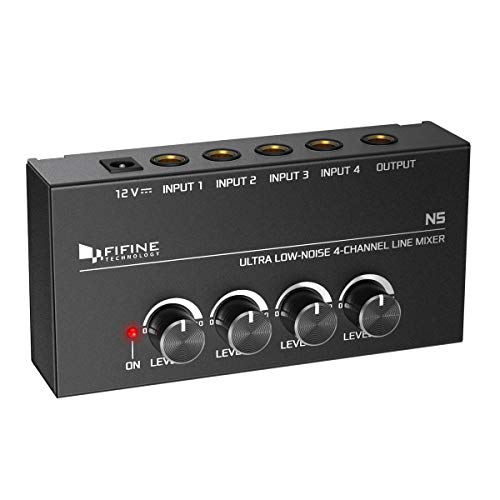
- Four independent line-level volume controls
- Compact metal enclosure
- Low-noise stereo or mono operation
Best For: Small instrument, monitoring, and submixing setups
Versatile Starter Pick
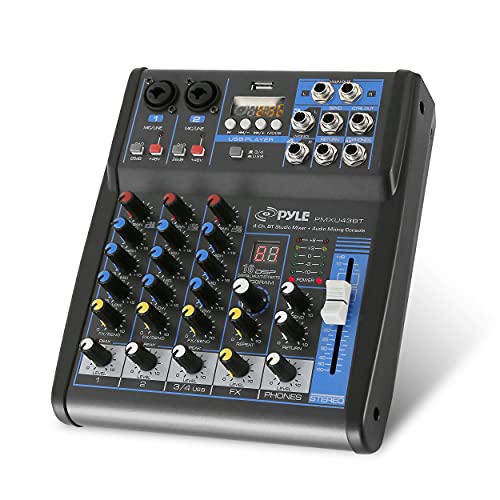
- Bluetooth, USB, flash-drive, and MP3 playback
- XLR and 1/4-inch inputs with 48V phantom power
- Three-band EQ, DSP effects, and rugged steel chassis
Best For: Karaoke, small live performances, and flexible beginner setups
Simple Sub-Mixing Choice
LZSIG Mini 4-Channel Line Mixer

- Combines four line sources into one output
- Accepts 3.5mm and 6.35mm connections
- Switches between mono and stereo modes
Best For: Basic sub-mixing for instruments, computers, and gaming consoles
Gaming and Streaming Pick

- XLR input with 48V phantom power and mic-type toggle
- Game/chat balance, USB-C, optical, and auxiliary inputs
- Voice changer, EQ modes, 7.1 surround, and RGB lighting
Best For: Beginner gamers and streamers using an XLR microphone
Best Analog Control
6-Channel Mixer with DSP Effects

- Four mono MIC/LINE inputs plus RCA stereo input
- 16 DSP effects and three-band EQ
- 48V phantom power; no USB connection
Best For: Hands-on mixing for karaoke, parties, and basic studio setups
Best Compact Connectivity

- USB interface for recording and live streaming
- Bluetooth input and USB MP3 playback
- Portable design with 48V phantom power
Best For: Podcasts, streams, home recording, and mobile setups
Best Feature-Rich Setup
6-Channel Bluetooth Mixer with DSP

- Four XLR inputs plus stereo 1/4-inch inputs
- Bluetooth, USB playback, and USB interface
- Three-band EQ, 16 DSP effects, and 48V phantom power
Best For: Karaoke, streaming, recording, and expanding beginner setups
Best Streaming Starter – MAONO G1 Neo Gaming Mixer
For beginners seeking an audio mixer for beginners, the MAONO G1 Neo combines an XLR input, 48V phantom power, one-click noise reduction, sound pads, and RGB lighting in a compact streaming-focused setup. Its controls are designed to simplify gaming, live streaming, and voice monitoring.
Best For: New gamers and streamers using an XLR microphone with OBS, Discord, Twitch, YouTube, or similar platforms.
Pros:
- XLR input with built-in preamp and 48V phantom power for compatible condenser microphones
- One-click mute, noise reduction, loopback, and direct monitoring simplify streaming control
- Voice effects, custom sound pads, Bluetooth accompaniment, and customizable RGB lighting add flexibility
Cons:
- Not compatible with USB microphones or Xbox
- Requires careful phantom-power use; it should remain off for XLR dynamic microphones
- Setup requires adjusting gain, volume, and headphone controls for the best result
The G1 Neo is a strong beginner choice when gaming features and streaming effects matter as much as basic mixing. It is less suitable for shoppers who need USB-microphone support or a traditional mixer layout.
Best Simple Analog Pick – Mackie Mix5 Compact Mixer
The Mackie Mix5 is a straightforward audio mixer for beginners who want dependable analog controls without streaming-specific effects. Its compact five-channel layout includes a mic/line input, stereo line inputs, RCA connectivity, and basic tone shaping.
Best For: Beginners building a small desktop, playback, recording, or basic live-audio setup.
Pros:
- Compact five-channel design with high-headroom, low-noise performance
- Mic/line input includes a two-band EQ for simple tone adjustment
- Dedicated stereo RCA inputs and outputs support playback and recording
- Phantom power supports compatible studio condenser microphones
Cons:
- Only one mic/line input is listed
- Does not include the built-in voice effects or streaming controls found on gaming-oriented mixers
- Requires corded electric power
The Mix5 is a practical introduction to analog mixing and is easy to place on a crowded desk. Choose it when clean, basic routing is more important than integrated USB, Bluetooth, or content-creation effects.
Best All-in-One Bundle – MAONO S1 Podcast Mixer Kit
The MAONO S1 bundle is a convenient audio mixer for beginners because it includes the mixer, a 3.5mm condenser microphone, cable, tripod, and windscreen. Its controls target podcasting and live streaming, with built-in effects, voice changes, monitoring, and support for multiple devices and platforms.
Best For: Beginners who want a ready-to-use podcasting or mobile live-streaming kit with a supplied microphone.
Pros:
- Includes a microphone, cable, tripod, windscreen, mixer, and charging cable
- Offers four recordable and eight built-in sound effects plus voice-change options
- Supports up to two people, four devices, and four platforms simultaneously
- Includes real-time monitoring, noise reduction, reverb, and adjustable tone controls
Cons:
- The AM200 uses 3.5mm microphone input and does not support phantom power
- Guitars and keyboards require an additional 6.35mm-to-3.5mm adapter
- Phones without a 3.5mm jack require a separate OTG adapter
This kit offers the simplest path to starting a podcast or stream because the key accessories are included. Its 3.5mm microphone design is convenient for beginners, but it is not the right fit for XLR microphones requiring phantom power.
Best Minimal Line Mixer – FIFINE N5 Four-Channel Mixer
The FIFINE N5 is a compact audio mixer for beginners who need to combine several line-level sources with minimal complexity. Each of its four channels has an independent volume control, making it useful for keyboards, guitars, bass, drum kits, and simple monitoring or submixing.
Best For: Beginners mixing multiple line-level instruments or creating a small stereo monitoring and submixing setup.
Pros:
- Four independent channels with separate volume controls
- Compact metal enclosure with firm knobs and a simple power indicator
- Designed for low-noise mixing of line-level sources
- Can be used for keyboards, small-stage setups, drum kits, or submixing
Cons:
- TRS/TS cables are not included
- It is a line mixer rather than a feature-rich streaming interface
- Stereo and mono operation require the appropriate cable type and connection setup
The N5 keeps the learning curve short by focusing on channel-level volume control and routing. It is a good fit for instrument submixing, but beginners wanting microphone preamps, USB connectivity, or built-in effects should consider another type of mixer.
Versatile Starter Pick – Pyle PMXU43BT 4-Channel Mixer
For beginners who want an audio mixer for beginners that can handle microphones, instruments, playback, and basic recording, the Pyle PMXU43BT offers a broad feature set in a compact, corded unit. Bluetooth, USB, flash-drive, and MP3 support make it easy to add music without extra equipment.
Best For: Beginners building a flexible setup for karaoke, small live performances, basic studio work, or DJ-style playback.
Pros:
- Four channels with XLR and unbalanced 1/4-inch inputs.
- Bluetooth streaming plus USB, flash-reader, computer, and built-in MP3 compatibility.
- 48V phantom power, three-band channel EQ, LED peak indicators, and onboard DSP effects.
- Rugged steel chassis with sealed rotary controls.
Cons:
- It uses corded power rather than battery operation.
- The feature-rich layout may take beginners some time to learn.
- The supplied notes do not identify the specific DSP effect selection.
The PMXU43BT is a strong all-purpose starting point when connectivity matters. Its microphone support and phantom power leave room to grow, while Bluetooth and media playback keep casual setups simple.
Simple Sub-Mixing Choice – LZSIG Mini 4-Channel Line Mixer
The LZSIG Mini is a straightforward audio mixer for beginners who mainly need to combine several line-level sources into one output. Its compact design accepts both 3.5mm and 6.35mm connections, making it useful for keyboards, electronic drums, guitars, computers, CD players, and gaming consoles.
Best For: Beginners who need basic stereo or mono sub-mixing without microphone preamps or onboard effects.
Pros:
- Combines up to four audio sources into a single stereo or mono output.
- Supports both 3.5mm and 6.35mm TS/TRS cables without adapters.
- Mono/stereo switching accommodates different routing setups.
- Compact enclosure with low-noise power management and op-amps.
Cons:
- Power adapter is sold separately.
- It is a line mixer, so the supplied notes do not list XLR microphone inputs or phantom power.
- It provides basic routing rather than built-in EQ, effects, or media playback.
This is an appealing choice if your beginner setup is centered on combining existing line outputs. Its small footprint and broad cable compatibility simplify audio routing, but users needing microphone control should choose a more complete console.
Gaming and Streaming Pick – FIFINE SC8 Audio Mixer
The FIFINE SC8 is an audio mixer for beginners who want hands-on control of game, chat, microphone, and background audio. It combines an XLR microphone input with USB-C plug-and-play connectivity, optical and auxiliary inputs, game/chat balancing, and streaming-focused controls.
Best For: New streamers and gamers using an XLR or 6.35mm microphone with PC, PS5, Switch, mobile, or other supported sources.
Pros:
- 48V phantom power and a Dynamic/Condenser toggle support different XLR microphone types.
- USB-C, optical AUX, and 3.5mm AUX-In provide flexible platform and source connections.
- Dedicated game/chat balance control, three EQ modes, virtual 7.1 surround, and adjustable monitoring.
- Voice changer, customizable buttons, mute controls, and RGB lighting suit streaming use.
Cons:
- It is not compatible with USB microphones; the notes specify XLR or 6.35mm microphones.
- An XLR cable is not included.
- The gaming-oriented controls may be unnecessary for traditional music mixing.
The SC8 is best viewed as a streaming control hub rather than a conventional studio mixer. Its dedicated game/chat controls and sound features can shorten the learning curve for content creation, provided you already have a compatible microphone and cable.
Best Analog Control – 6-Channel Mixer with DSP Effects
For beginners looking for an audio mixer for beginners setup, this six-channel sound board offers straightforward analog controls, four mono mic/line inputs, a stereo RCA input, and built-in effects. Its stepped knobs and clear channel layout can help new users make repeatable adjustments for karaoke, home parties, DJ events, or basic studio use.
Best For: Beginners who want hands-on analog mixing with microphone support, stereo playback, and onboard effects.
Pros:
- Six channels with four mono MIC/LINE inputs and one RCA stereo input.
- Includes 16 DSP effects for adding reverb and other mix treatments.
- 48V phantom power supports compatible condenser microphones.
- Stepped knobs, three-band EQ, and separate master mix outputs provide practical control.
Cons:
- No USB connectivity for direct computer recording.
- Requires consulting the manual before use.
This is a good choice if you prefer physical controls and do not need a USB audio interface. The RCA stereo input is useful for playback devices, while the DSP section gives beginners room to experiment with effects.
Best Compact Connectivity – 4-Channel Bluetooth USB Mixer
This compact four-channel model is a practical audio mixer for beginners who want Bluetooth playback, USB recording, and simple controls in one portable unit. It accepts microphones and instruments, connects to a computer for recording or streaming, and fits easily into a backpack for mobile content creation.
Best For: Beginners making podcasts, live streams, home recordings, online presentations, or small DJ setups.
Pros:
- Bluetooth supports wireless music input from phones, tablets, and laptops.
- Built-in USB audio interface supports plug-and-play recording and live streaming.
- Supports USB flash-drive MP3 playback and recording controls.
- Compact, lightweight design with 48V phantom power for compatible condenser microphones.
Cons:
- Bluetooth supports input only, not wireless output.
- Four channels provide less connection capacity than the six-channel alternatives.
- Effects are mentioned in the product highlight but not specified in the supplied details.
Choose this mixer when convenience and computer connectivity matter more than a larger channel count. Its USB interface and Bluetooth input reduce setup complexity for beginners who want to record or stream from a desktop or portable workspace.
Best Feature-Rich Setup – 6-Channel Bluetooth Mixer with DSP
For beginners who want an audio mixer for beginners setup with room to explore, this six-channel board combines Bluetooth, USB playback, four XLR inputs, three-band EQ, and 16 DSP effects. It supports microphones, instruments, and stereo sources, making it flexible for karaoke, streaming, recording, and small live applications.
Best For: Beginners who need multiple inputs and want to learn EQ, effects, Bluetooth playback, and USB audio functions.
Pros:
- Six channels include four XLR inputs plus stereo 1/4-inch inputs.
- Offers Bluetooth streaming, USB interface functionality, and USB-drive playback.
- Includes 48V phantom power for compatible condenser microphones.
- Three-band EQ and 16 DSP effects provide extensive sound-shaping options.
Cons:
- Its listed manufacturer warranty is 90 days from purchase.
- The feature set may require more learning than a basic mixer.
- The supplied dimensions listing is unusually large for a compact mixer and should be checked before purchase.
This model offers the broadest feature set of the three, especially for users who expect their setup to grow. It is worth considering if you want several input types and built-in effects, provided you are comfortable spending time learning its controls.
How We Picked the Best Audio Mixer for Beginners
We focused on mixers that are approachable for first-time users while covering common entry-level needs: podcasting, live streaming, gaming, music practice, home recording, and casual DJing. Selection criteria included input flexibility, control layout, monitoring options, connection types, phantom-power availability, size, and the likelihood that a beginner can use the mixer without extensive external equipment.
We also included different mixer styles rather than treating every model as interchangeable. Compact analog mixers are useful for combining line-level sources, while USB mixers and audio interfaces are generally better suited to computer recording. Streaming-focused models may prioritize quick-access controls, effects, and headset compatibility.
Quick Comparison
| Best For | Look For | Most Relevant Features |
|---|---|---|
| Podcasting and recording | USB audio and XLR input | Computer connectivity, gain control, monitoring |
| Gaming and live streaming | Streaming interface or gaming mixer | Headset support, quick mute, effects, routing |
| Simple home mixing | Compact analog mixer | Multiple line inputs, independent volume controls |
| DJing and playback | Bluetooth, USB, or MP3 input | Stereo channels, playback control, output flexibility |
| Condenser microphones | 48V phantom power | Phantom-power switch and suitable XLR preamp |
Key Buying Factors for an Audio Mixer for Beginners
Inputs and Connection Type
Count the sources you will connect at the same time. An XLR input is important for many microphones, while 3.5mm and RCA connections suit phones, headsets, and consumer audio gear. USB is valuable if you want to record or stream directly through a computer.
Phantom Power and Microphone Support
Condenser microphones often require 48V phantom power, but not every mixer provides it. Confirm that phantom power is available on the appropriate microphone input, and avoid assuming that a Bluetooth or line-input mixer can power an XLR microphone.
Monitoring and Routing
A headphone output with an adjustable level makes setup easier and helps prevent feedback. If you plan to stream, check whether the mixer can route microphone, music, chat, and computer audio in the way your software requires.
Controls, Noise, and Room to Grow
Large, clearly labeled knobs are usually easier for beginners than dense multifunction controls. Low-noise circuitry matters for quiet microphones, while extra channels provide flexibility but can add size and complexity. Buy enough capacity for your actual setup rather than paying solely for a larger channel count.
Who Should Buy Which Audio Mixer for Beginners?
Choose a USB-equipped mixer or audio interface if your priority is podcasting, voice recording, or streaming to a computer. A gaming-focused model is more suitable when headset connections, quick controls, and live effects matter more than traditional studio routing.
For keyboards, phones, media players, and other line-level devices, a compact analog mixer is often the simplest and most affordable solution. Select a Bluetooth or USB MP3 model if convenient wireless playback is central to your use case. If you expect to add microphones or record music later, prioritize XLR inputs, phantom power, and USB connectivity from the start.