The best audio mixers for home studio setups make it easier to connect microphones, instruments, headphones, and playback devices while keeping your recordings organized and controllable.
This roundup compares 10 options ranging from compact USB interfaces to full-featured analog mixers, with practical guidance for choosing the right fit for recording, streaming, podcasting, or live use.
Best 10 Audio Mixers for Home Studio Picks for 2026
Versatile Analog Hub

- 10 channels with USB and SPX effects
- EQ, filters, and one-knob compressors
- Rugged metal chassis for studio use
Best For: Home studios needing multiple inputs and hands-on mixing
Focused Recording Interface
Focusrite Scarlett 2i2 4th Gen

- Two mic preamps and Hi-Z inputs
- 120dB dynamic range with 24-bit/192kHz support
- Auto Gain, Clip Safe, and Air modes
Best For: Solo recording with microphones or guitars
Compact Essentials Mixer

- Eight channels in a compact format
- Two mic/line inputs with phantom power
- Three-band EQ on every channel
Best For: Simple small-studio mixing and rehearsal setups
Versatile Recording Hub

- 12 channels with USB connectivity
- Onyx preamps and GigFX effects
- Designed for recording and content creation
Best For: Home studios needing flexible recording, live sound, and effects
Streamer Control Center

- XLR mic input with 48V phantom power
- Independent mic, line, headphone, and output controls
- Built for streaming on Mac and Windows
Best For: Beginner streamers and podcasters using an XLR microphone
Feature-Packed Mixing Console

- 12 channels with combo inputs and USB recording
- Bluetooth playback from mobile devices
- 16 DSP effects, phantom power, and 7-band EQ
Best For: Studios and live setups needing broad connectivity and processing
Versatile 12-Channel Pick
12-Channel USB/Bluetooth Audio Mixer
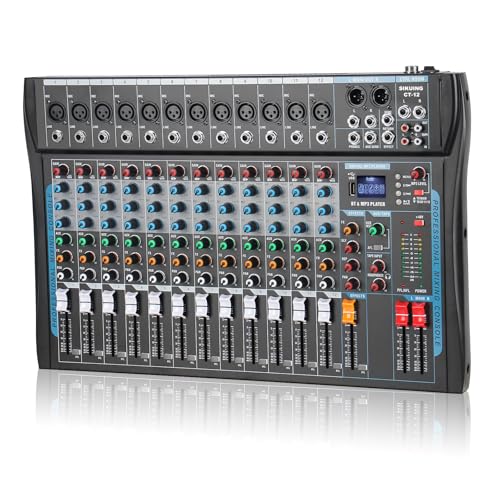
- 12 channels for microphones and line sources
- USB, Bluetooth, and +48V phantom power
- 3-band EQ with 16 DSP effects
Best For: Expanding home studios, streaming, and live mixing
Beginner-Friendly Compact Pick
Pyle 4-Channel Bluetooth Mixer

- USB soundcard for Mac and PC recording
- Bluetooth input for wireless playback
- Four channels with combo mic/line inputs
Best For: Beginners and compact home recording setups
Effects-Focused Mid-Size Pick

- Six channels with four XLR inputs
- 16 DSP effects and 3-band EQ
- USB, Bluetooth, and phantom power
Best For: Home recording, vocals, karaoke, and live effects
Versatile Analog Hub – Yamaha MG10XU
The Yamaha MG10XU is a practical choice among audio mixers for home studio setups that need several inputs, hands-on controls, USB connectivity, and built-in effects. Its 10-channel layout, three-band EQ, high-pass filters, and one-knob compressors provide useful control for vocals, guitars, and other sources.
Best For: Home musicians and small recording setups that want an analog-style mixer with USB recording and onboard effects.
Pros:
- 10-channel design supports multiple connected sources.
- USB connectivity and SPX digital effects add recording flexibility.
- Three-band EQ, high-pass filters, and one-knob compressors simplify mix shaping.
- Rugged, impact-resistant powder-coated metal chassis.
Cons:
- At 7.7 pounds, it is less portable than smaller interfaces.
- The corded-electric design requires a dedicated power connection.
The MG10XU stands out when you want physical channel controls and more input capacity than a basic two-channel interface. It is a strong fit for a growing home studio, provided you do not need a particularly compact mobile setup.
Focused Recording Interface – Focusrite Scarlett 2i2 4th Gen
The Focusrite Scarlett 2i2 4th Gen is a streamlined option for audio mixers for home studio buyers who primarily record one or two sources directly into a computer or tablet. It combines two mic preamps, two Hi-Z instrument inputs, USB connectivity, and recording-focused features in a compact 1.7-pound unit.
Best For: Solo musicians, vocalists, and guitarists who need a compact two-input recording interface.
Pros:
- Two mic preamps and two Hi-Z inputs accommodate microphones and instruments.
- 24-bit/192kHz operation and a 120dB dynamic range support detailed recording.
- Auto Gain and Clip Safe help manage recording levels.
- Includes Ableton Live Lite, Cubase LE, Pro Tools Intro+, and additional software.
Cons:
- Two input channels limit larger multi-microphone sessions.
- It is an audio interface rather than a multichannel mixer with numerous physical channel strips.
Choose the Scarlett 2i2 when simplicity, portability, and direct computer recording matter more than a high channel count. Its included software and level-assistance features make it especially approachable for starting projects.
Compact Essentials Mixer – Mackie Mix8
The Mackie Mix8 keeps things straightforward for home users comparing audio mixers for home studio monitoring, rehearsal, or basic recording workflows. It offers eight channels, two mic/line inputs with phantom power, two stereo line inputs, three-band EQ on every channel, and an aux send with stereo returns.
Best For: Budget-conscious home setups that need a simple compact mixer for microphones, stereo sources, and basic tone shaping.
Pros:
- Eight-channel layout fits small studio and rehearsal setups.
- Two mic/line inputs include phantom power for studio condenser microphones.
- Three-band EQ is available on all channels.
- Aux send and stereo returns support external processing or monitoring workflows.
Cons:
- The supplied notes do not list USB connectivity.
- Only two inputs are specified as mic/line channels.
The Mix8 is a sensible choice when you want an uncomplicated, physical mixer rather than a computer-centered interface. Its feature set covers everyday small-scale mixing, but buyers needing built-in USB recording should look elsewhere.
Creator-Ready Hybrid Interface – MAONO P2 Hybrid USB Interface
The MAONO P2 is aimed at creators seeking audio mixers for home studio recording, streaming, and mobile production. Its dual USB ports can connect a computer and phone or iPad simultaneously, while dual XLR inputs, loopback, direct monitoring, and independent mute controls support flexible recording and live content workflows.
Best For: Podcasters, streamers, and musicians who record across computers and mobile devices.
Pros:
- Dual USB connectivity supports simultaneous computer and phone or iPad workflows.
- Dual XLR inputs offer 56dB gain and 24-bit/192kHz recording.
- Loopback and ProStudio 2 support routing desktop audio and adding VST effects.
- Independent headphone, monitor, and mute controls aid live recording.
Cons:
- Its creator-focused routing may be more involved than needed for simple recording.
- The supplied notes do not specify a traditional multichannel mixer layout.
The P2 is particularly compelling for hybrid workflows where voice, instruments, desktop audio, and mobile content need to work together. Its compact tilted design and included cables also suit a desk-based or mobile creator setup.
Versatile Recording Hub – Mackie ProFX12v3
The Mackie ProFX12v3 is a practical choice among audio mixers for home studio work when you need multiple channels, USB connectivity, and built-in effects in one corded mixer. Its Onyx preamps and GigFX engine support recording, live sound, and content creation.
Best For: Home recording, live sound, and content creators who need a 12-channel mixer with USB and onboard effects.
Pros:
- 12-channel layout accommodates a range of connected sources.
- USB connectivity supports recording and computer-based use.
- Built-in GigFX effects and Onyx preamps add useful studio features.
Cons:
- Its larger channel count may be more than a very simple setup requires.
- It uses corded electric power rather than a portable battery setup.
Choose this model if you want a flexible, traditional mixer for a growing home studio rather than a compact streaming-only controller.
Streamer Control Center – FIFINE Ampligame SC3
The FIFINE Ampligame SC3 is one of the more streaming-focused audio mixers for home studio users who want straightforward control over a microphone, computer audio, and monitoring. It includes an XLR input, selectable 48V phantom power, independent channel controls, and USB-C computer connectivity.
Best For: Beginner streamers, podcasters, and creators using an XLR microphone with Mac or Windows.
Pros:
- Dedicated controls separately adjust microphone, line-in, headphone, and line-out levels.
- XLR input with built-in 48V phantom power supports compatible condenser microphones.
- Includes mute, monitor, customizable sound buttons, voice-changing modes, and RGB lighting.
- Supports two-PC setups and plug-and-play use with Mac OS and Windows.
Cons:
- It is not compatible with USB microphones.
- An XLR cable is not included.
- Its feature set is aimed more at streaming and voice content than multichannel studio recording.
This is a convenient control surface for voice-led content, especially when quick mute access, monitoring, and fun effects matter more than a large mixer channel count.
Feature-Packed Mixing Console – Pyle PMXU128BT
The Pyle PMXU128BT offers a broad feature set for audio mixers for home studio applications, with 12 channels, USB recording, Bluetooth streaming, combo inputs, phantom power, and DSP effects. Its many connection options make it suitable for users who want one console for studio projects, live sound, and playback from mobile devices.
Best For: Home studios and live setups needing numerous inputs, Bluetooth playback, USB recording, and built-in effects.
Pros:
- 12-channel design provides multiple XLR/combo and line connection options.
- USB soundcard functionality supports recording and Mac or PC connection.
- Bluetooth enables wireless streaming from compatible phones, tablets, and players.
- Includes +48V phantom power, 16 DSP effects, and a 7-band EQ.
Cons:
- At 10.6 pounds and over 21 inches deep, it is less compact than smaller mixers.
- The extensive controls and connection options may be more than a basic setup needs.
Consider the PMXU128BT when connectivity and onboard processing are priorities; its console-style format is best suited to a dedicated workspace rather than a minimalist desktop rig.
Versatile 12-Channel Pick – 12-Channel USB/Bluetooth Audio Mixer
For home studio setups that need room to grow, this 12-channel board is one of the more flexible audio mixers for home studio recording, streaming, karaoke, and live use. It combines multiple mic and line inputs with USB, Bluetooth, phantom power, EQ controls, and onboard effects.
Best For: Home studios, creators, DJs, and performers who need many inputs and wireless playback.
Pros:
- 12 channels with XLR and balanced line inputs
- USB and Bluetooth support audio playback, mixing, and recording
- +48V phantom power supports condenser microphones
- 3-band EQ and 16 DSP effects offer hands-on sound shaping
Cons:
- The feature set may be more than a small, simple home setup requires
- Software update support is listed as unknown
This is a strong all-purpose option when input capacity matters. Its compact chassis and broad connectivity make it suitable for expanding a home studio, though users seeking only basic two-channel recording may prefer a simpler interface.
Beginner-Friendly Compact Pick – Pyle 4-Channel Bluetooth Mixer
This Pyle mixer is a practical starting point for buyers comparing audio mixers for home studio recording and PC-based production. Its four channels, USB soundcard, Bluetooth input, combo microphone inputs, and straightforward controls cover common beginner and small-studio needs.
Best For: Beginners and small home studios recording to a Mac or PC with a few connected sources.
Pros:
- USB soundcard connects to Mac or PC for recording
- Bluetooth supports wireless playback from phones, tablets, and MP3 players
- Combo XLR/1/4-inch inputs and a headphone jack support flexible monitoring
- +48V phantom power is available for compatible microphones
Cons:
- Four channels provide less expansion room than larger mixers
- Bluetooth range is listed at 15 feet
- Software update support is listed as unknown
With its familiar knobs, LED indicators, and computer connectivity, the PMXU46BT keeps the learning curve manageable. It is best suited to modest recording and streaming rigs rather than larger multi-microphone productions.
Effects-Focused Mid-Size Pick – 6-Channel DSP Bluetooth Mixer
This six-channel console offers a useful middle ground for audio mixers for home studio setups that need more inputs than a basic interface but do not require a large board. USB playback, Bluetooth, 3-band EQ, phantom power, and 16 DSP effects support recording, streaming, karaoke, and live applications.
Best For: Home creators and performers who want several microphone inputs plus built-in reverb and delay-style effects.
Pros:
- Six channels include four XLR inputs and stereo channels
- +48V phantom power supports condenser microphones on channels 1–4
- USB and Bluetooth enable playback and mixing from external devices
- 16 DSP effects and 3-band EQ provide hands-on processing
Cons:
- The supplied warranty description covers 90 days from purchase
- The traditional analog design may require more manual operation
- Software update support is listed as unknown
This model is appealing when onboard effects are a priority and six inputs fit the planned setup. It adds useful flexibility for vocals, instruments, and playback, while remaining more manageable than a full-size 12-channel console.
How We Picked the Best Audio Mixers for Home Studio Use
We evaluated these mixers and interfaces by focusing on the features that matter most in a home studio: input count, microphone preamp support, USB connectivity, monitoring options, onboard effects, phantom power, portability, and ease of use. We also considered whether each model suits a specific workflow, such as multitrack recording, podcast production, livestreaming, karaoke, or basic music practice.
Because a traditional mixer and a USB audio interface serve different purposes, this list includes both categories. A mixer typically offers hands-on control over several sources, while an interface is often simpler and more direct for recording into a computer.
Quick Comparison
| Best For | What to Look For |
|---|---|
| Solo recording | Two quality inputs, direct monitoring, and USB-C connectivity |
| Band or multi-microphone sessions | Eight or more inputs, multiple XLR connections, and phantom power |
| Podcasting and streaming | Easy level controls, headphone monitoring, USB audio, and effects |
| Gaming and content creation | Fast mute controls, independent volume adjustment, and compact design |
| Live playback or karaoke | Bluetooth, USB playback, effects, and flexible output connections |
Key Buying Factors for Audio Mixers for Home Studio
Inputs and Channel Layout
Count the microphones, instruments, and playback sources you expect to connect at the same time. XLR or combo inputs are important for microphones, while line and instrument inputs provide flexibility for keyboards, guitars, and other gear. Buying extra channels can help you avoid replacing the mixer as your setup grows.
USB Recording and Computer Compatibility
For computer recording, confirm that the unit supports your operating system and preferred connection type. USB-C is convenient on newer computers, but USB-A compatibility may still be useful. Also check whether the device sends a stereo mix or separate channels to your recording software.
Phantom Power and Monitoring
Condenser microphones generally require +48V phantom power. Headphone monitoring, a dedicated monitor output, and direct monitoring can reduce latency and make recording more comfortable. If several people need to monitor simultaneously, check the available outputs and consider a headphone amplifier.
Effects, Bluetooth, and Controls
Built-in reverb, compression, equalization, and voice effects can be useful for live work and streaming, but they are not essential for clean studio recording. Bluetooth is convenient for playback, though it is normally intended for monitoring or backing tracks rather than low-latency recording.
Size, Workflow, and Software
A compact interface saves desk space and simplifies setup, while a larger mixer provides more tactile control. Before buying, consider where the unit will sit, how often you will move it, and whether bundled software or drivers support your recording workflow.
Who Should Buy Which Audio Mixers for Home Studio?
Choose a compact USB interface if you mainly record one or two microphones or instruments into a computer and want the simplest signal path. These models are usually the best fit for solo musicians, voiceover work, and basic home recording.
Choose a multichannel mixer if you record several sources at once, need physical faders, or want to combine studio recording with rehearsals, live sound, or podcast production. More inputs and onboard effects add flexibility but also require more setup knowledge.
Choose a streaming or gaming mixer if quick control over voice, game audio, music, and headphones matters more than multitrack music recording. These models prioritize convenience and real-time adjustment.
Choose a Bluetooth-equipped console mixer for karaoke, casual DJ playback, presentations, or mixed home entertainment use. For serious music production, prioritize preamp quality, driver support, monitoring, and recording-channel flexibility over extra playback features.