If you want clean live sound and flexible recording in one box, mixing consoles with multitrack USB recording are hard to beat. They let you capture each channel separately, making later editing, remixing, and archiving far easier.
Below, we break down the best options for bands, podcasters, streamers, and small studios so you can choose the right balance of inputs, workflow, and recording power.
Best 10 Mixing Consoles with Multitrack USB Recording Picks for 2026
Flagship Live Band Mixer/Recorder
Zoom LiveTrak L-20 20-Channel Multitrack USB
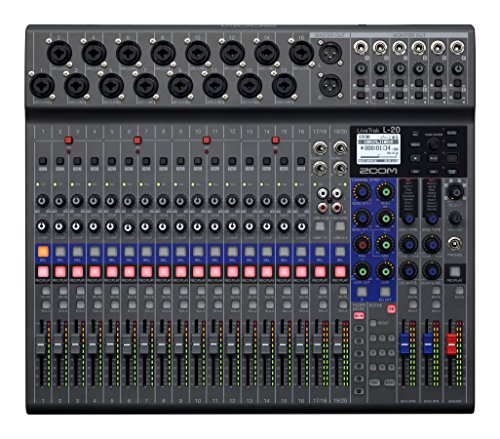
- 22-track recording to SD card
- Six independent monitor mixes
- Wireless iPhone/iPad control
Best For: Large bands and live productions needing multitrack capture
Premium Analog USB Mixer
Mackie Onyx16 16-Channel Multitrack

- 24-bit/96kHz multitrack USB recording
- Onyx preamps with up to 60dB gain
- Bluetooth streaming and onboard effects
Best For: Small bands and creators who prefer analog controls
Portable Battery Mixer-Recorder
Zoom LiveTrak L-12 Multitrack USB

- Up to 14 tracks at 24-bit/96kHz
- Five monitor mixes with headphone outputs
- Battery power for mobile recording
Best For: Mobile recording and compact live setups
Wireless-Control Digital Rack Mixer
Ui24R Multi-Track USB Recorder

- 24 simultaneous inputs with 24 channels of I/O
- Records 22 inputs plus stereo mix to USB
- Browser control from up to 10 devices
Best For: Installed rigs and bands needing wireless control
Compact 8-Channel USB Mixer
FULUODE 8-Channel Mixer with Bluetooth & Reverb

- 8 channels with 3-segment per-channel control
- USB recording, MP3 input, and Bluetooth 5.0
- 48V phantom power and ultra-thin chassis
Best For: Family KTV, small bands, campus events, and conference setups
Tablet-Controlled Digital Mixer

- 18-input digital mixer with 18x18 USB interface
- 16 programmable MIDAS-designed preamps
- Built-in Wi-Fi and tablet control
Best For: Tablet-based live mixing, studio capture, and direct multichannel USB recording
Feature-Packed 16-Channel Mixer
W IN-MIX DX16 16-Channel DJ Mixer

- 16 channels with 3-band EQ and gain control
- 99 DSP effects plus Bluetooth playback
- USB recording and 48V phantom power on every channel
Best For: DJs, podcasters, streamers, and home studio users who want flexible USB recording and onboard effects
All-in-One 16-Track Recorder

- 16-track recorder to SD at 48kHz/24-bit
- USB interface with 16-in/14-out connectivity
- 14 inputs and 10 Ultra-HDDA mic preamps
Best For: Hands-on mixing and standalone multitrack capture
Budget 8-Channel USB Board
8 Channel Professional Audio Mixer Console

- 8-channel mixer with XLR and 1/4-inch inputs
- USB recording plus Bluetooth playback
- 3-band EQ, gain, reverb, and delay
Best For: Small live and streaming setups needing simple USB recording
24-Track Live Recorder

- Records up to 24 tracks simultaneously to SD
- USB interface for PC or Mac integration
- 16 mic preamps and multiple stereo line inputs
Best For: Bands and studios needing live console control with 24-track capture
Flagship Live Band Mixer/Recorder – Zoom LiveTrak L-20 20-Channel Multitrack USB
If you want mixing consoles with multitrack usb recording for larger sessions, the Zoom LiveTrak L-20 is built for exactly that workflow. It combines 20 channels, 22-track recording to SD card, and USB audio interface support, so you can mix a band live and capture a detailed multitrack session at the same time.
Best For: Large bands, live shows, and engineers who need a road-ready all-in-one mixer/recorder.
Pros:
- Records 22 tracks at 24-bit/96kHz directly to SD card.
- Six independent monitor mixes help different performers hear custom blends.
- 20 onboard effects and -128dBu EIN preamps support clean, flexible signal handling.
- Wireless control from iPhone or iPad adds convenience during setup or mixing.
Cons:
- Larger format may be more mixer than small solo or home podcast setups need.
- Designed around live and band workflows, so casual users may not use all features.
The L-20 stands out when you need serious input count, multitrack capture, and monitor flexibility in one rugged unit. For bigger sessions, it offers a practical balance of live mixing and recording features.
Premium Analog USB Mixer – Mackie Onyx16 16-Channel Multitrack
The Mackie Onyx16 is a strong option if you’re comparing mixing consoles with multitrack usb recording and want a traditional analog layout with modern capture features. It records in high-resolution 24-bit/96kHz over USB to Mac or PC, while also offering direct-to-SD stereo recording and playback for quick sessions.
Best For: Players and small production teams who want an analog mixer feel with multitrack USB recording.
Pros:
- 96kHz/24-bit multitrack recording via USB supports high-resolution sessions.
- Award-winning Onyx mic preamps provide up to 60dB of gain.
- Perkins British-style EQ with sweepable midrange offers flexible tone shaping.
- Includes a digital effects engine plus Bluetooth streaming to a channel strip.
Cons:
- Limited to 16 channels, so very large setups may need more inputs.
- Direct SD recording is stereo, not multitrack.
For users who want an easy-to-understand mixer with strong preamps and USB recording, the Onyx16 hits a useful middle ground. It is especially appealing when sound quality and tactile control matter as much as recording capability.
Portable Battery Mixer-Recorder – Zoom LiveTrak L-12 Multitrack USB
The Zoom LiveTrak L-12 is a practical pick for mixing consoles with multitrack usb recording when portability matters as much as channel count. It records up to 14 tracks at 24-bit/96kHz to SD card and also works as a USB audio interface, making it useful for rehearsals, podcasts, and mobile recording.
Best For: Mobile musicians, podcasters, and compact bands that need battery-powered recording.
Pros:
- Records up to 14 tracks simultaneously at 24-bit/96kHz.
- Five separate monitor mixes give performers their own headphone blend.
- Can be powered by batteries for on-the-go sessions.
- Class-compliant USB mode supports easy iOS compatibility.
Cons:
- 12 inputs make it better for compact setups than larger live rigs.
- Less channel headroom than the larger L-20 model.
The L-12 is a strong fit if you need multitrack recording without being tied to the studio. Its battery option and smaller footprint make it especially appealing for mobile workflows.
Wireless-Control Digital Rack Mixer – Ui24R Multi-Track USB Recorder
If you need mixing consoles with multitrack usb recording in a rack-style format, the Ui24R is built for flexible control and dense I/O. It offers 24 simultaneous inputs, records all 22 inputs plus the stereo mix to USB storage or a connected computer, and can be controlled from multiple devices over onboard dual-band Wi-Fi.
Best For: Installations, bands, and engineers who want browser-based wireless control and multitrack recording.
Pros:
- 24 channels of I/O and 24 simultaneous inputs support complex sessions.
- Records all 22 inputs plus stereo mix directly to USB storage and computer.
- Dual-band Wi-Fi lets up to 10 devices control it from browser-based interfaces.
- Includes Studer-designed preamps and Lexicon/dbx/Digitech processing tools.
Cons:
- Renewed unit with a 90-day limited warranty.
- Rack-style workflow may be less convenient for users who want a traditional tabletop mixer.
The Ui24R is especially compelling if remote control is a priority, since it can be managed from many devices without installing apps. Combined with broad I/O and multitrack recording, it suits demanding live or installed setups.
Compact 8-Channel USB Mixer – FULUODE 8-Channel Mixer with Bluetooth & Reverb
If you want mixing consoles with multitrack usb recording features in a compact, budget-friendly format, this 8-channel FULUODE board is built for basic studio, karaoke, and live sound use. It adds USB recording, Bluetooth playback, MP3 support, and 48V phantom power, while keeping the chassis very slim for easy placement.
Best For: Family KTV, small bands, campus events, and conference setups that need simple USB recording and wireless playback.
Pros:
- 8-channel layout with 3-segment per-channel control
- USB recording plus MP3 input and Bluetooth 5.0 support
- 48V phantom power for compatible condenser microphones
- Ultra-thin design makes it easier to fit into tight spaces
Cons:
- Only an 8-channel mixer, so it is less suited to larger rigs
- USB recording is included, but no multitrack recording detail is listed in the notes
- Best suited to simple setups rather than advanced production workflows
For buyers focused on easy operation and everyday entertainment use, this model covers the core mixer functions without adding much complexity. The slim build and wireless playback options make it a practical pick when recording and live control both matter.
Tablet-Controlled Digital Mixer – Behringer XR18 Digital Mixer
For mixing consoles with multitrack usb recording, the Behringer XR18 stands out as a serious live and studio option. It combines 18 inputs, 16 Midas-designed preamps, built-in Wi-Fi, and an 18×18 bidirectional USB interface for direct recording, making it a strong fit when you need flexible digital control and computer connectivity.
Best For: Tablet-based live mixing, studio capture, and direct multichannel USB recording.
Pros:
- 18-input digital mixer with 18×18 bidirectional USB audio interface
- 16 programmable MIDAS-designed preamps for higher-end mic handling
- Built-in Wi-Fi router for iPad/Android control without external gear
- Dugan-style auto-mixing support for easier microphone management
Cons:
- Requires tablet control rather than a traditional full-size surface
- More advanced than basic analog-style mixers
- Best value comes when you actually need the digital routing and USB interface
If multichannel recording and remote control are priorities, this mixer offers a feature set that goes well beyond entry-level boards. It is especially compelling for users who want a live mixer that doubles as a direct recording interface.
Feature-Packed 16-Channel Mixer – W IN-MIX DX16 16-Channel DJ Mixer
If you are comparing mixing consoles with multitrack usb recording for live performance or content creation, the W IN-MIX DX16 offers a practical middle ground. It includes 16 channels, built-in DSP effects, Bluetooth playback, and USB recording, plus plenty of connectivity for mics, instruments, and line-level sources.
Best For: DJs, podcasters, streamers, and home studio users who want flexible USB recording and onboard effects.
Pros:
- 16 channels with 3-band EQ and gain control on each channel
- 99 DSP effects for reverb, delay, and dynamics
- USB recording plus Bluetooth playback from a phone or tablet
- Independent 48V phantom power on every channel
Cons:
- USB recording is listed, but the notes do not specify true multitrack recording
- Uses an auxiliary output connector type, which may not suit every studio setup
- More feature-rich than a basic mixer, so it may be more than casual users need
This is a useful choice if you want a mixer that can handle live duties and also record over USB without adding extra gear. The broad input count and onboard effects make it versatile for small production spaces and performance setups.
All-in-One 16-Track Recorder – Tascam Model 16
If you want mixing consoles with multitrack usb recording that also capture takes without a computer, the Tascam Model 16 is built for that workflow. It combines a 16-channel analog mixer, a 16-track SD recorder, and a USB audio interface in one surface-friendly unit, so you can track live shows, rehearsals, or studio sessions and move straight into DAW editing when needed.
Best For: Musicians, engineers, and small studios that want hands-on mixing plus standalone multitrack recording.
Pros:
- Records up to 16 tracks at 48kHz/24-bit to SD, SDHC, or SDXC cards.
- Built-in USB interface offers 16-in/14-out audio I/O for DAW use.
- Includes 14 inputs and 10 Ultra-HDDA mic preamps on channels 1 through 8.
- Supports punch in/out on up to 8 tracks simultaneously.
Cons:
- Requires compatible Class 10 or higher SD media for recording.
- Large 16-channel format takes more space than compact mixers.
This is a strong fit if you want a traditional mixer workflow with real multitrack capture built in. The Model 16 is especially practical for users who need both live control and straightforward transfer to a DAW.
Budget 8-Channel USB Board – 8 Channel Professional Audio Mixer Console
For buyers looking at mixing consoles with multitrack usb recording on a tighter budget, this 8-channel mixer focuses on basic recording and live-control features rather than advanced track counts. It offers USB connectivity, Bluetooth playback, and onboard EQ plus effects, making it a practical option for small gigs, streaming, podcasts, and simple computer-based recording.
Best For: Small setups that need an affordable mixer for streaming, karaoke, and basic USB recording.
Pros:
- 8-channel layout with XLR and 1/4-inch input support on all channels.
- USB connectivity can mix and record with a computer or flash drive.
- Bluetooth playback adds easy wireless music streaming.
- Includes 3-band EQ, gain controls, reverb, delay, and headphone monitoring.
Cons:
- Notes mention USB recording, but not true dedicated multitrack track-by-track capture.
- Fewer channels and simpler controls than larger studio mixers.
This is best viewed as a versatile small-format soundboard for general-use recording and live sound. If you need advanced multitrack production, the feature set is more basic than the larger Tascam units.
24-Track Live Recorder – Tascam Model 24
The Tascam Model 24 is aimed at users who want mixing consoles with multitrack usb recording and a more expansive live-studio workflow. It can capture up to 24 tracks simultaneously to SD at 24-bit/48kHz, then play those tracks back through the console for mixdown, while also connecting directly to a PC or Mac as a USB audio interface.
Best For: Bands, project studios, and live recording sessions that need 24-track capture and console-style control.
Pros:
- Records up to 24 tracks simultaneously to SD card at 24-bit/48kHz.
- Works as a USB audio interface for PC or Mac integration.
- Includes 16 TASCAM mic preamps plus multiple stereo line inputs.
- Surface controls keep EQ and auxiliary adjustments easy to access.
Cons:
- Larger format is less portable than smaller mixers.
- Supplied details conflict on channel count, so buyers should verify fit before ordering.
If you need a mixer that can handle serious multitrack recording without giving up tactile control, this model stands out. It bridges live mixing and studio capture in a way that suits both rehearsal spaces and small production rooms.
How We Picked the Best Mixing Consoles with Multitrack USB Recording
For this roundup, we focused on practical features that matter most in real-world use: channel count, true multitrack recording, USB audio interface quality, onboard monitoring, and ease of setup. We also considered whether a mixer works well for both live mixing and studio-style capture, since many buyers want one device to handle both jobs.
We favored models that offer a clear workflow, useful routing options, and enough headroom for bands, content creators, or rehearsal spaces. Extras like onboard effects, phantom power, Bluetooth, and wireless control can be helpful, but they only matter if the core recording features are solid.
Quick Comparison
Higher-channel units such as the Zoom LiveTrak L-20 and Tascam Model 24 are better for full bands, larger live setups, and more complex session recording. Mid-sized options like the Zoom LiveTrak L-12, Mackie Onyx16, and Tascam Model 16 usually fit small bands, churches, and project studios. Compact 8-channel mixers are a better match for solo creators, small podcasts, or simple streaming rigs.
If you need app-based control, the Behringer X AIR XR18 stands out. If you want a straightforward analog-style workflow with USB recording, the Tascam and Mackie models are especially appealing.
Key Buying Factors for Mixing Consoles with Multitrack USB Recording
1. Channel Count and Track Count
Make sure the mixer can record enough isolated tracks for your setup, not just a stereo mix. A 12-channel mixer may be enough for a podcast or small ensemble, while larger bands will usually benefit from 16, 18, or 24 tracks.
2. True Multitrack Vs. Stereo USB
Some mixers send only a stereo USB output, which is useful for simple capture but limits post-production. If editing flexibility matters, look for true multitrack USB recording so each input can be adjusted independently later.
3. Monitoring and Headphone Outputs
Separate headphone mixes, direct monitoring, and enough aux sends can make a big difference during tracking. These features help performers hear what they need without creating latency problems.
4. Connectivity and Workflow
Consider whether you want physical knobs, app control, or a hybrid approach. App-controlled digital mixers can save space and offer powerful routing, while analog-style units may feel faster if you prefer hands-on operation.
5. Power, Expansion, and Live Use
Phantom power, DSP effects, EQ, and reliable preamps are important, but so is stability. If you plan to use the mixer on stage or in a rehearsal room, prioritize dependable hardware and a layout you can operate quickly under pressure.
Who Should Buy Which Mixing Consoles with Multitrack USB Recording?
Choose a larger mixer if you record full bands, multi-mic drum kits, or live events. Choose a mid-size model if you want a single unit for home studio tracking, small gigs, or a church setup. Choose a compact mixer if your main priorities are streaming, podcasting, or simple multi-source recording with minimal setup time.
In short, the best Mixing Consoles with Multitrack USB Recording are the ones that match your real input needs and your preferred workflow. Start with track count, then narrow down by monitoring, control style, and recording flexibility.