The right compressor can make spoken audio sound more consistent, polished, and easier to understand without forcing you to chase volume changes in every edit. For podcasting, that means controlling peaks while preserving a natural voice.
This roundup covers 10 options across rackmount processors, podcast consoles, USB interfaces, and mixer bundles, so you can match your choice to your microphone setup, recording workflow, and production experience.
Best 10 Audio Compressors for Podcasting Picks for 2026
Flexible Rackmount Control

- Dual-channel compression with auto attack/release
- Noise gate and LED monitoring
- XLR/TRS connectivity with sidechain insert
Best For: Rackmount podcast and streaming setups needing hands-on dynamics control
All-in-One Podcast Production

- Four microphone inputs and studio-grade preamps
- USB, smartphone, and Bluetooth channels
- APHEX processing, sound pads, and multitrack recording
Best For: Complete podcast and live-stream production with remote guests
Peak Protection and Voice Control

- Dual-channel compression and peak limiting
- Noise gate and feedback suppression
- XLR/TRS connectivity with DSP processing
Best For: Hybrid podcast, streaming, and live audio systems
De-Essing and Dynamics
Behringer Composer Pro-XL MDX2600

- Two-channel compressor, limiter, and gate
- Integrated de-esser for vocal sibilance
- Intended for production, mixing, and mastering
Best For: Vocal-focused podcast production and rack-based mixing
Flexible USB Podcast Interface

- Two XMAX-L mic preamps with phantom power
- Integrated effects, presets, and loopback mixing
- USB interface supports up to 96 kHz recording
Best For: Two-channel podcasting and streaming with XLR microphones
Tube Channel Strip Compressor
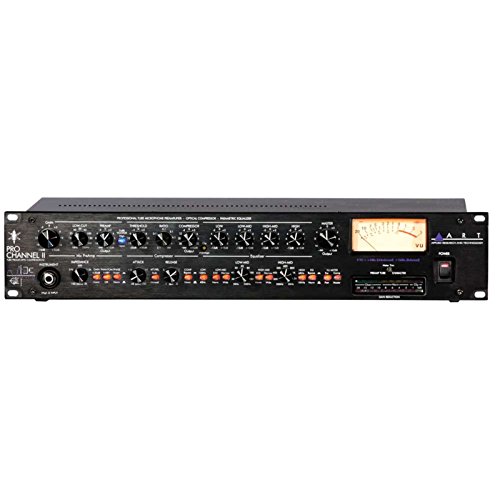
- Tube mic preamp, compressor, and EQ in one unit
- Selectable optical or tube compression
- Selectable VU metering for several signal points
Best For: Single-microphone voice recording with hardware processing
Portable Multimic Podcast Recorder

- Four XLR inputs with phantom power
- Four headphone outputs with individual volume control
- Mix-minus for phone and remote interviews
Best For: Portable multi-person podcasts and remote interviews
Studio Rackmount Pick

- Dual-channel VCA compression with adjustable attack and release
- Built-in noise gate, LED metering, and sidechain insert
- XLR/TRS connectivity for mixers and interfaces
Best For: Dedicated vocal dynamics control in studio or broadcast setups
Beginner Streaming Bundle

- Includes condenser microphone and essential starter accessories
- Supports two people, multiple devices, and simultaneous platforms
- Adds denoise, monitoring, voice effects, reverb, and sound effects
Best For: First-time podcasters and live streamers wanting an all-in-one kit
Flexible Interface Pick
Saramonic Dual-Channel USB Mixer

- Two combo inputs accept XLR microphones and 6.35mm sources
- 24-bit/192kHz recording with independent gain controls
- Real-time/playback monitoring and speaker outputs
Best For: Mac or PC podcasters recording two microphones or instruments
Flexible Rackmount Control – Dual-Channel Audio Compressor
This dual-channel rackmount unit is a practical choice among audio compressors for podcasting when you need hands-on control over vocal dynamics, background noise, and signal routing. Its VCA circuitry, noise gate, LED monitoring, and adjustable compression controls support studio, streaming, and live setups.
Best For: Podcasters and streamers using XLR or TRS equipment who want separate channel control and rackmount connectivity.
Pros:
- Dual-channel design with Overeasy compression and auto attack/release settings
- Built-in noise gate and independent LED monitoring for compression and gain reduction
- XLR/TRS inputs and outputs plus a sidechain insert for targeted frequency control
Cons:
- Requires external microphones or other audio equipment
- Rackmount format may be less convenient for simple desktop podcast setups
Choose this model if you want traditional hardware control and flexible routing rather than an all-in-one podcast console. The sidechain and dual-channel layout are especially useful for more involved audio systems.
All-in-One Podcast Production – RØDECaster Pro
The RØDECaster Pro is a complete production console for creators who want compression-style onboard processing alongside recording, mixing, and guest integration. Among audio compressors for podcasting, it stands out as an all-in-one solution with four microphone inputs, remote-guest channels, sound pads, and APHEX processing.
Best For: Beginners and professionals who want a central console for podcast recording, live streaming, and remote guests.
Pros:
- Four microphone inputs with studio-grade preamps
- USB, smartphone, and Bluetooth channels for integrating remote guests
- Onboard APHEX Aural Exciter and Big Bottom processing for broadcast-ready sound
Cons:
- It is a full production console rather than a dedicated standalone compressor
- Its larger feature set may be more than needed for a basic single-microphone setup
This is the strongest fit when workflow matters as much as dynamics processing. One-touch stereo or multitrack recording, programmable sound pads, and multiple input options reduce the need for separate podcasting hardware.
Peak Protection and Voice Control – 2-Channel Audio Processor
This 1U dual-channel processor combines compression, limiting, noise gating, and additional signal-processing features for creators handling demanding vocal or live audio environments. It is one of the more feature-packed audio compressors for podcasting if you also need peak protection and XLR/TRS integration.
Best For: Podcast, streaming, and stage setups that need compression, limiting, noise reduction, and vocal-focused processing.
Pros:
- Dual-channel compressor/limiter for consistent output and peak control
- Noise gate, feedback suppression, anti-howling functions, and DSP reverb processing
- XLR and 1/4-inch TRS connectivity with intuitive adjustment knobs
Cons:
- The supplied notes provide limited information about detailed specifications and controls
- Its stage-oriented processing may be unnecessary for a simple home podcast chain
Consider this processor when preventing overload and managing unwanted noise are priorities. Its broader processing feature set may suit hybrid podcast and live-production rigs better than minimalist recording systems.
De-Essing and Dynamics – Behringer Composer Pro-XL MDX2600
The Behringer Composer Pro-XL MDX2600 is a two-channel compressor, limiter, and gate with an integrated de-esser. For audio compressors for podcasting, that combination is useful when vocal dynamics and excessive sibilance need to be addressed in a rack-based production or mixing setup.
Best For: Podcasters and audio producers who want two-channel dynamics control with de-essing for vocal-focused production.
Pros:
- Combines compression, limiting, and gating across two channels
- Includes a de-esser for managing vocal sibilance
- Designed for audio production, mixing, and mastering
Cons:
- It is a dedicated hardware processor, so it does not provide podcast recording or guest features
- The supplied product notes do not detail its individual controls or connectivity
This model is worth considering when a podcast chain needs dedicated vocal cleanup in addition to level control. Its two-channel format also makes it practical for processing more than one source in a production system.
Flexible USB Podcast Interface – Revelator io24
For creators comparing audio compressors for podcasting, the PreSonus Revelator io24 combines two XMAX-L mic preamps with built-in effects and a loopback mixer. It is a practical USB-C interface for recording, streaming, and managing multiple audio sources from a computer.
Best For: Podcasters and streamers using XLR microphones who need loopback mixing, onboard effects, and a compact two-channel interface.
Pros:
- Two XMAX-L mic preamps with +48V phantom power support professional XLR microphones.
- Integrated effects, presets, reverb, and Stream Mix mode add production flexibility.
- Two stereo loopback streams can mix audio from Zoom, Skype, backing tracks, and other sources.
- Supports recording up to a 96 kHz sample rate and includes MIDI I/O.
Cons:
- It has two channels, so it may not suit larger multi-microphone podcast setups.
- Its effects and loopback features require compatible Windows or macOS software workflows.
The Revelator io24 is a versatile choice when podcasting involves streaming, remote audio, or software playback. It offers useful processing and routing features without requiring a separate mixer for many two-channel setups.
Tube Channel Strip Compressor – ART Pro Channel II
ART Pro Channel II Microphone Preamp/Compressor/EQ Professional Tube Based Selectable VU Metering
Check Price On AmazonThe ART Pro Channel II is a hardware channel strip for podcasters evaluating audio compressors for podcasting alongside a microphone preamp and EQ. Its tube-based design places mic gain, selectable compression, and tone shaping in one professional recording unit.
Best For: Voice-focused recording setups that use professional audio equipment and benefit from hardware tube coloration, compression, and EQ.
Pros:
- Combines a tube microphone preamp, switchable optical/tube compressor, and tube EQ.
- Selectable VU metering can monitor mic pre output, compressor output, or main output.
- Provides XLR, 1/4-inch TRS, and 1/4-inch TS connectivity for flexible studio integration.
- Precision detented potentiometers support repeatable adjustments.
Cons:
- It provides one channel, limiting use for multi-microphone recordings.
- At 13.4 pounds, it is less portable than compact USB podcast interfaces.
- It is a corded professional audio unit rather than a battery-powered recorder.
The Pro Channel II is suited to a more traditional hardware workflow. Its integrated preamp, compressor, and EQ can help shape a single spoken-word microphone before the signal reaches a recorder or interface.
Portable Multimic Podcast Recorder – Zoom PodTrak P4
The Zoom PodTrak P4 is a portable recorder and USB interface for podcasters comparing audio compressors for podcasting with a broader need for on-location production. It supports four XLR microphones, individual headphone monitoring, remote interviews, and programmable sound pads.
Best For: Mobile or multi-person podcasting with several microphones, separate headphone feeds, phone calls, and remote interview sources.
Pros:
- Four XLR microphone inputs include phantom power for compatible microphones.
- Four headphone outputs provide individual volume control for co-hosts and guests.
- Automatic mix-minus supports phone and remote interviews through TRRS or USB.
- Works as a 2-in/2-out USB audio interface and can run up to 3.5 hours on two AA batteries.
Cons:
- The supplied notes do not identify a dedicated compressor or built-in compression controls.
- Battery operation is limited to approximately 3.5 hours.
- It records to WAV and does not list wireless connectivity in the supplied specifications.
The PodTrak P4 prioritizes routing, monitoring, and portability rather than dedicated compressor hardware. It is a strong fit when a podcast requires multiple XLR inputs and easy call-in or remote-interview handling.
Studio Rackmount Pick – Dual-Channel Vocal Compressor
For podcasters who want hands-on dynamics control, this rackmount unit is a dedicated choice among audio compressors for podcasting. Its VCA circuit, adjustable attack and release, noise gate, and LED metering are suited to shaping vocal levels in a studio, broadcast, streaming, or live setup.
Best For: Podcasters using mixers, audio interfaces, or rack equipment who want dedicated vocal compression and noise reduction.
Pros:
- Dual-channel compression supports vocals and other audio sources.
- Adjustable attack and release allow detailed dynamics shaping.
- Built-in noise gate, LED metering, and sidechain insert add setup flexibility.
- XLR and 1/4-inch TRS connectivity integrates with professional audio gear.
Cons:
- Rackmount design may be more equipment than a basic podcast setup needs.
- It is a corded, analog processor rather than an all-in-one USB interface.
This is the most traditional hardware-focused option of the three. It makes sense when you already have compatible routing equipment and want precise, visible control over vocal dynamics rather than a bundled recording solution.
Beginner Streaming Bundle – MAONO Podcast Mixer Kit
This MAONO bundle combines a mixer, condenser microphone, cables, and accessories for creators who want a simple starting point. While it is not a standalone compressor, its mixer-based controls, denoise button, monitoring, and vocal effects make it a practical alternative for entry-level audio compressors for podcasting and live streaming.
Best For: Beginners who want an included microphone and mixer for podcasts, live streams, or mobile recording.
Pros:
- Includes a condenser microphone, tripod, cable, windscreen, mixer, and charging cable.
- Supports up to two people, four devices, and four platforms for simultaneous streaming.
- Offers real-time monitoring, a denoise function, voice changes, reverb, and built-in effects.
- Works with many computers, smartphones, iPhones, and tablets.
Cons:
- The mixer supports 3.5mm microphone input and does not support phantom power.
- Phones without a 3.5mm jack require an OTG adapter, which is not included.
- Guitars and keyboards require an additional 6.35mm-to-3.5mm adapter.
The S1 bundle favors convenience and creative live features over dedicated compression controls. Check the input limitations and workspace dimensions before buying, especially if you plan to use condenser microphones beyond the included model.
Flexible Interface Pick – Saramonic Dual-Channel USB Mixer
The Saramonic MV-Mixer is a compact two-channel USB interface for podcasters who need flexible microphone or instrument connections. Its combo inputs, independent gain controls, real-time and playback monitoring, and 24-bit/192kHz support make it a useful front end when comparing audio compressors for podcasting and broader recording workflows.
Best For: Mac and PC podcasters recording with two microphones, instruments, or line-level sources.
Pros:
- Two XLR/6.35mm combo inputs accept microphones, instruments, and line-level devices.
- Independent gain controls simplify balancing each input.
- Supports 24-bit/192kHz recording and playback.
- Includes input/playback monitoring plus separate speaker output controls.
Cons:
- It is an audio interface and mixer, not a dedicated compressor or limiter.
- Its two-channel design may not suit larger multi-person recordings.
- The supplied compatibility details focus on Mac and PC computers.
This is a strong choice when connection flexibility and clean computer recording matter more than onboard dynamics processing. Add compression in compatible recording software if you need tighter vocal level control.
How We Picked the Best Audio Compressors for Podcasting
We selected products that address common podcast recording needs: steady vocal levels, peak protection, straightforward controls, flexible connectivity, and compatibility with solo, co-hosted, live, or remote formats. The list includes dedicated compressors for users who already own an interface or mixer, as well as integrated devices that combine preamps, processing, routing, recording, and monitoring.
We also considered channel count, input and output options, portability, USB connectivity, headphone support, and features such as noise gates, limiters, de-essers, sidechain inputs, loopback mixing, and remote-interview connections. A dedicated rack unit may offer deeper signal control, while an all-in-one podcast device can reduce setup complexity.
Quick Comparison
| Best For | Recommended Type | What to Prioritize |
|---|---|---|
| One or two studio microphones | Dual-channel compressor | Clean preamp compatibility, noise gate, limiter, and sidechain control |
| Podcast production with routing and sound effects | Podcast console or recorder | Multiple inputs, headphone outputs, mix-minus, USB, and onboard effects |
| Streaming and computer recording | USB audio interface | Low-latency monitoring, loopback, software control, and reliable drivers |
| Hands-on voice shaping | Channel strip | Mic preamp, compressor, EQ, metering, and phantom power |
| Portable or budget setups | Compact mixer or bundle | Simple gain control, useful connectivity, and easy monitoring |
Key Buying Factors for Audio Compressors for Podcasting
Compression Controls
Look for threshold, ratio, attack, release, and makeup gain controls if you want to fine-tune dynamics. A limiter is useful for preventing sudden peaks, while a noise gate can reduce room noise between phrases. De-essing is particularly helpful when microphones emphasize sibilant sounds.
Inputs, Outputs, and Headphone Monitoring
Count your microphones, guests, phone connections, and headphones before buying. XLR inputs are the standard choice for podcast microphones, while combo XLR/TRS inputs add flexibility. Multiple independently controlled headphone outputs are important for in-person interviews.
Workflow and Connectivity
Rack processors generally need a separate interface or mixer and may require more setup knowledge. USB interfaces and podcast consoles can combine recording, monitoring, effects, and routing in one unit. If you record remote guests, prioritize mix-minus or echo-free phone and computer routing.
Gain Staging and Ease of Use
Compression works best when the incoming signal is set correctly. Choose clearly labeled controls, visible metering, and presets or automatic modes if you want a faster workflow. More controls are valuable only if you are comfortable adjusting them.
Who Should Buy Which Audio Compressors for Podcasting?
Choose a dual-channel rack compressor if you already have a mixer or interface and want consistent hardware processing for one or two voices. These units suit fixed studio installations and hands-on users.
Choose a podcast console or recorder if you need several microphones, headphone monitoring, sound pads, phone calls, or portable recording. These are often the easiest options for interviews and multi-person shows.
Choose a USB interface or channel strip if you primarily record into a computer and want cleaner monitoring, loopback, or more detailed control over the vocal chain. A channel strip is especially useful when you want preamp, compression, and EQ in one signal path.
Choose a compact mixer or bundle if affordability and simplicity matter most. Verify microphone compatibility, phantom-power requirements, headphone connections, and whether compression is hardware-based or provided through software before buying.