Choosing among the best drum machines for home studio production depends on how you create: hands-on finger drumming, classic analog sounds, sample-based arranging, or a fully standalone workflow.
We’ve gathered 10 capable options for different budgets and setups, including dedicated rhythm machines, modern samplers, and MIDI controllers that integrate with popular recording software. The guide below explains what separates them and how to choose the right fit.
Best 10 Drum Machines for Home Studio Picks for 2026
Classic Beat Foundation

- 500 onboard sounds with built-in effects
- MIDI connectivity for studio integration
- Pattern Play, Drum Roll, and tap tempo controls
Best For: Songwriters and producers wanting a dedicated pattern-based drum machine
Portable Sampling Groovebox

- Standalone operation with battery, speaker, and microphone
- 16 pads and over 100 factory kits
- Sampling, chopping, sequencing, and onboard effects
Best For: Portable beatmaking and sample-based home studio production
Analog Impact Specialist

- Separate accent controls for each drum
- Song mode chains patterns
- Color sound shaping on most instruments
Best For: Tactile analog drum programming and pattern-based performance
Standalone Production Hub

- Standalone sampling, sequencing, arranging, and audio recording
- 7-inch touchscreen with 16 sensitive MPC pads
- USB-C studio connectivity and over 20GB of content
Best For: Full song production and hybrid home studio setups
Classic Powerhouse

- Circuit-modeled 808, 606, 909, 707, 727, and CR-78 sounds
- Import and combine custom samples with TR sounds
- Per-kit effects and settings support live-ready workflows
Best For: Hands-on producers building detailed hybrid drum kits
DAW Beat Controller
Akai MPC Studio USB MIDI Controller

- 16 RGB pads with velocity, pressure sensitivity, and aftertouch
- Direct MPC2 integration with Windows, Mac, and third-party DAWs
- Includes MPC2 software, plugins, effects, and learning resources
Best For: Computer-based beat-makers seeking expressive MPC pad control
Portable Sampling Studio
teenage engineering EP-133 K.O. II
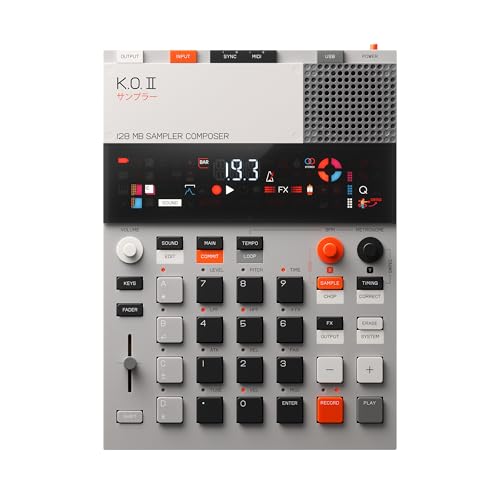
- Built-in microphone, line input, resampling, and 128MB memory
- Four-track sequencing with patterns, effects, and song mode
- Portable design with battery or USB-C power
Best For: Mobile beat-makers capturing samples and building ideas quickly
Expressive Pad Control

- 16 velocity- and pressure-sensitive RGB pads
- Includes Studio One Artist and Ableton Live Lite
- Eight pad banks plus assignable controls
Best For: Computer-based producers seeking expressive DAW control
Classic Analog Rhythms

- 15 authentic analog drum sounds
- 34 rhythm presets for quick beat ideas
- 16-step sequencer in a compact design
Best For: Producers wanting simple standalone-style hardware sequencing
Flexible MIDI Beat Making

- 16 pads expand to 48 assignable pads
- Adds faders, knobs, MIDI I/O, and Note Repeat
- Includes Melodics courses and Cubase LE
Best For: DAW users wanting compact, expandable MIDI pad control
Classic Beat Foundation – Alesis SR-18
The Alesis SR-18 is a practical choice for musicians seeking drum machines for home studio work without relying entirely on a computer. Its 500 onboard sounds, built-in effects, MIDI support, and pattern-focused controls make it suitable for building grooves, rehearsing ideas, and performing.
Best For: Songwriters, live performers, remix engineers, and producers who want a dedicated pattern-based drum machine.
Pros:
- Includes 500 professional sounds and built-in digital effects.
- Supports MIDI connections to keyboards, computers, DAWs, and electronic drum kits.
- Pattern Play, programmable Drum Roll, and tap tempo support hands-on beat creation.
- Runs from the included wall adapter or six AA batteries.
Cons:
- AA batteries are not included.
- Its plastic construction may feel less substantial than metal-bodied alternatives.
- The workflow is centered on onboard patterns rather than full standalone song production.
The SR-18 makes sense when immediate rhythm programming and broad preset coverage matter more than touchscreen editing or extensive sampling. It is a compact, established option for adding dependable drum parts to a home studio.
Portable Sampling Groovebox – Akai MPC Sample
The Akai MPC Sample is a flexible option for drum machines for home studio setups, especially if sampling is central to your workflow. It combines MPC pads, sequencing, effects, a microphone, speaker, rechargeable battery, and storage in a portable standalone unit.
Best For: Beatmakers, finger drummers, DAWless creators, and producers who want portable sampling and beatmaking.
Pros:
- Works without a computer and includes a rechargeable battery, speaker, and microphone.
- Provides 16 responsive pads, over 100 factory kits, and sample-chopping tools.
- Offers four internal effects processors with 60 effect types.
- Includes USB-C audio/MIDI, line I/O, MIDI connectivity via adapter, and microSD storage.
Cons:
- The MIDI DIN adapter is not included.
- Its 2.4-inch display is smaller than the MPC One G2’s 7-inch touchscreen.
- Sampling-focused features may be more than needed for users who only want preset drum patterns.
The MPC Sample is most compelling when portability and hands-on sample manipulation are priorities. Its self-contained design can support quick ideas away from the desk while still connecting to a home studio.
Analog Impact Specialist – Arturia DrumBrute Impact
The Arturia DrumBrute Impact targets producers who want an analog-focused rhythm instrument for drum machines for home studio use. Separate accents, pattern chaining, and optional Color sound shaping provide hands-on control over its drum voices.
Best For: Producers who prefer tactile analog drum programming and performance-oriented pattern control.
Pros:
- Offers separate accent control for each drum.
- Song mode allows patterns to be chained into longer arrangements.
- Optional Color sound shaping is available on all instruments except the cowbell.
- Metal construction provides a substantial feel for a desktop performance instrument.
Cons:
- The cowbell does not receive the optional Color sound shaping.
- The supplied notes provide fewer connectivity details than the other options here.
- Its analog, pattern-oriented approach may be less suitable for users seeking extensive sampling or full song production.
Choose the DrumBrute Impact when physical controls and sound shaping are more important than a large sample library. Song mode also makes it useful for arranging linked patterns into a performance.
Standalone Production Hub – Akai MPC One G2
The Akai MPC One G2 is a powerful choice for drum machines for home studio production when you also want sampling, sequencing, arranging, and audio recording. Its 7-inch touchscreen, 16 pads, MPC3 OS, and standalone operation support complete projects without requiring a laptop.
Best For: Producers building full arrangements, hybrid hardware setups, and compact standalone home studios.
Pros:
- Supports standalone sampling, sequencing, arranging, and up to 16 stereo audio tracks.
- Includes a 7-inch touchscreen, 16 velocity- and pressure-sensitive pads, and an 8-core processor.
- USB-C provides multichannel audio streaming, expanded MIDI, and host/device support.
- Ships with over 20GB of factory content, plugins, and an MPC3 Pro Pack expansion.
Cons:
- Its broad production feature set may be more complex than needed for simple drum programming.
- It is a desktop production center rather than a battery-powered portable unit.
- Some functions and bundled content may require working within the MPC ecosystem or compatible software.
The MPC One G2 stands out for buyers who want one compact unit to move from drum programming to complete song creation. It is particularly well suited to home studios that need standalone capability plus computer and external-gear integration.
Classic Powerhouse – Roland TR-8S Rhythm Performer
For drum machines for home studio setups that need authentic classic sounds and room to customize, the Roland TR-8S is a versatile performance-focused option. It combines circuit-modeled TR-808, TR-606, TR-909, TR-707, TR-727, and CR-78 sounds with sample import, kit design, and detailed effects control.
Best For: Producers who want hands-on access to classic Roland drum sounds while mixing samples and custom effects into flexible kits.
Pros:
- Includes detailed circuit-modeled sounds from several iconic TR drum machines.
- Supports mono and stereo sample imports through the SD card slot.
- Offers per-instrument sound shaping, effects, and kit storage for repeatable setups.
- Free TR-EDITOR software adds visual controls and organizational tools.
Cons:
- Its feature set may be more extensive than needed for simple beat-making.
- It uses a physical SD card workflow for importing samples.
The TR-8S stands out when authentic Roland character, deep sound manipulation, and performance-ready kits matter more than a minimal interface.
DAW Beat Controller – Akai MPC Studio USB MIDI Controller
The Akai Professional MPC Studio is a USB-powered controller for home studio producers who prefer working inside a computer-based setup. Its velocity- and pressure-sensitive RGB pads, assignable touch strip, transport controls, and included MPC2 software are designed for tactile beat production on Windows and Mac.
Best For: Beat-makers who want MPC-style pad performance and software integration with a DAW-based home studio.
Pros:
- Provides 16 RGB velocity- and pressure-sensitive pads with aftertouch across eight banks.
- Integrates directly with MPC2 and supports third-party DAWs such as Ableton and Cubase.
- Includes a touch strip, LCD display, transport controls, and Chords and Scale modes.
- Comes with MPC2, instrument plugins, mixing and mastering effects, and educational content.
Cons:
- It is a controller rather than a standalone drum machine and requires a USB-connected computer.
- Its broad software ecosystem may take time to learn.
Choose the MPC Studio if expressive pads and computer-based MPC production are your priorities; it is especially practical for producers who already build tracks in a DAW.
Portable Sampling Studio – teenage engineering EP-133 K.O. II
For portable drum machines for home studio use and quick idea capture, the teenage engineering EP-133 K.O. II combines sampling, sequencing, effects, and performance controls in a compact unit. It includes a built-in microphone, line input, speaker, pattern-based sequencing, and 128MB of memory for samples and beats.
Best For: Producers who want to sample everyday sounds, sketch beats quickly, and perform or arrange ideas away from a full studio setup.
Pros:
- Samples through the built-in microphone or line input and supports resampling and chopping.
- Offers four groups with 99 patterns, a four-track sequencer, and song mode.
- Includes six master effects and 12 punch-in effects controlled by the multifunctional fader.
- Works with batteries or USB-C and provides built-in speaker, line-out, sync, and MIDI connections.
Cons:
- The 128MB memory is smaller than that of many computer-based production systems.
- Its compact workflow may be less suitable for detailed, full-scale arrangement work.
- Battery operation requires four AAA batteries.
The K.O. II is a strong choice for fast sampling and playful beat construction, particularly when portability and immediate hands-on performance are central to your workflow.
Expressive Pad Control – PreSonus ATOM
For home studios that use a computer-based workflow, the PreSonus ATOM adds hands-on control for drum parts, samples, loops, effects, and virtual instruments. Its velocity- and pressure-sensitive pads, software integration, and compact USB design make it a flexible choice among drum machines for home studio setups.
Best For: Producers who want an expressive MIDI pad controller for Studio One, Ableton Live, or other compatible music software.
Pros:
- 16 full-size velocity- and pressure-sensitive RGB pads support expressive performance.
- Includes Studio One Artist, Ableton Live Lite, and the Studio Magic Plug-In Suite.
- Offers eight assignable pad banks, 20 assignable buttons, and four endless rotary encoders.
- Includes useful performance features such as Note Repeat, Full Velocity, and MIDI keyboard mode.
Cons:
- It requires compatible software and a USB-connected device rather than operating as a standalone drum machine.
- The editor and feature set may take time to configure for first-time users.
The ATOM is a strong fit when tactile performance and DAW integration matter more than standalone hardware operation. It is especially appealing for producers who want to trigger drums and samples while staying focused on the beat instead of the screen.
Classic Analog Rhythms – Behringer RD-78
The Behringer RD-78 brings a dedicated hardware workflow to drum programming, with 15 analog drum sounds, built-in rhythm presets, and a 16-step sequencer. For home studios looking for straightforward drum machines for home studio production, its compact design emphasizes immediate beat creation without a complicated interface.
Best For: Beginners and performers who want a compact hardware drum machine with classic analog sounds and ready-to-use patterns.
Pros:
- Provides 15 analog drum sounds for varied production styles.
- Includes 34 rhythm presets to start ideas quickly or support live performance.
- The 16-step sequencer enables hands-on beat programming.
- Compact alloy-steel construction is designed for studio and live use.
Cons:
- The supplied notes do not list extensive editing, connectivity, or sequencing features beyond the core controls.
- Its focused sound set may be less flexible than a software-based drum library.
The RD-78 is a practical choice for creators who prefer dedicated hardware and classic-style analog drum sounds. Its presets and 16-step sequencer make it approachable, while the portable build suits both home-studio sessions and live setups.
Flexible MIDI Beat Making – Donner STARRYPAD
The Donner STARRYPAD is a USB MIDI pad controller for producers who want hands-on triggering inside a DAW. With 16 illuminated pads, three pad banks, faders, knobs, Note Repeat, and included learning and software resources, it offers a versatile entry point for drum machines for home studio workflows.
Best For: Home-studio producers who need an affordable, portable pad controller for drums, samples, effects, and virtual instruments.
Pros:
- 16 velocity-sensitive pads can expand to 48 assignable pads through three pad banks.
- Includes two faders, two knobs, three buttons, and an additional MIDI input/output connection.
- Tap Tempo and low-latency Note Repeat support rhythm practice and sample performance.
- Works with Android, iOS, Mac, and Windows, and includes Melodics courses and Cubase LE software.
Cons:
- It does not produce sound on its own and requires DAW software.
- The editor controls pad configuration but does not record or arrange music.
- Connecting to an iPhone or iPad requires an Apple Lightning to USB adapter where applicable.
The STARRYPAD offers substantial hands-on control in a small footprint, especially for users building a DAW-centered setup. It is more of a MIDI performance controller than a standalone drum machine, but its pad banks and extra controls provide room to grow.
How We Picked the Best Drum Machines for Home Studio Use
We focused on workflow, sound creation, sequencing, connectivity, and overall usefulness in a home recording environment. The selection includes standalone drum machines, sampler-based production devices, analog rhythm boxes, and MIDI pad controllers. That range matters because the best choice for a beginner using a laptop may be very different from the best choice for a producer who wants to finish tracks without a computer.
We also considered hands-on control, portability, included sounds or software, performance features, and how easily each device can fit into a broader MIDI or audio setup. Product specifications and capabilities can vary by version, so confirm current details before purchasing.
Quick Comparison
| Type | Best For | What to Look For |
|---|---|---|
| Standalone production center | Computer-free arranging and beatmaking | Sequencing depth, storage, audio connectivity |
| Sampler drum machine | Working with samples and complete ideas | Sampling tools, memory, effects, workflow |
| Analog drum machine | Immediate sound design and live performance | Sound shaping, pattern controls, outputs |
| MIDI pad controller | DAW-based home studios | Pad feel, software integration, USB setup |
| Compact portable sampler | Mobile sketches and experimental beats | Portability, battery options, sampling features |
Key Buying Factors for Drum Machines for Home Studio
Standalone Versus Computer-Based Workflow
Standalone models can sequence, sample, arrange, and sometimes mix without a computer. They are a strong fit if you want a dedicated creative station. MIDI controllers are usually more affordable and provide tactile pads, but they depend on a computer, DAW, and available software.
Sound Engine and Sampling
Analog machines offer a distinctive synthesis-based character and direct controls for shaping kicks, snares, and percussion. Sample-based devices provide broader sonic variety and let you import or record your own sounds. Check storage, memory, sample transfer methods, and supported formats if custom sounds are important.
Sequencing and Performance Controls
Look for pattern length, song or arrangement mode, step editing, quantization options, probability, parameter locks, and real-time recording. Responsive pads, mute and fill controls, motion recording, and pattern chaining can make a major difference during live performance.
Connectivity and Studio Compatibility
Confirm whether the unit includes stereo or individual audio outputs, MIDI In and Out, USB MIDI, USB audio, and sync options. Individual outputs are useful when mixing drums separately, while class-compliant USB can simplify connection to a modern computer. Also check whether included software works with your operating system and DAW.
Size, Budget, and Expandability
A compact machine may be easier to keep beside a keyboard or laptop, while larger devices generally provide more controls and a broader production workflow. Leave room in your budget for cables, storage, headphones, or a suitable audio interface. Firmware updates and sound-pack support can extend a device’s useful life.
Who Should Buy Which Drum Machines for Home Studio?
- Choose a standalone production center if you want to build complete tracks away from a computer and need deep sequencing, sampling, and arrangement features.
- Choose a sampler-focused machine if chopping recordings, layering unusual sounds, and creating sample-driven beats are central to your process.
- Choose an analog drum machine if you value immediate controls, classic synthesized percussion, and a focused performance workflow.
- Choose a MIDI pad controller if your home studio already revolves around Ableton Live, Studio One, or another DAW and you want better hands-on beat programming.
- Choose a compact portable sampler if portability, quick sketches, and creative experimentation matter more than extensive studio I/O.
Before buying, identify whether you need a sound source, a sequencer, or simply a better way to control your existing software. Matching that role to your preferred workflow is the fastest way to narrow these Drum Machines for Home Studio setups down to the right option.